-
-
Cloud Connector Standalone Citrix Secure Ticketing Authority (STA) service
-
-
-
-
Unified Communications SDK Optimization
-
-
This content has been machine translated dynamically.
Dieser Inhalt ist eine maschinelle Übersetzung, die dynamisch erstellt wurde. (Haftungsausschluss)
Cet article a été traduit automatiquement de manière dynamique. (Clause de non responsabilité)
Este artículo lo ha traducido una máquina de forma dinámica. (Aviso legal)
此内容已经过机器动态翻译。 放弃
このコンテンツは動的に機械翻訳されています。免責事項
이 콘텐츠는 동적으로 기계 번역되었습니다. 책임 부인
Este texto foi traduzido automaticamente. (Aviso legal)
Questo contenuto è stato tradotto dinamicamente con traduzione automatica.(Esclusione di responsabilità))
This article has been machine translated.
Dieser Artikel wurde maschinell übersetzt. (Haftungsausschluss)
Ce article a été traduit automatiquement. (Clause de non responsabilité)
Este artículo ha sido traducido automáticamente. (Aviso legal)
この記事は機械翻訳されています.免責事項
이 기사는 기계 번역되었습니다.책임 부인
Este artigo foi traduzido automaticamente.(Aviso legal)
这篇文章已经过机器翻译.放弃
Questo articolo è stato tradotto automaticamente.(Esclusione di responsabilità))
Translation failed!
Unified Communications SDK Optimization
Introduction
Citrix Virtual Apps and Desktops lets you deliver applications to your users on a wide variety of endpoint devices. Many of these applications include real-time communication (RTC) features, like audio and video conferencing. However, challenges can arise when delivering these applications in a virtualized environment. Traditional delivery methods route media streams (audio/video) from the client device to the VDI server in the data center before sending them back to the endpoint. This “hairpinning” introduces unnecessary traffic and processing overhead on the server, especially for bandwidth-intensive audio & video calls.
The Citrix Unified Communications SDK (UCSDK) is a technology that allows technology vendors to optimize these RTC applications for use in Citrix environments. When an application is optimized, it can provide a user experience that matches or even exceeds that of the application running on a local desktop. In today’s world, seamless real-time communication is essential for productivity and collaboration. When using applications within a virtual environment, it’s crucial that audio and video calls, screen sharing, and other communication features work as smoothly as they would on a local desktop. Optimized applications deliver this experience.
This product documentation details all that is needed for the Citrix customers to learn and deploy UCSDK optimized applications.
How it works
Citrix offers an optimized delivery method for real-time communication applications within VDIs. This approach leverages the Unified Communications SDK (UCSDK) to split the virtualized application into two parts:
- User Interface (UI): The user interface remains within the virtual host, displayed seamlessly within the virtual desktop or application window.
- Media Engine: The media processing tasks (encoding/decoding audio and video) are offloaded to the user’s local device. This minimizes server load and optimizes network usage.
Typically, Citrix offers UCSDK to technology vendors in the real-time communications space and works with them to get UCSDK integrated into those applications. Once integrated, any Citrix customer using a UCSDK optimized application will have an enhanced experience. Citrix UCSDK can also be consumed by Citrix customers in cases where a custom in-house application is being built. In most cases, however, customers do not need to consume & develop with UCSDK – they just need to configure the Citrix environment and the application to achieve an optimized experience.
Note:
References of Citrix WebRTC SDK (or) an HDX™ optimized application indicate integration with Citrix UCSDK and can be used interchangeably.
Key Benefits
When you are using applications optimized with Citrix UCSDK, you can expect:
- Enhanced media processing performance by offloading processor-intensive media encoding/decoding from the Citrix Virtual Delivery Agent (VDA) to the client endpoint, increasing overall responsiveness for end users.
- Reduced CPU and bandwidth usage on Citrix VDA, allowing IT to support more concurrent users per host and enterprises to scale Citrix virtual desktop deployments cost-effectively.
- Lower total cost of ownership for enterprises, as optimized endpoints extend legacy virtual desktop lifespans and reduce host infrastructure needs, thus reducing capital expenditures and operating costs over time.
- Support for Windows, Mac, Linux, ChromeOS, and HTML5 endpoint platforms.
Use Cases
UCSDK is purpose-built to optimize real-time communication applications that adhere to the WebRTC standard. Here are key scenarios and the types of WebRTC-based applications that can / already use UCSDK.
-
Contact Center as a Service (CCaaS) / Cloud Contact Center Platforms: Primarily manage customer interactions across multiple channels, optimizing agent workflows.
- Examples: Amazon Connect, Twilio, Avaya Experience Platform, Talkdesk, Content Guru
-
Unified Communications as a Service (UCaaS) / Cloud Business Communications: Integrate voice, video, team messaging, and presence for comprehensive business communication.
- Examples: Ring Central, 8x8, Intermedia, Alcatel-Lucent Rainbow
-
Communications Platform as a Service (CPaaS): Provide APIs for embedding real-time communication capabilities directly into custom applications.
- Examples: Twilio, Ribbon Communications
-
Enterprise Video Conferencing and Collaboration: Dedicated platforms for high-quality video meetings, conferencing, and advanced collaboration features.
- Example: Pexip
-
Financial Trading Communications: Engineered for the unique, high-performance, and compliant communication needs of financial markets.
- Example: IPC Unigy
-
Virtual Learning and Training Platforms: Designed for interactive, high-quality virtual classroom and training experiences.
- Example: Vitero
The underlying WebRTC foundation of the Citrix UCSDK means its optimization capabilities can extend to any WebRTC-based communication applications. This opens the door for optimizing a wide array of applications that utilize WebRTC for real-time interactions, even if they are not currently listed as optimized with UCSDK. We encourage customers to reach out to Citrix with any use cases or applications they want to see optimized.
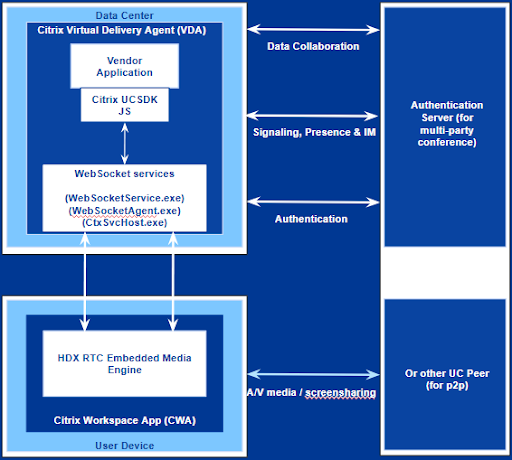
UCSDK Architecture
-
Vendor application: This can be any third-party real-time communication application which is desktop-based or browser-based that integrated UCSDK.
-
UCSDK JS: UCSDK JS provides the APIs that vendor applications utilize to offload the audio/video to the endpoint.
-
HdxRtcEngine: This is the embedded WebRTC media engine in Citrix Workspace App that processes and handles the offloaded audio/video call.
Once the SDK is loaded and used, the HdxRtcEngine.exe process is launched on the client endpoint if redirection succeeds. Once HdxRtcEngine.exe is launched on the client endpoint, any signaling and payload data flows from Citrix VDA to the client endpoint, reaches the cloud, bounces back to the client endpoint, and then is forwarded to VDA. For example, a complete round trip of flow could be:
Vendor App -> CitrxWebrtc.js SDK -> Citrix VDA components -> Citrix Client Endpoint components -> Cloud -> Citrix Client Endpoint components -> Citrix VDA components -> CitrxWebrtc.js SDK -> Vendor App
System Requirements
The system requirements indicate the various versions of Citrix components needed with the latest version of UCSDK - 5.0.0. For compatibility details for older versions of the SDK and specific feature requirements, see Versions and Feature Matrix table below.
Note:
For customers to use any feature that is added to UCSDK – ensure that the vendor application has integrated the appropriate UCSDK version and enabled the feature and use the appropriate VDA and CWA versions in your environment.
Fully Compatible Versions
Fully compatible versions indicate that by using these versions of Citrix components along with the latest version of UCSDK, customers can take advantage of all the features available. For the current latest version of UCSDK – 5.0.0, fully compatible versions of Citrix components are as below:
- Citrix Virtual Apps™ and Desktops: 2603
- Citrix Workspace App Windows: 2603
- Citrix Workspace App Mac: To be released
- Citrix Workspace App Linux: 2603
- Citrix Workspace App ChromeOS/HTML5: To be released
Note:
UCSDK Optimization is supported on all endpoint platforms: Windows, Mac, Linux, ChromeOS, and HTML5. If the list above shows To be released for a specific endpoint platform, it simply means that a version fully compatible with the latest UCSDK features hasn’t been released yet. Hence, customers can still use older versions of the Citrix Workspace app to continue using existing features, even with the newer UCSDK.
Configuration
UCSDK feature functionality depends on three factors: the UCSDK version that the vendor has integrated and features that vendor has enabled, the Citrix Virtual Apps and Desktops, and the Citrix Workspace app version in use.
On the Citrix Side, please ensure the following is configured so that the optimized application is allowed to be optimized:
- Ensure the Microsoft Teams redirection policy is turned on. Refer to Multimedia Policy Settings for more information. Note that this policy is ON by default.
- Third-party Electron or browser-based applications that utilize the
CitrixWebrtc.jsSDK are not supported by default. TheCtxHdxWebSocketService(WebSocketService.exe) will not allow connections from applications that are not on the allowlist. The desired application binary executable name must be added to a whitelist registry key.
On the VDA
- Create a Key Path:
HKLM\Software\WOW6432Node\Citrix\WebSocketService - KeyName:
ProcessWhitelist - Type:
MULTISZ - Key Value:
Mytestapp.exe
If you have multiple applications, type each application in a new line. Do not copy and paste from a text file or insert commas. Make sure the name provided matches the executable name of the application. This registry value is not case-sensitive.
If the application is accessed through a browser instead of a full-fledged desktop application, then you need to allow for, e.g., chrome.exe in the registry value.
Once the above registry is configured successfully, reboot the VDA or restart CtxHdxWebSocketService to finish the Whitelist setup.
On the Client
No configuration is needed. Just install the Citrix Workspace app.
Each vendor might have a very specific application name. Hence, refer to the vendor documentation linked in the Current Vendor Support section to determine which application name must be allowed in the WebSocketService.
Feature Reference
Enhanced Call Connect times with Smart Sync
Introduced in UCSDK 5.0.0, the Smart Sync feature accelerates call connection times by streamlining communication between the VDA and the client endpoint. This enhancement delivers faster call setups across the board, providing the most significant performance improvements for high-latency network environments.
Citrix recommends that customers reach out to their application vendors to upgrade to UCSDK 5.0.0 to take advantage of this feature.
Note:
This feature depends only on UCSDK 5.0.0 and the Citrix Workspace app. See the Versions and Feature Matrix for exact client versions. There is no VDA version dependency, so older supported VDAs can still be used.
Optimized Overlay Clipping for Enhanced Performance and User Experience
From CVAD 2511, the mechanism for handling redirected video overlays in features such as HDX Microsoft Teams Optimization and UCSDK Optimization, has been re-architected to improve both the user experience and server performance.
Essential Benefits
-
Improved Visual Accuracy: This enhancement resolves visual glitches where application elements, such as pop-up menus or notifications, would incorrectly appear behind video content. The new logic ensures all components are rendered in the correct order, providing a more seamless and predictable experience.
-
Enhanced Performance: This optimization significantly reduces CPU utilization on the Virtual Delivery Agent. By replacing older, resource-intensive polling methods with a more efficient graphics-based approach, this change improves server scalability and allows for higher user density.
Note:
The functionality depends on a future version of Microsoft Teams (or other UCSDK partner application) and requires Citrix Workspace App for Windows 2511.
Versions and Feature Matrix
As version updates happen frequently, please refer to Citrix Virtual Apps and Desktops and Citrix Workspace app product lifecycle pages to ensure a particular version is supported. For many of the older features, the versions mentioned in the table are the last supported Current Release (CR) versions at the time of writing this document.
| Feature | UCSDK Version | VDA | CWA Windows | CWA Mac | CWA Linux | CWA ChromeOS/HTML5 |
|---|---|---|---|---|---|---|
| Audio / Video (p2p & conference) | 3.1.0 | 2203 LTSR Latest CU / 2311 CR | 2402 LTSR Latest CU / 2311 CR | 2311 | 2311 | 2312 |
| Screen sharing | 3.1.0 | 2203 LTSR Latest CU / 2311 CR | 2402 LTSR Latest CU / 2311 CR | 2311 | 2311 | 2312 |
| DTMF | 3.1.0 | 2203 LTSR Latest CU / 2311 CR | 2402 LTSR Latest CU / 2311 CR | 2311 | 2311 | 2312 |
| Proxy Server Support | 3.1.0 | 2203 LTSR Latest CU / 2311 CR | 2402 LTSR Latest CU / 2311 CR | 2311 | 2311 | 2312 |
| App Sharing | 3.1.0 | 2203 LTSR Latest CU / 2311 CR | 2402 LTSR Latest CU / 2311 CR | 2311 | 2311 | N/A |
| Dynamic e911 | 3.1.0 | 2203 LTSR Latest CU / 2311 CR | 2402 LTSR Latest CU / 2311 CR | 2311 | 2311 | 2312 |
| Multi Window | 3.1.0 | 2203 LTSR Latest CU / 2311 CR | 2402 LTSR Latest CU / 2311 CR | 2311 | 2311 | 2312 |
| SDP Unified Plan Support | 3.1.0 | 2203 LTSR Latest CU / 2311 CR | 2402 LTSR Latest CU / 2311 CR | 2311 | 2311 | 2312 |
| Stream resolution / Simulcast | 3.1.0 | 2203 LTSR Latest CU / 2311 CR | 2402 LTSR Latest CU / 2311 CR | 2311 | 2311 | 2312 |
| Remote Audio (with Loop) | 3.1.0 | 2203 LTSR Latest CU / 2311 CR | 2402 LTSR Latest CU / 2311 CR | 2311 | 2311 | 2405 |
| Browser-based UCSDK (Bootstrap support) | 4.0.2 | 2407 CR | 2402 LTSR Latest CU / 2311 CR | 2311 | 2311 | 2312 |
| Web HID API | 4.0.2 | 2203 LTSR Latest CU / 2311 CR | 2409.10 | 2411 | 2411 | 2505 |
| Web Audio API | 4.0.2 | 2203 LTSR Latest CU / 2311 CR | 2405 | 2405 | 2405 | N/A |
| Restart ICE | 4.1.0 | 2203 LTSR Latest CU / 2311 CR | 2503.2 | 2503 | 2503 | 2502.10 |
| Screen Recording (Preview)¹ | 4.1.0 | 2503 | 2503.2 | N/A | N/A | N/A |
| SmartSync | 5.0.0 | 2203 LTSR latest CU / 2311 CR | 2603 | N/A | 2604 | N/A |
Note:
We’ve introduced a new policy for screen recording, so you need the 2503 version of the delivery controller™, which comes with CVAD 2503.
Current Vendor Support
Several third-party vendors have integrated the Unified Communications SDK into their products. The current list of vendors and their supporting documentation is listed below:
| Vendor | Documentation |
|---|---|
| Sprinklr | Citrix Media Offloading for Voice Calls |
| Microsoft Dynamics 365 | Dynamics 365 Contact Center Documentation |
| Amazon Connect | Optimize Amazon Connect audio for Citrix cloud desktops |
| Ring Central | Using RingCentral in a Citrix VDI environment |
| Five9 | Five9 WebRTC in Citrix Environments |
| Twilio | Twilio Flex on Citrix VDI |
| Avaya | Avaya Experience Platform Public Cloud VDI solution for Citrix |
| 8x8 | Citrix VDI Integration with 8x8 Work for Desktop & Web |
| Content Guru | Content Guru Citrix Integration |
| Ribbon Communications | Ribbon Communications Citrix WebRTC SDK |
| Intermedia | Installing Intermedia Unite on Citrix Virtual Apps and Desktops |
| Alcatel-Lucent Rainbow | Citrix Optimization for Rainbow Desktop Application |
| Talkdesk | Talkdesk Agent Workspace VDI Connect |
| IPC | IPC Unigy Soft Client Citrix VDI |
| Vitero | Vitero Inspire for Citrix VDI |
| Pexip | Deploying Connect desktop app in Citrix Pexip Infinity Docs |
| Zoom Web App | Configure WebRTC redirection for Zoom Web App |
Troubleshooting
For troubleshooting information, see Troubleshooting Guidance for Apps Optimized with Citrix Unified Communications SDK.
Known Issues & Limitations
This section will document the current known issues and limitations as they are recognized.
Share
Share
This Preview product documentation is Citrix Confidential.
You agree to hold this documentation confidential pursuant to the terms of your Citrix Beta/Tech Preview Agreement.
The development, release and timing of any features or functionality described in the Preview documentation remains at our sole discretion and are subject to change without notice or consultation.
The documentation is for informational purposes only and is not a commitment, promise or legal obligation to deliver any material, code or functionality and should not be relied upon in making Citrix product purchase decisions.
If you do not agree, select I DO NOT AGREE to exit.