Licensing elements
The License Server comprises several licensing elements:
- Citrix vendor daemon
- Options configuration file
- License request process
- Citrix Licensing data collection programs
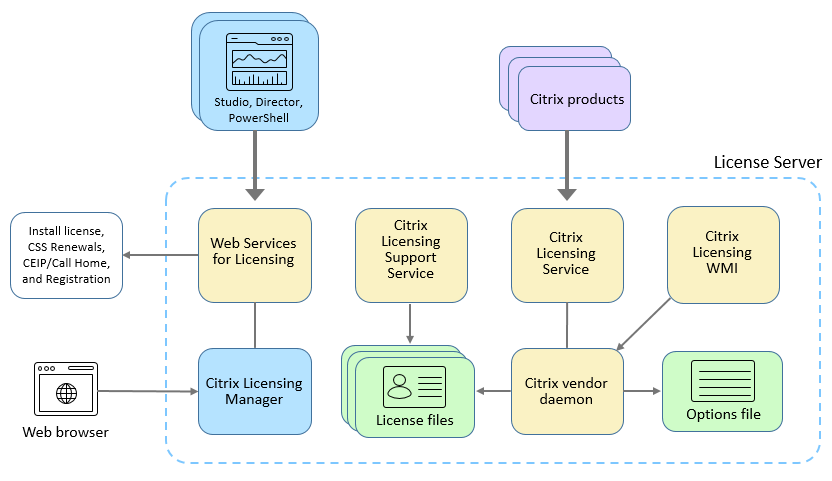
The following diagram shows how Citrix products connect to the License Server.
Citrix® vendor daemon
The Citrix vendor daemon (CITRIX), a process that runs on the License Server, grants licenses. The Citrix vendor daemon tracks the number of licenses that are checked out and which product has them. Citrix products communicate with the Citrix vendor daemon using TCP/IP. By default, the Citrix vendor daemon uses TCP/IP port 7279.
Options file
The options file (Citrix.opt) is a License Server configuration file. The Citrix vendor daemon reads this file every time it restarts or receives a command to reread the file. This configuration file defines licensing behavior-the number of licenses a product server can use, the location of the System Logs, logging levels, and other user-defined customizations. The Customer Experience Improvement Program (CEIP) and Call Home configurations are stored in this file.
License request process
When a product requests a license from the License Server, the Citrix vendor daemon determines whether a license is available for the request.
The license request process has two phases: the product startup phase and the user connection phase.
Product Start-Up Phase:
- When a Citrix product starts, it retrieves the License Server location from its data store.
- The product connects to the Citrix vendor daemon.
- The product checks out a startup license.
User connection phase:
- A user connects to a computer running the Citrix product.
- The product requests a license from the License Server.
- The Citrix vendor daemon checks to see if any licenses are available and grants or denies the product’s request.
- The license module in the product grants or denies the use of the product based on the response from the Citrix vendor daemon.