This content has been machine translated dynamically.
Dieser Inhalt ist eine maschinelle Übersetzung, die dynamisch erstellt wurde. (Haftungsausschluss)
Cet article a été traduit automatiquement de manière dynamique. (Clause de non responsabilité)
Este artículo lo ha traducido una máquina de forma dinámica. (Aviso legal)
此内容已经过机器动态翻译。 放弃
このコンテンツは動的に機械翻訳されています。免責事項
이 콘텐츠는 동적으로 기계 번역되었습니다. 책임 부인
Este texto foi traduzido automaticamente. (Aviso legal)
Questo contenuto è stato tradotto dinamicamente con traduzione automatica.(Esclusione di responsabilità))
This article has been machine translated.
Dieser Artikel wurde maschinell übersetzt. (Haftungsausschluss)
Ce article a été traduit automatiquement. (Clause de non responsabilité)
Este artículo ha sido traducido automáticamente. (Aviso legal)
この記事は機械翻訳されています.免責事項
이 기사는 기계 번역되었습니다.책임 부인
Este artigo foi traduzido automaticamente.(Aviso legal)
这篇文章已经过机器翻译.放弃
Questo articolo è stato tradotto automaticamente.(Esclusione di responsabilità))
Translation failed!
Citrix Telemetry Service との統合
Citrix Telemetry Service (ctxtelemetry) が Linux VDA ソフトウェアと統合されているため、Citrix Scout を実行できます。Citrix Scout は、/opt/Citrix/VDA/bin/xdlcollect.sh スクリプトを使用して、Linux VDA に関するログを収集します。
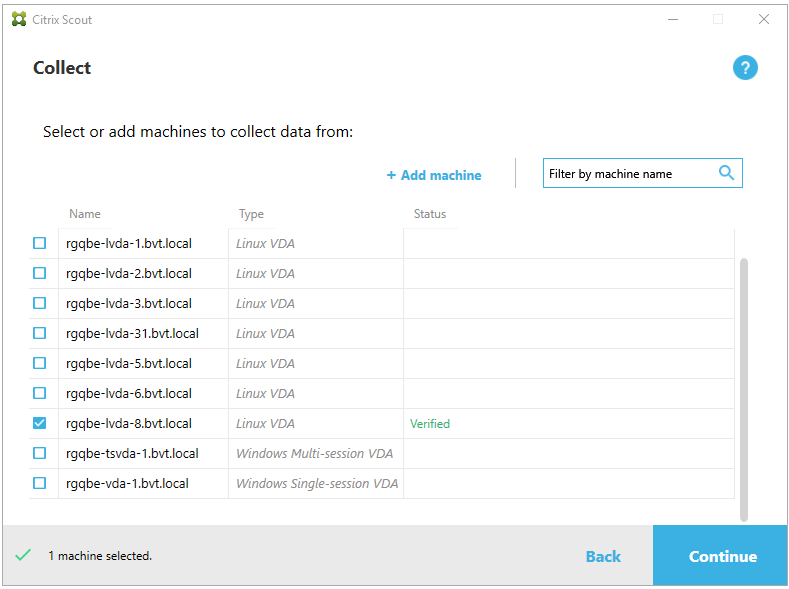
Citrix Telemetry Service の有効化と無効化
- サービスを有効にするには、
**sudo systemctl enable ctxtelemetry.socket**コマンドを実行します。 - サービスを無効にするには、
**sudo systemctl disable ctxtelemetry.socket**を実行します。
ポート
Citrix Telemetry Service (ctxtelemetry) は、デフォルトで TCP/IP ポート 7503 を使用して Citrix Scout をリッスンします。Delivery Controller 上では TCP/IP ポート 7502 を使用して Citrix Scout と通信します。
VDA のインストール後にポートを変更するには、次の手順を実行します。
-
Scout と通信するためのポートを変更するには、次のコマンドを実行します。
/opt/Citrix/VDA/bin/ctxreg create -k "HKLM\Software\Citrix\VirtualDesktopAgent" -t REG_DWORD -v "TelemetryServicePort" -d <port number> --force <!--NeedCopy--> -
Scout をリッスンするためのソケットポートを変更するには、次のコマンドを実行して
ctxtelemetry.socketファイルを開き、編集します。sudo vi /etc/systemd/system/ctxtelemetry.socket <!--NeedCopy-->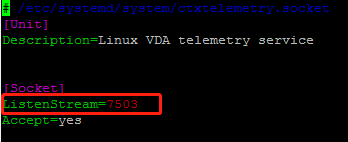
-
ソケットポートを再起動するには、次のコマンドを実行します。
sudo systemctl daemon-reload sudo systemctl stop ctxtelemetry.socket sudo systemctl start ctxtelemetry.socket <!--NeedCopy--> -
ファイアウォール構成で新しいポートを有効にします。
たとえば、Ubuntu を使用している場合は、
**sudo ufw allow 7503**コマンドを実行してポート 7503 を有効にします。
注:
代わりに
ctxsetup.shを実行して、上記のステップ 3 と 4 を自動化することもできます。
デバッグモード
Citrix Telemetry Service が期待どおりに動作しない場合は、デバッグモードを有効にして原因を特定できます。
-
デバッグモードを有効にするには、次のコマンドを実行して
ctxtelemetryファイルを開き、DebugModeの値を 1 に変更します。sudo vi /opt/Citrix/VDA/sbin/ctxtelemetry <!--NeedCopy-->
-
Citrix Telemetry Service を手動で停止するか、サービスが自動的に停止するまで 15 分間待ちます。
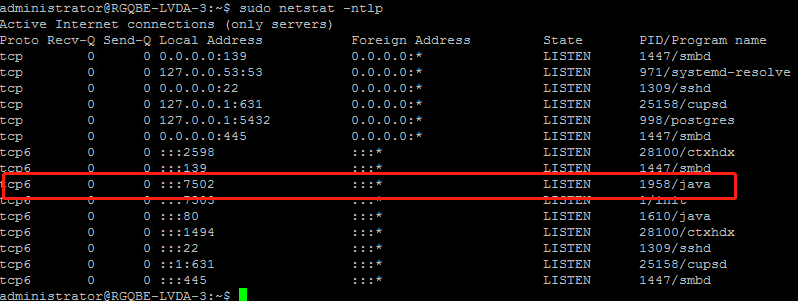
この例では、次のコマンドを実行して Citrix Telemetry Service を停止できます。
sudo netstat -ntlp Kill -9 1958 <!--NeedCopy--> -
Citrix Telemetry Service を再起動するには、Scout で Linux VDA を選択し、
/var/log/xdl/内のtelemetry-debug.logを見つけます。
サービス待機時間
ソケットポートを開く systemd デーモンはデフォルトで起動し、使用するリソースはわずかです。Citrix Telemetry Service はデフォルトで停止しており、Delivery Controller からのログ収集要求があった場合にのみ起動します。ログ収集が完了すると、サービスは 15 分間、新しい収集要求を待ち、要求がない場合は再度停止します。待機時間は次のコマンドで構成できます。最小値は 10 分です。10 分未満の値を設定した場合、最小値である 10 分が適用されます。待機時間を設定したら、サービスを停止して再起動します。
/opt/Citrix/VDA/bin/ctxreg create -k "HKLM\Software\Citrix\VirtualDesktopAgent" -v "TelemetryServiceIdleTimeoutInMinutes" -d <number> -t REG_DWORD
<!--NeedCopy-->
検証テスト
収集が開始される前に、選択された各マシンに対して検証テストが自動的に実行されます。これらのテストは、要件が満たされていることを確認します。マシンのテストが失敗した場合、Scout は推奨される是正措置を含むメッセージを表示します。検証テストの詳細については、Citrix Scout ドキュメントの「検証テスト」セクションを参照してください。
共有
共有
This Preview product documentation is Citrix Confidential.
You agree to hold this documentation confidential pursuant to the terms of your Citrix Beta/Tech Preview Agreement.
The development, release and timing of any features or functionality described in the Preview documentation remains at our sole discretion and are subject to change without notice or consultation.
The documentation is for informational purposes only and is not a commitment, promise or legal obligation to deliver any material, code or functionality and should not be relied upon in making Citrix product purchase decisions.
If you do not agree, select I DO NOT AGREE to exit.