
Deleting relocation notification
-
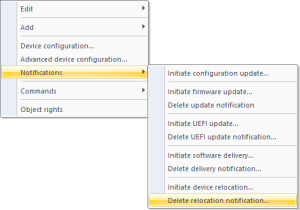
For the relevant devices, from the context menu, choose Notifications > Delete relocation notification.
-
To include the devices of all subordinate OUs, in the Delete relocation notification message, select the option Include sub organization units.
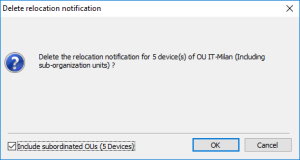 The number of devices shown in brackets is updated dynamically.
-
Confirm with OK.
After refreshing the Properties window, you will see that the Relocation notification status for the relevant devices is deleted.
Notifications are always set or deleted for all selected devices regardless of whether they are only available for individual devices.