
Special options for date fields
The value of a date field can be set to a fixed date and time. Alternatively, you may refer to relative time periods:
-
A period of time to be specified before or after the current day (Today)
-
A specific weekday within the last week (Weekday)
If you work with relative time specifications such as -4d from today, you can run a report, let\'s say each Friday, and always get the results for the last four days without having to change the report definition.
The Weekday option refers to the last seven days. The reference to a weekday allows you to query the same time period or point in time with the same report definition every week.
-
To define a date or time period for a date field, click in the table cell under Value.
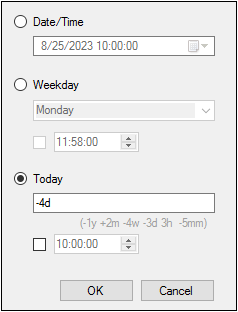
| Option | Description |
|---|---|
| Date/Time | Fixed date and time |
| Weekday | If you select Monday, the value refers to the last Monday before the current day at 0:00 o'clock. |
| Example | |
| With =Monday, on a Monday morning, you can show all IDFs of devices that have been updated automatically at the weekend - with status Monday at 0:00 o'clock. | |
| Example | |
| With the expressions > Monday AND < Tuesday you will get results referring to the whole Monday (0:00 o'clock to 0:00 o'clock). | |
| Today | Time period relative to the current day, optionally including time |
| y Years | |
| m Months | |
| w Weeks | |
| d Days | |
| h Hours | |
| mm Minutes | |
| Example | |
| [-4d] refers to the last four days before the current date |