
Defining filters
-
Select a report, and then click
 Filter or click Edit > Filter
-
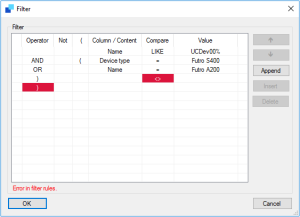
In the Report filter dialog, define one or more filter expressions by specifying column, comparison operator and value. To define the column and operator, click the relevant cell and select an entry from the list. For further information, see Report filter dialog.
-
Confirm with OK.The entries are checked and white spaces are removed. If there are any invalid entries, they are highlighted in red. The window can only be closed, if the filter definition is correct.
-
Run the report by clicking
 .