
Setting first configuration settings on VM
Configure the root password, host name and network cards directly on the machine.
To operate the in a DMZ, you may configure two network interfaces for internal and external LAN. For further information, see Scout Cloud Gateway in a DMZ.
-
Start a remote console of the VM.Note:The English keyboard language is active.
-
Use the following keys for navigation:
Key Description TabJump to next element SpaceEnable or disable selected option ReturnTrigger selected button -
Under General, set and confirm an individual root password.
-
Under Network, optionally change the host name of your SCG machine.If you enter the host name as FQDN, avoid using
.localas the domain.ImportantThe host name must not be changed later on. -
Under Network, specify your NTP server.
-
Configure the internal and external network settings. Under internal and external, define whether the respective network card is used and whether DHCP is to be used. If you disable DHCP, you can configure the IP address and other data yourself.The first network card is defined as internal, the second as external.
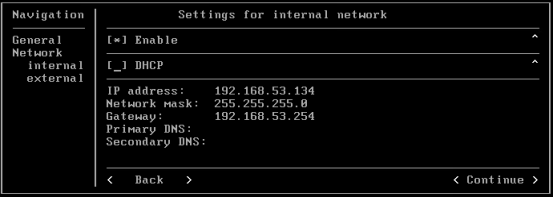 For further information on two network interfaces in the DMZ, see Scout Cloud Gateway in a DMZ.
Then, use a browser to log on to the SCG WebAdmin interface. (Up to SCG 1 2201, the system needed two to three minutes to complete the configuration.)