
Adding individual file entries
-
In the Scout Console, click Options > Advanced Options. Or: For the relevant OU, open the context menu and click Advanced device configuration
-
Click the Advanced file entries tab.
-
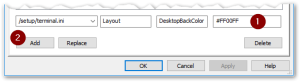
Below the list, edit the following fields (1):
Option Description File Enter the full path including file name or select from the list: Terminal: /setup/terminal.iniCitrix ICA: /setup/ica/wfclient.iniand/setup/ica/appsrv.iniCisco VPN: /setup/ciscovpn/sample.pcfSection Section heading without brackets Key Keyword Value Value you want to assign to the keyword Blanks, hyphens and multiple values are allowed. Example: valueA,valueB,valueC;comment -
Click Add (2).
-
Confirm with Apply and OK.
The new entry is written to the .ini file on the next device restart.