Microsoft Edge WebView support for Windows Citrix Secure Access
Important:
Starting from the Citrix Secure Access client for Windows version 24.11.1.17, Microsoft Edge WebView is enabled by default.
Starting January 29, 2025, Citrix changes the method of enabling preview features in the Citrix Secure Access client for Windows. To ensure optimal performance of preview features (features under feature flag) in the Citrix Secure Access client for Windows, you must enable traffic to
features.netscalergateway.netand upgrade the clients to version 24.8.1.19 or later. For more information, see Feature management for the Citrix Secure Access client for Windows.
Microsoft Edge WebView is now the recommended WebView by Microsoft because the Internet Explorer WebView is deprecated. We recommend you to use Citrix Secure Access client 23.8.1.5 or later versions to leverage the functionalities of Microsoft Edge WebView.
Changes to the end-user
The authentication screens of the Citrix Secure Access client UI appear as follows.
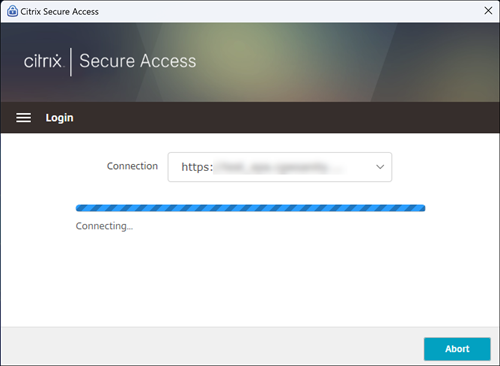
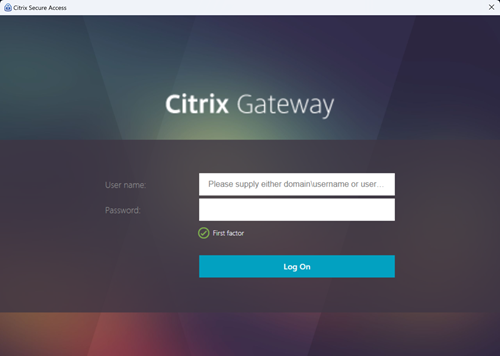
Once the end-users select the URL, Citrix Secure Access client opens a new window prompting them to log on to NetScaler Gateway using their credentials.
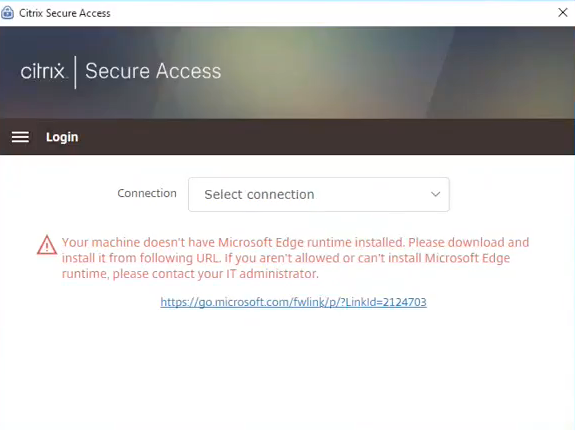
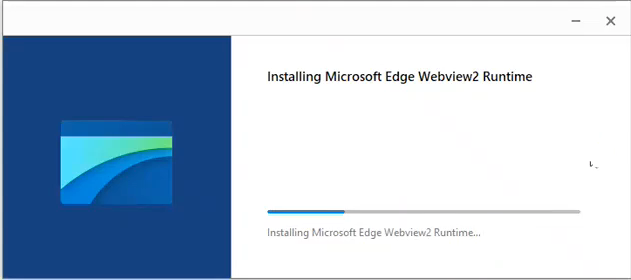
If the Windows client machine does not have the Microsoft Edge WebView runtime installed, end-users are provided with a link on the Citrix Secure Access client UI to download and install the Microsoft Edge WebView runtime. End-users can download and install the Edge WebView runtime seamlessly when connected to the VPN and the authentication isn’t interrupted during this process.
Notes:
The Microsoft Edge WebView functionality does not impact any admin-specific configurations.
We recommend that you enable the HttpOnly cookie feature when using Edge WebView on Citrix Secure Access. This improves the NetScaler Gateway logon duration when EPA is used as a factor in the nfactor flow.
Troubleshooting
-
If you face any issues with this feature, contact Citrix support.
-
You can submit your feedback about the Edge WebView feature through citrixgatewaybetafeedback@cloud.com.