Session recording control
Session recording records, catalogs, and archives sessions for retrieval and playback.
Session recording offers the following key benefits:
- Provides flexible policies to trigger recordings of application and desktop sessions automatically.
- Enables IT personnel to monitor and examine user activity, and supports internal controls for regulatory compliance and security monitoring.
- Aids technical support by speeding up problem identification and reducing time-to-resolution.
For details, see Benefits.
Architecture
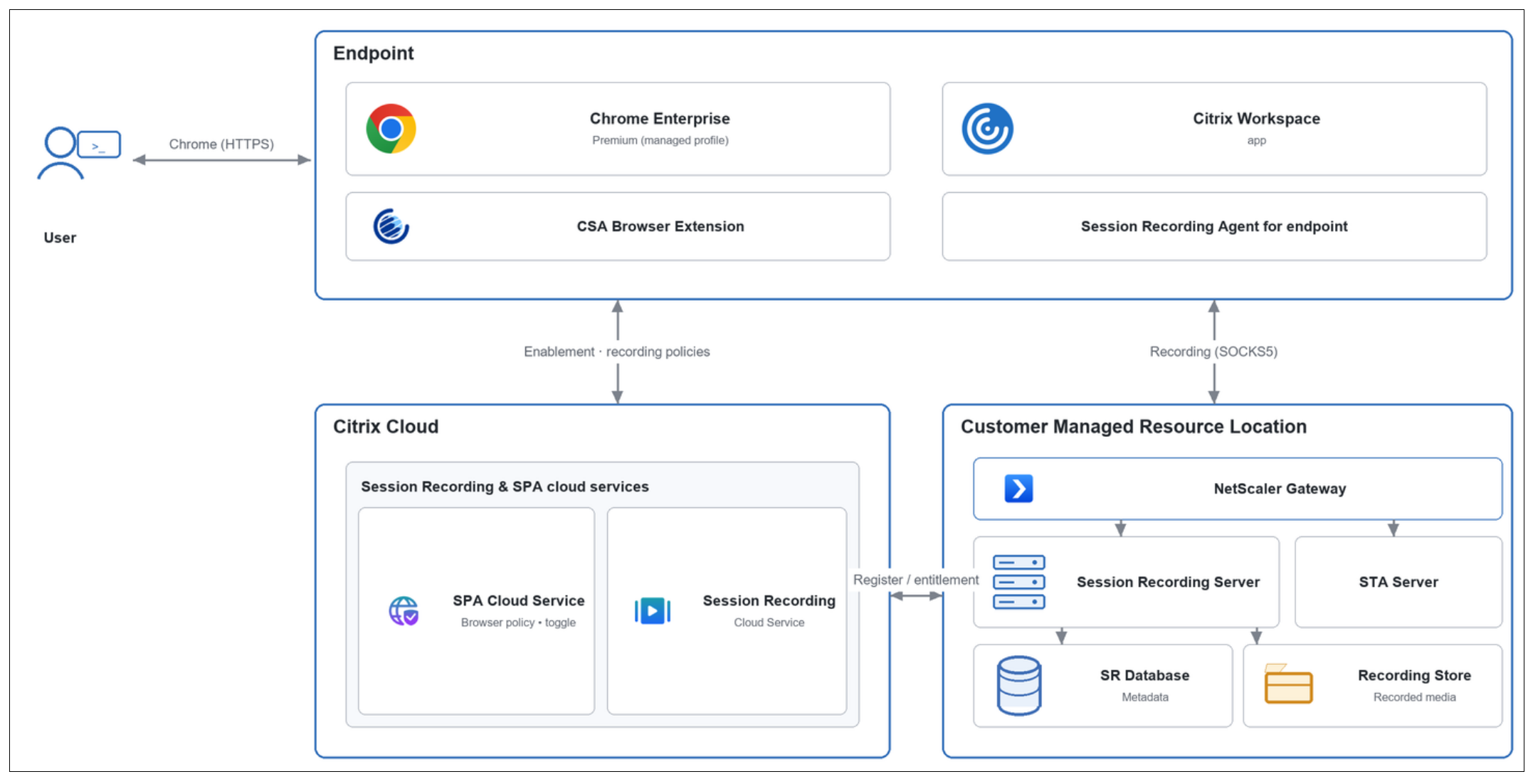
The session recording solution spans three planes:
- The endpoint with the managed Chrome profile, Citrix Secure Access extension, and Session Recording Agent for endpoints.
- The Citrix Cloud control plane, which houses the Secure Private Access and Session Recording cloud services.
- The customer-managed resource location, which encompasses NetScaler Gateway, the STA server, the Session Recording server, and its database and recording stores.
Prerequisites
- Citrix Workspace app for Windows 2603.10 or later
- Endpoint analysis (EPA) version: 26.5.1.7 and later
System requirements
-
Citrix Secure Private Access, deployed in either service or hybrid mode combined with Chrome Enterprise Premium (with managed profile).
-
Session Recording Cloud service with Session Recording server 2511 or later. For details, see Get started.
-
Windows 64-bit or 32-bit endpoints with the following components:
- Citrix Endpoint Analysis (EPA) plug-in 26.5.1.7 or later.
- Citrix Workspace app for Windows, version 2603.10 or later, with the Session Recording Endpoint Agent installed
Set up the environment
Complete the following steps to enable and validate endpoint recording for Chrome Enterprise sessions.
Configure the Session Recording site
Follow the steps documented in Configure endpoint recording policies.
Note:
NetScaler Gateway is required for endpoint recording. It routes recording traffic to the Session Recording Server through the STA in both Secure Private Access deployment types. Even with the Secure Private Access service, where NetScaler does not manage user-to-application access, you must provide a gateway URL for recording traffic.
Configure the Session Recording browser policy in Secure Private Access
- Log in to the Secure Private Access admin console.
- Go to Policies > Browser Policies, and then click Create browser policy.
- Select Session recording, and then click Manage.
- Click Add Rule, enter a name for the rule, and then click Next.
-
Set the conditions (users and groups). (Optional) Add Geo-location, Network location and Device posture check, and then click Next.
- Click Save. The rule count appears on the Browser Policies > Session recording tab.
Install the Workspace App with Session Recording Agent for endpoints
Follow the steps documented in Session Recording add-on support.
Replay recorded sessions
Recordings are viewable in the Session Recording console.
- All windows associated with the user’s Chrome work profile are recorded.
- Multiple windows across one or more monitors are recorded.
- Windows that are out of focus or obscured by another application are still recorded in their entirety.
- Minimized windows and windows with anti-screen capture enabled appear as black rectangles during playback.
Best practices
- Keep one global site. Use a single global endpoint-recording site and document the configuration. Changing it can unintentionally disable the other sites’ configured policies.
- Align regions. Keep the Session Recording cloud service URL, cloud client, and back end in the same Citrix Cloud region to avoid latency and data-residency issues.
- Plan storage. Full-screen web/SaaS recording can be storage-intensive. Size the server, Session Recording database, and recording storage accordingly, and monitor storage consumption closely.
- Validate entitlement and roles first. Mismatched Citrix DaaS and Citrix Secure Private Access entitlements are the most common cause of deployment failure. Confirm that a single active customer record exists and that the required administrative roles are assigned before enabling policies.