Solution overview
Citrix Secure Private Access™ for hybrid deployments provides a Zero Trust Network Access (ZTNA) solution that divides functions between your on-premises environment and Citrix Cloud. This architecture allows you to leverage existing investments while gaining cloud-based management. The responsibilities are distributed as follows:
-
On-premises components (data plane): Your existing NetScaler Gateway, StoreFront, and Windows Cloud Connector installations remain on-premises. These components are responsible for controlling and routing all user access traffic.
-
Citrix Cloud components (control plane):
- Centralized management: Use the Citrix Cloud UI for all configuration, administration, and policy management.
- Monitoring and troubleshooting: Utilize the hosted Citrix Monitor service for all monitoring, analytics, and troubleshooting functions.
Why Use Secure Private Access
Citrix Secure Private Access solution provides end-to-end access control by integrating single sign-on (SSO), remote access, and out-of-band content inspection into a unified platform.
-
Govern app access: Enforce security policies and provide simplified SSO experience for all approved SaaS and internal applications.
-
Enhance security: Protect the network and user devices from malware and data leaks by filtering access to specific websites and website categories.
-
Google Chrome Enterprise Premium integration: Leverage Google Chrome Enterprise Premium, allowing users to natively access authorized corporate web apps with a familiar and secure experience. For details, see Integration with Google Chrome Enterprise Premium.
-
Data loss prevention (DLP): Enforce granular controls to restrict printing, downloads, and clipboard copy-paste actions.
-
Analyse user activity and protect enterprise network: Gain deep visibility into user activities, such as malicious website visits or risky file transfers. Use these analytics to take corrective actions and protect the enterprise network.
-
Seamless user experience: Provide secure, seamless access to critical business applications from any device, location, or network.
Key components
The following sections provide more information about the key components of the Secure Private Access hybrid solution.
Network diagram
The following figure illustrates the network diagram of the Secure Private Access hybrid solution.
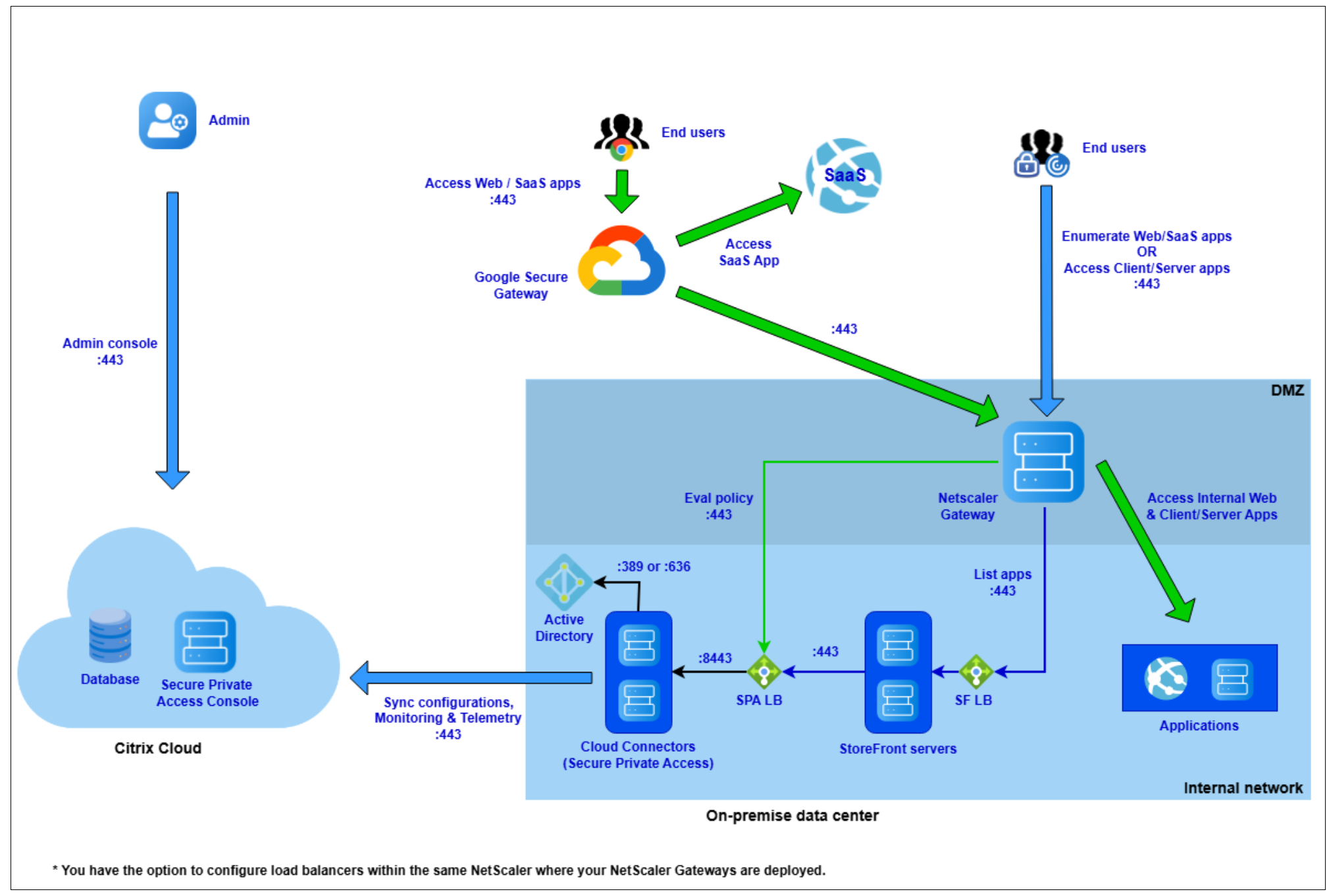
The key components of the Secure Private Access hybrid solution are:
-
Secure Private Access admin console: Click the Secure Private Access tile in Citrix Cloud to access the admin console. Use the admin console to onboard, configure apps, and set policies. Site management is centralized and streamlined. No on-premises infrastructure required.
-
Google Chrome and Chrome Enterprise Premium Secure Gateway: End users access corporate internal and SaaS applications using the Google Chrome browser.
The Chrome Enterprise Premium Secure Gateway functions as a forward proxy to enforce a zero-trust access framework. It provides granular, context-aware control over application access. All traffic from the user’s Chrome browser connects to the NetScaler Gateway through the Chrome Enterprise Premium Secure Gateway, ensuring policies are applied before access is granted.
Note:
The Google components are required only when using Secure Private Access to provide secure access to SaaS and internal Web applications. They are not required if you plan to use Secure Private Access only for TCP/UDP (client/server) applications.
-
NetScaler Gateway: The NetScaler Gateway component provides secure remote access to applications and desktops. It acts as the secure entry point for external users, allowing them to connect to corporate resources from outside the network. For details, see NetScaler.
-
Cloud Connector: The Cloud Connector is an on-premises component, installed on a Windows server, that acts as a secure communication bridge between your network and Citrix Cloud.
Cloud Connector is responsible for synchronizing all configurations and policies from the Secure Private Access service in the cloud. These policies are then used to enforce access rules for applications. The connector also persistently caches this data, which allows users to continue accessing applications even if Citrix Cloud becomes unavailable. For details, see Cloud Connector.
-
StoreFront: The on-premises StoreFront is the user facing component that aggregates, enumerates, and delivers all authorized applications and desktops to end-users. It functions as an enterprise app store. This hybrid architecture allows you to leverage your existing StoreFront setup without migrating to the cloud. For details, see StoreFront.
Note:
StoreFront is optional if you plan to use Secure Private Access only for TCP/UDP (client/server) applications. If you do configure StoreFront, it only enumerates applications that are configured as a web application type. Standard TCP/UDP apps are not displayed in the store.
End user access methods
End users can access the Secure Private Access apps using any of the following methods:
-
Citrix Workspace App (CWA) and Workspace UI: These are the two clients end users can use to connect and view Citrix Store.
- Citrix Workspace App (native client): This is the full, native application installed on the user’s endpoint (for example, Windows and macOS). It provides the richest user experience and is required for certain advanced features.
- Citrix Workspace UI (web client): This is the browser-based version of the store. Users access it by navigating to the StoreFront URL in a web browser. It allows users to access their applications without installing any client software.
-
Google Chrome: All web and SaaS applications are launched exclusively through the Google Chrome browser using a managed enterprise profile. When a user launches an application from their Citrix Store, it automatically opens in this managed Chrome Enterprise profile to enforce all security controls.
Note:
Google Chrome is not mandatory if you plan to use Secure Private Access only for TCP/UDP (client/server) applications. Users can use any browser (such as a non-managed Chrome, Edge, or Firefox) to access TCP/UDP applications.
-
Citrix Secure Access (CSA) client: This is the client-side agent, installed on the user’s endpoint, that is required for ZTNA access to all TCP/UDP (client/server) applications.
CSA provides secure, per-application connectivity to internal corporate resources without requiring a traditional, full-tunnel VPN.
Citrix Endpoint Analysis (EPA) client
The Citrix EPA client is a lightweight plug-in that runs on the user’s endpoint to perform device posture scans (also known as EPA scans). This client is required only if you have configured access policies that check the endpoint’s security posture (for example, up-to-date OS, specific antivirus software, or registry keys) before granting access.
Limitations
-
EPA as a factor is not supported. Instead, you can use the Device Posture service. For more information about the Device Posture service, see Device Posture.
-
Enabling device posture checks at virtual server level is not supported with Always On.
- Policy modeling supports only user conditions. Device posture and network location conditions are not supported.
-
StoreFront analyzer supports only one Secure Private Access type Store in StoreFront.
-
The simplified Secure Private Access user interface for hybrid deployments supports only one data center (one gateway and one StoreFront) in the current release.
- IPv6 is not supported for Network Locations in the Citrix Secure Access client.