Creating an individual USB recovery stick
| Requires |
|---|
|
|
|
|
Creating a USB recovery stick
-
In ELIAS, open the relevant IDF (
.idf). -
Click Image > Create USB stick …
-
In the Recovery USB stick creation dialog, in the first list field, select the operating system of the relevant devices for which you want to create the recovery flash drive:
eLux® RP 6 X64 Recovery eLux RP 6 (64 Bit) with and without UEFI eLux RP 5 Recovery eLux RP 5 eLux RP 5 UEFI Recovery eLux RP 5 with UEFI Note that, depending on the selected system, the image must contain the relevant eLux packages for the 64 bit kernel and UEFI.
-
In the second list field, select the appropriate USB drive. If more than one USB storage device is connected, select the relevant one.
-
To delete the contents on the selected USB stick or reset an existing recovery system, click the Delete all stick data button.
-
Click Create recovery system.
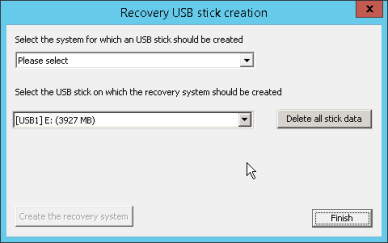
Creating a USB recovery stick involves two important steps:
- Creating the recovery system on the USB storage device to turn the USB stick bootable
- Transferring the individual IDF containing the relevant eLux packages to the container directory on the USB stick.
A progress bar at the bottom indicates the status of the copying process. As soon as the USB stick is fully written, a message is displayed.
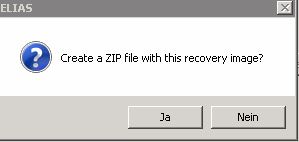
After having created your USB recovery stick, you can optionally create a disk image in terms of a .zip file to make it distributable.
Creating a disk image of the USB recovery stick
-
Immediately after the creation of the USB recovery stick, click Yes.
-
Select a storage location and name for the
.zipfile.
ELIAS creates a .zip file containing an image of the USB recovery stick as a DD file. In addition, the .zipfile includes the application StickWizz.exe and a text file with a description .
The StickWizz tool helps you create a bootable USB stick out of the image. For further information, see Preparing a recovery image for USB in the Recovery guide.
Note:
Hint: Alternatively create an
stwfile from your image on a local or network drive. The StickWizz tool then helps you create a bootable USB stick out of thestwfile. For further information, see [Writing an image to USB (with StickWizz)] (/en-us/unicon-elux-scout/admin_guides/elias/elias_usbrecovery/stickwizz.html) in the Recovery guide.