Tools and utilities
Session data query utility
We provide a utility (
ctxsdcutil) that you can use to query session data on each Linux VDA. To query the following data of all sessions or a specific session hosted on a VDA, run the /opt/Citrix/VDA/bin/ctxsdcutil -q <all | SessionID> [-c] command. The [-c] argument means to query data every second.
-
Input Session Bandwidth
-
Output Session Bandwidth
-
Output Session Line Speed
-
Latency - Last Recorded
-
Round Trip Time
-
Output ThinWire Bandwidth
-
Output Audio Bandwidth
-
Output Printer Bandwidth
-
Input Drive Bandwidth
-
Output Drive Bandwidth
XDPing
The Linux XDPing tool is a command-line based application that automates the process of checking for common configuration issues with a Linux VDA environment.
The Linux XDPing tool performs over 150 individual tests on the system, which are broadly categorized as follows:
-
Check whether Linux VDA system requirements are met
-
Identify and display machine information including the Linux distributions
-
Check the Linux kernel compatibility
-
Check for any known Linux distribution issues that can impact the Linux VDA operation
-
Check the Security-Enhanced Linux (SELinux) mode and compatibility
-
Identify network interfaces and check network settings
-
Check storage partitioning and available disk space
-
Check machine host and domain name configuration
-
Check DNS configuration and perform lookup tests
-
Identify underlying hypervisors and check virtual machine configuration. Support for:
-
Citrix Hypervisor™
-
Microsoft HyperV
-
VMware vSphere
-
-
Check time settings and check whether network time synchronization is operational
-
Check whether PostgreSQL service is properly configured and operational
-
Check whether the firewall is enabled and required ports are open
-
Check Kerberos configuration and perform authentication tests
-
Check the LDAP search environment for the group policy service engine
-
Check whether Active Directory integration is set up properly and the current machine is joined to the domain. Support for:
-
Samba Winbind
-
Dell Quest Authentication Services
-
Centrify DirectControl
-
SSSD
-
-
Check the integrity of the Linux computer object in Active Directory
-
Check Pluggable Authentication Module (PAM) configuration
-
Check the core dump pattern
-
Check whether packages required by the Linux VDA are installed
-
Identify the Linux VDA package and check the integrity of the installation
-
Check the integrity of the PostgreSQL registry database
-
Check whether the Linux VDA services are properly configured and operational
-
Check the integrity of the VDA and HDX™ configuration
-
Probe each configured Delivery Controller™ to test that the Broker Service is reachable, operational, and responsive
-
Check whether the machine is registered with the Delivery Controller farm
-
Check the state of each active or disconnected HDX session
-
Scan log files for the Linux VDA related errors and warnings
-
Check whether the version of Xorg is suitable
Use the Linux XDPing tool
Note:
Running ctxsetup.sh does not install XDPing. You can run
sudo /opt/Citrix/VDA/bin/xdping to install XDPing. This command also creates a Python3 virtual environment that is required for XDPing. If this command fails to create a Python3 virtual environment, create it manually following the instructions at Create a Python3 virtual environment.
To address SSL connection errors that you might encounter when using the pip tool, consider adding the following trusted hosts to the /etc/pip.conf file:
[global] trusted-host =
pypi.org files.pythonhosted.org
XDPing comes with the single executable named
xdping that is run from the command shell.
To display the command-line options, use the
--help option:
sudo /opt/Citrix/VDA/bin/xdping --help
To run the full suite of tests, run
xdping without any command-line options:
sudo /opt/Citrix/VDA/bin/xdping
To check the environment before installing the Linux VDA package, run the
pre-flight tests:
sudo /opt/Citrix/VDA/bin/xdping --preflight
To run specific test categories only, for example, the time and Kerberos tests, use the
-T option:
sudo /opt/Citrix/VDA/bin/xdping -T time,kerberos
To probe a particular XenDesktop® Controller:
sudo /opt/Citrix/VDA/bin/xdping -d myddc.domain.net
Sample Output
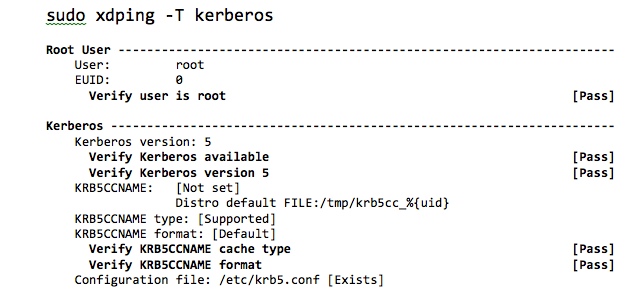
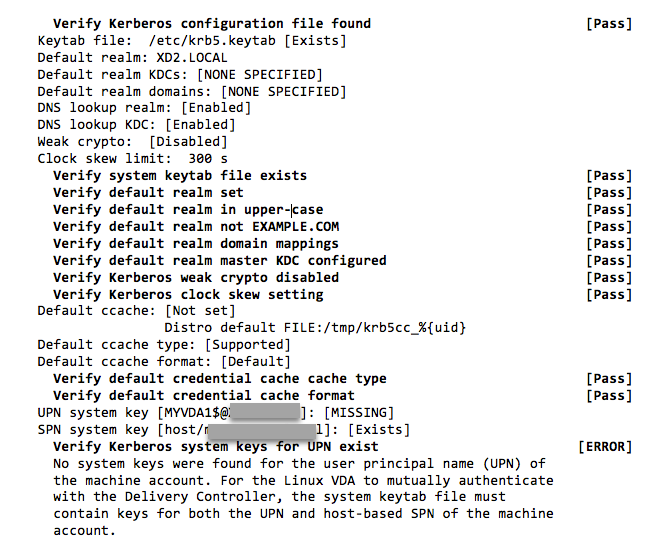
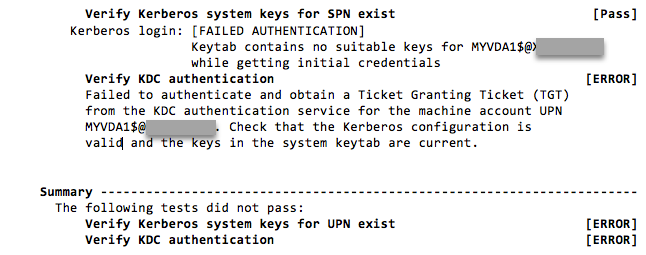
The following is a sample output from running the Kerberos test: