-
-
-
-
MDM オプションデバイスポリシー
-
This content has been machine translated dynamically.
Dieser Inhalt ist eine maschinelle Übersetzung, die dynamisch erstellt wurde. (Haftungsausschluss)
Cet article a été traduit automatiquement de manière dynamique. (Clause de non responsabilité)
Este artículo lo ha traducido una máquina de forma dinámica. (Aviso legal)
此内容已经过机器动态翻译。 放弃
このコンテンツは動的に機械翻訳されています。免責事項
이 콘텐츠는 동적으로 기계 번역되었습니다. 책임 부인
Este texto foi traduzido automaticamente. (Aviso legal)
Questo contenuto è stato tradotto dinamicamente con traduzione automatica.(Esclusione di responsabilità))
This article has been machine translated.
Dieser Artikel wurde maschinell übersetzt. (Haftungsausschluss)
Ce article a été traduit automatiquement. (Clause de non responsabilité)
Este artículo ha sido traducido automáticamente. (Aviso legal)
この記事は機械翻訳されています.免責事項
이 기사는 기계 번역되었습니다.책임 부인
Este artigo foi traduzido automaticamente.(Aviso legal)
这篇文章已经过机器翻译.放弃
Questo articolo è stato tradotto automaticamente.(Esclusione di responsabilità))
Translation failed!
MDMオプションデバイスポリシー
MDMオプションデバイスポリシーは、監視対象のiOSデバイスでiPhone/iPadを探すのアクティベーションロックを管理します。iOSデバイスを監視モードに設定する手順については、Apple Configurator 2を使用したデバイスの展開を参照してください。
アクティベーションロックは、紛失または盗難された監視対象デバイスの再アクティベーションを防止するiPhone/iPadを探すの機能です。アクティベーションロックでは、誰かがiPhone/iPadを探すをオフにしたり、デバイスを消去したり、デバイスを再アクティベートしたりする前に、ユーザーのApple IDとパスワードが必要です。組織が所有するデバイスの場合、たとえばデバイスをリセットまたは再割り当てするために、アクティベーションロックをバイパスすることが必要です。
アクティベーションロックを有効にするには、Citrix Endpoint Management MDMオプションデバイスポリシーを構成して展開します。その後、ユーザーのApple資格情報なしでCitrix Endpoint Managementコンソールからデバイスを管理できます。アクティベーションロックのApple資格情報要件をバイパスするには、Citrix Endpoint Managementコンソールからアクティベーションロックバイパスセキュリティアクションを発行します。
- たとえば、ユーザーが紛失した電話を返却した場合、または完全ワイプの前後にデバイスをセットアップする場合、電話がApple App Storeアカウントの資格情報を要求したときに、Citrix Endpoint Managementコンソールからアクティベーションロックバイパスセキュリティアクションを発行することで、その手順をバイパスできます。
このポリシーを追加または構成するには、[構成] > [デバイスポリシー]に移動します。詳細については、デバイスポリシーを参照してください。
iOS設定
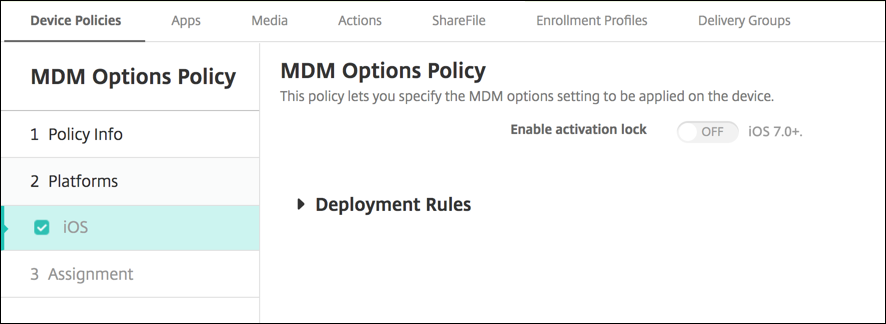
- アクティベーションロックを有効にする: このポリシーを展開するデバイスでアクティベーションロックを有効にするかどうかを選択します。デフォルトは[オフ]です。
MDMオプションデバイスポリシーを展開してアクティベーションロックを有効にした後、[管理] > [デバイス]ページでそれらのデバイスを選択し、[セキュリティ]をクリックすると、セキュリティアクション[アクティベーションロックバイパス]が表示されます。アクティベーションロックバイパスを使用すると、デバイスユーザーのApple IDとパスワードを知らなくても、デバイスのアクティベーション前に監視対象デバイスからアクティベーションロックを削除できます。完全ワイプの前または後に、デバイスにアクティベーションロックバイパスを送信できます。詳細については、iOSアクティベーションロックのバイパスを参照してください。
共有
共有
この記事の概要
This Preview product documentation is Citrix Confidential.
You agree to hold this documentation confidential pursuant to the terms of your Citrix Beta/Tech Preview Agreement.
The development, release and timing of any features or functionality described in the Preview documentation remains at our sole discretion and are subject to change without notice or consultation.
The documentation is for informational purposes only and is not a commitment, promise or legal obligation to deliver any material, code or functionality and should not be relied upon in making Citrix product purchase decisions.
If you do not agree, select I DO NOT AGREE to exit.