Layering
This document provides an overview of layering and the different layer types involved.
Layers
The App Layering architecture lets you manage just one copy of your Windows OS and apps, regardless of your hypervisor. You can maintain one set of apps for two environments. For example, you can deploy an OS and its app layers in an on-premises hypervisor and in a cloud-based hypervisor. The same layers run on each.
You can create layers for your operating system, platform tools, and applications. To preserve users’ settings and data, enable user layers on your image templates.
OS layer
The OS layer includes your operating system and hypervisor software and settings. It is an essential building block for all other layers that you create. You only need one OS layer for a specific Windows OS. For example, if you support both a Windows desktop OS and a Windows Server OS, create one OS layer for each. Layered images can only contain app and platform layers that were built using the OS layer selected for the image.
When you add an update to one of the OS layers, the platform and app layers built with that OS continue to run on it.
Platform layer
The platform layer includes the provisioning software and connection broker tools. The platform layer ensures that your OS and app layers run flawlessly in a specific on-premises or cloud environment. You can reuse your OS and App layers, and select a different platform layer for each hypervisor or Provisioning Service.
App layers
App layers include the software for each of your applications. Many App layers can be combined and deployed in different layered images. They also can be assigned to users, groups, or machines and deployed as Elastic layers. Layered images are used to provision users’ systems, while Elastic layers are delivered when the user logs in.
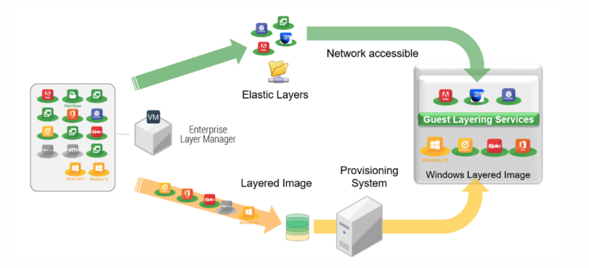
Elastic layers
Elastic layers are app layers that are assigned to users, groups, or machines for delivery on demand rather than being built into a layered image. Assignment of elastic layers can be done through the App Layering management console or the Studio App Packages node. See Elastic layers for more details.
User layers
User layers enable persistence on non-persistent machines by storing a user’s settings, files, and installed apps. The layer is created at first login to a machine running a layered image with user layers enabled, and is reapplied whenever the user logs into any machine with user layers enabled. This delivers a consistent, personalized desktop experience while supporting image updates, machine pools, and on-demand provisioning.
User layers are only compatible with single session, non-persistent machines.