
Custom announcements
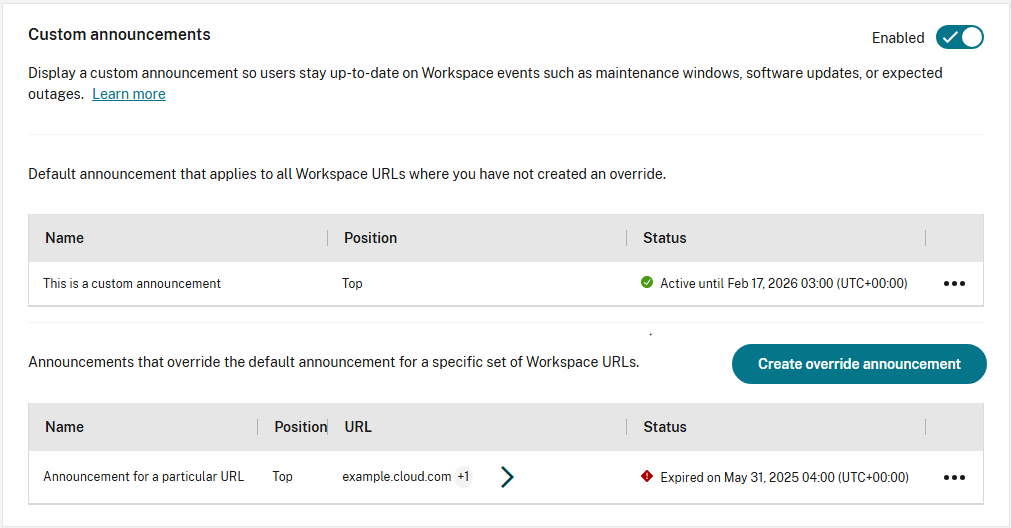
You can send a custom announcement to your users during a given time period, for instance to inform them of an upcoming maintenance window. You can configure a default announcement along with an override for each store. Only a single announcement can be configured per store.
-
From the Citrix Cloud menu, choose StoreFront Cloud.
-
From the Customize menu, choose Preferences.
-
Go to the Custom announcements section.
Create announcement
-
To add an announcement that applies to stores where there is no active override, select Create default announcement. To add an announcement for a specific store, select Create override announcement.
-
If you added an override announcement, choose which stores it applies to. This is not applicable to the default announcement.
-
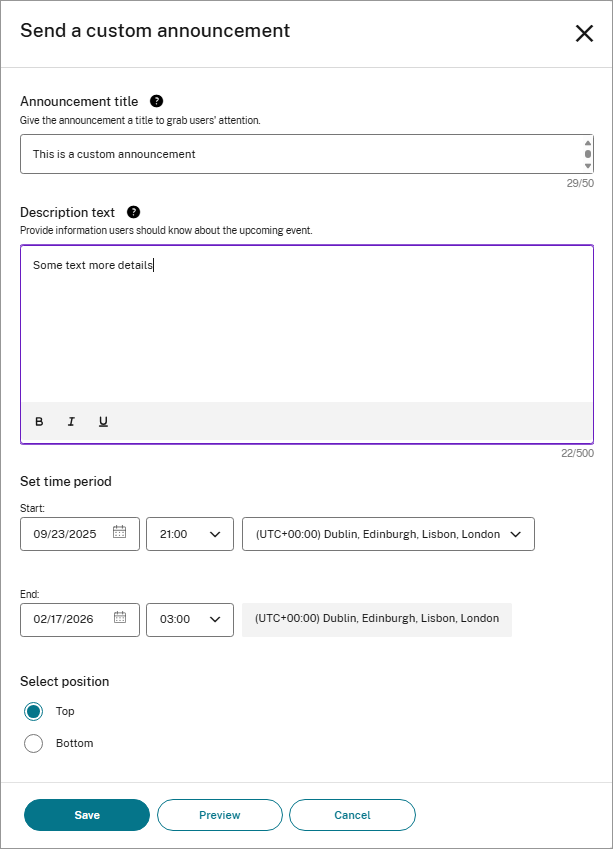
Enter the Announcement title.
-
Enter the Description text.
-
Enter the time period during which the announcement should appear.
-
Choose whether to place the announcement at the top or bottom.
-
To view how your message appears to users, select Preview.
-
When you're finished, select Save.
Delete announcement
-
In the row containing the announcement, select ... to open the menu then select Delete.
-
In the confirmation window, select Delete.
Edit announcement
-
In the row containing the announcement, select ... to open the menu then select Edit.
-
Make changes as required.
-
Select Save.