Citrix web extension
Citrix web extension establishes a secure and reliable connection between the store website and the locally installed Citrix Workspace app. It streamlines the opening of apps and desktops from the web client to the native app, which uses HDX™ protocol. When you access the web client and open any apps or desktops after installing this extension on your browser, the extension opens the app or desktop from your native Citrix Workspace app.
The web extension offers various benefits such as seamless opening of desktop and apps, service continuity, supports App Protection service etc. For more information on the benefits of the web extension, see Benefits of Citrix web extension. To find out what’s new, see What’s new
Note:
Users need to have the Citrix Workspace app client natively installed on their device for this extension to work. To download Citrix Workspace app, visit the Citrix Downloads page.
Supported Browsers
| Browser name | Operating systems | Browser Version |
|---|---|---|
| Google Chrome | Windows, macOS, Linux | Latest |
| Microsoft Edge | Windows, macOS, Linux * | Latest |
| Safari | macOS | Latest |
* Citrix Web Extension only works with Microsoft Edge if Google Chrome is also installed on the device. A future release might address this.
Important:
On Linux, install the browser before you install Citrix Workspace app. If you install the browser after installing Citrix Workspace app, Citrix Web extension does not detect Citrix Workspace app. To resolve this, reinstall Citrix Workspace app.
Supported versions of StoreFront™
The extension is available for both cloud and on-premises stores.
Citrix web extension is always available for use with Citrix® StoreFront Cloud without requiring any additional configuration.
To use the Citrix web extension with StoreFront, StoreFront 2203 CU2 or higher is required.
- For StoreFront versions earlier than 2402, Citrix web extension is disabled by default and you must enable it manually.
- For StoreFront version 2402, Citrix web extensions is enabled by default for new deployments but you must manually enable it when upgrading from a previous version.
- For StoreFront 2407 and later, Citrix web extension is enabled by default and hence you don’t need to do any configuration.
For more information about enabling use of Citrix web extensions in StoreFront, see Citrix web extensions on StoreFront.
Benefits of Citrix web extension
The web extension enhances the reliability and security of hybrid deployments. It comes with the following built-in features.
Seamless opening of desktops and apps
Normally, the store website uses Citrix Workspace launcher to detect the locally installed Citrix Workspace app and launch virtual apps and desktops. However, each time the website invokes Citrix Workspace launcher, the browser displays a pop-up asking for permission, unless the user chooses the option to always always allow permission. The web extension allows the web client to seamlessly open desktops and apps with no browser pop-ups.
More reliable launches for StoreFront GSLB deployments
When using multiple StoreFront deployments behind a Global Server Load Balancer (GSLB), the responses might be directed to the wrong server, leading to failures in opening apps and desktops. This can be mitigated through GSLB configuration but it is complex to configure. Citrix web extension allows for reliable client detection and opening of apps and desktops with no special configuration for GSLB deployments.
Service Continuity for store
If a user is unable to sign in to their store, Service Continuity enables them to open their resources in offline mode. For more information, see Service Continuity.
When accessing the store web client, users must install Citrix web extension to enable service continuity. During the initial sign in, the extension stores connection leases. Subsequently, if sign-in fails after 60 seconds, the web extension displays a prompt to use Offline Mode.
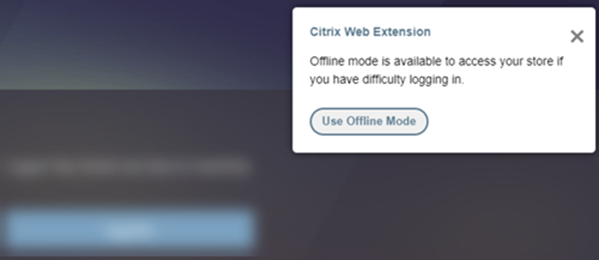
Users can continue their work without losing their data, enhancing work productivity. Once connectivity is restored, users can click Reconnect to store to switch to online mode.
Note:
This functionality applies only when using Citrix® StoreFront Cloud, not on-premises StoreFront.
This new offline mode prompt is applicable only to Chrome and Edge browsers. For Safari browser, the old prompt remains unchanged.
App Protection for store
Citrix® StoreFront Cloud can be configured so that the web extension is required for users to view and open apps that have App Protection enabled. This feature prevents unauthorized access to sensitive information from apps by protecting users from keylogging, screen capturing, and other security threats.
For more information, see Show or hide resources requiring App Protection.
Install Citrix web extension
For more information on the installation of the web extension, see Install Citrix web extension.