This content has been machine translated dynamically.
Dieser Inhalt ist eine maschinelle Übersetzung, die dynamisch erstellt wurde. (Haftungsausschluss)
Cet article a été traduit automatiquement de manière dynamique. (Clause de non responsabilité)
Este artículo lo ha traducido una máquina de forma dinámica. (Aviso legal)
此内容已经过机器动态翻译。 放弃
このコンテンツは動的に機械翻訳されています。免責事項
이 콘텐츠는 동적으로 기계 번역되었습니다. 책임 부인
Este texto foi traduzido automaticamente. (Aviso legal)
Questo contenuto è stato tradotto dinamicamente con traduzione automatica.(Esclusione di responsabilità))
This article has been machine translated.
Dieser Artikel wurde maschinell übersetzt. (Haftungsausschluss)
Ce article a été traduit automatiquement. (Clause de non responsabilité)
Este artículo ha sido traducido automáticamente. (Aviso legal)
この記事は機械翻訳されています.免責事項
이 기사는 기계 번역되었습니다.책임 부인
Este artigo foi traduzido automaticamente.(Aviso legal)
这篇文章已经过机器翻译.放弃
Questo articolo è stato tradotto automaticamente.(Esclusione di responsabilità))
Translation failed!
Persistent User Configurations
This guide describes the Persistent Home feature in UniconOS. When enabled, user-specific configuration data is retained across logoff/logon cycles and device reboots.
By default, Persistent Home is disabled.
Overview
When persistent home is enabled, your personal settings will be saved and selected user configurations remain available across:
- User sign-out and subsequent sign-in
- Device restarts
Persistence is controlled explicitly via configuration (see Configuration).
Supported Applications and Data
Google Chrome
- Persisted data:
- User profiles
- Appearance settings (themes, fonts, color schemes)
- other browser preferences
- Behavior:
- Settings persist across sessions
- Depending on backend configuration, settings may follow the user across devices
Firefox
- Persisted data:
- Appearance settings (fonts, color schemes
- Download location/path
- other browser preferences
- Important:
- See Limitations regarding full profile file support.
ICA (Citrix Workspace App)
- Persisted data:
- User-specific ICA settings (for example, session-related preferences)
- Continuity behavior:
- Enables improved session continuity during temporary disruptions in the Citrix Delivery infrastructure.
GNOME Keyring (credentials/secrets)
This option is typically used in combination with browser or ICA persistence.
- Persisted data:
- Stored credentials
- Application secrets used by supported applications
Audio
- Persisted data:
- Each user’s list of USB audio devices remembered with Remember device. The list is per user and stays on the device — it does not follow the user to another device.
- Requires UniconOS 2609 or later. Earlier versions ignore this option.
- Requires user authentication. When User authentication is set to None, remembered devices last only for the current session, even with Audio selected.
- UniconOS offers Remember device only while Inform user on changes (device configuration, Hardware > USB Settings) is on. When it’s off, no notification appears for USB audio devices, so users can’t remember one.
Scout Board also offers Microsoft Edge as a persistable application, in addition to the applications described above.
Configuration
Persistent Home can be configured either locally or centrally.
- Local file:
/setup/terminal.ini - Central management: Configurable via device profile in Scout
Configuration Parameter
- Use
PersistentHomeApplicationsto select which items persist. - Allowed values:
google-chromefirefoxicagnome-keyringaudioALL
Behavior
- Multiple values can be combined as required, separated by commas, for example
google-chrome,audio. - ALL enables persistence for all supported applications available in the environment, including Audio.
- gnome-keyring can be combined with:
- google-chrome
- ica
- or both
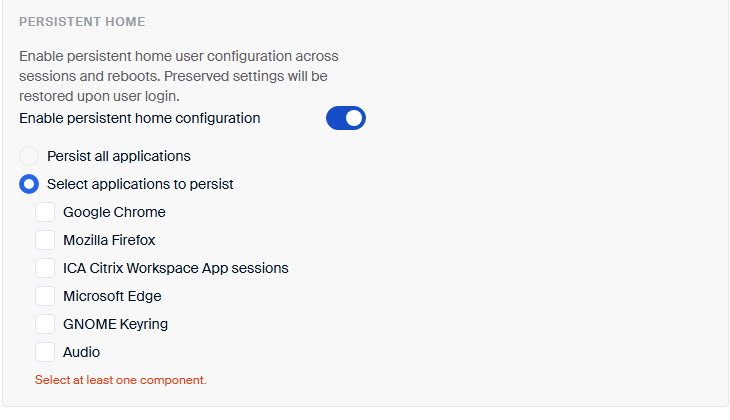
Scout Board route (from UniconOS Management 2609): go to Devices > Device management > Device configuration (base configuration, an OU or a device) > Persistent home > Enable persistent home configuration > Select applications to persist, then select Audio (or any other application). Persist all applications includes Audio. The same control is available in Configuration labels. This is Scout Board only — the legacy Scout Console has no Persistent home settings.
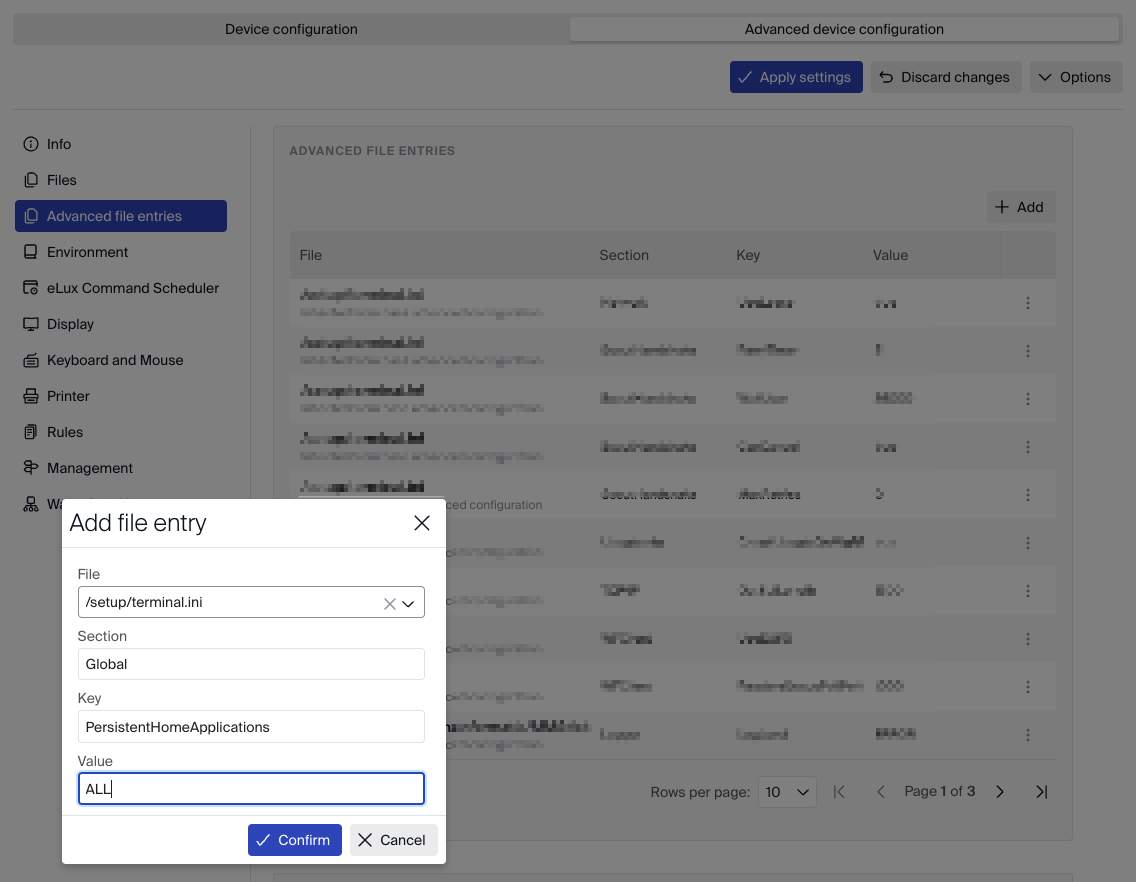
An advanced file entry for PersistentHomeApplications overrides the Persistent home section.
Add audio to that entry too, or remove the entry so the Scout Board setting takes effect.
Limitations
- Firefox:
- Customized settings persist
- Full profile file persistence is not supported in this release
- Persistence behavior may vary depending on:
- Organizational security policies
- Infrastructure configuration
- Central management settings
- A factory reset deletes all Persistent Home data, including every user’s remembered audio devices, whether it is started on the device or sent from Scout Board (Reset configuration). Retain local configuration does not keep this data. Moving a device to another OU also deletes its Persistent Home data.
Administrators should validate persistence behavior in their specific deployment scenario.
Share
Share
In this article
This Preview product documentation is Citrix Confidential.
You agree to hold this documentation confidential pursuant to the terms of your Citrix Beta/Tech Preview Agreement.
The development, release and timing of any features or functionality described in the Preview documentation remains at our sole discretion and are subject to change without notice or consultation.
The documentation is for informational purposes only and is not a commitment, promise or legal obligation to deliver any material, code or functionality and should not be relied upon in making Citrix product purchase decisions.
If you do not agree, select I DO NOT AGREE to exit.