This content has been machine translated dynamically.
Dieser Inhalt ist eine maschinelle Übersetzung, die dynamisch erstellt wurde. (Haftungsausschluss)
Cet article a été traduit automatiquement de manière dynamique. (Clause de non responsabilité)
Este artículo lo ha traducido una máquina de forma dinámica. (Aviso legal)
此内容已经过机器动态翻译。 放弃
このコンテンツは動的に機械翻訳されています。免責事項
이 콘텐츠는 동적으로 기계 번역되었습니다. 책임 부인
Este texto foi traduzido automaticamente. (Aviso legal)
Questo contenuto è stato tradotto dinamicamente con traduzione automatica.(Esclusione di responsabilità))
This article has been machine translated.
Dieser Artikel wurde maschinell übersetzt. (Haftungsausschluss)
Ce article a été traduit automatiquement. (Clause de non responsabilité)
Este artículo ha sido traducido automáticamente. (Aviso legal)
この記事は機械翻訳されています.免責事項
이 기사는 기계 번역되었습니다.책임 부인
Este artigo foi traduzido automaticamente.(Aviso legal)
这篇文章已经过机器翻译.放弃
Questo articolo è stato tradotto automaticamente.(Esclusione di responsabilità))
Translation failed!
特集アプリグループ
注:
この機能は、統合エクスペリエンスを使用している場合にのみ利用できます。
特定のカテゴリに関連する、または適合する製品の特集アプリグループをエンドユーザー向けに作成できます。たとえば、営業部門で使用されるアプリケーションを含む営業部門の特集アプリグループを作成できます。StoreFront管理コンソールでは、アプリケーション名を使用するか、Studioコンソールで定義されたキーワードまたはアプリケーションカテゴリを使用して、特集アプリを定義できます。
特集アプリグループの作成
-
ストアWebサイトの編集画面で、[特集アプリグループ] タブを選択します。
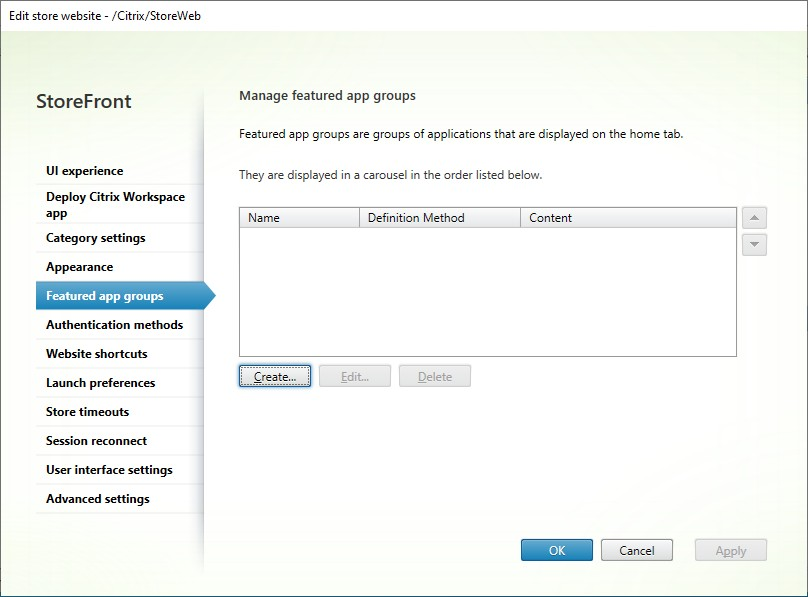
- [作成] をクリックして、新しい特集アプリグループを定義します。
-
特集アプリグループ名、説明(オプション)、背景、および特集アプリグループを定義する方法を指定します。キーワード、アプリケーション名、またはアプリケーションカテゴリを選択できます。
オプション 説明 キーワード キーワードに基づいてアプリを照合します。Studioで、アプリの説明にキーワードを含めることで定義されます。例: “Use to send and receive emails KEYWORDS:collaboration” アプリケーションカテゴリ Studioで入力された特定のアプリケーションカテゴリ内のアプリを照合します。 アプリケーション名 アプリケーション名を使用して特集アプリグループを定義します。ここで [特集アプリグループの作成] ダイアログ画面に含まれる名前に一致するすべてのアプリケーション名が、特集アプリグループに含まれます。StoreFrontはアプリケーション名でのワイルドカードをサポートしていません。照合では大文字と小文字は区別されませんが、完全な単語が照合されます。たとえば、「Excel」と入力すると、StoreFrontは「Microsoft Excel 2013」という公開済みアプリを照合しますが、「 Exc」と入力しても何も照合されません。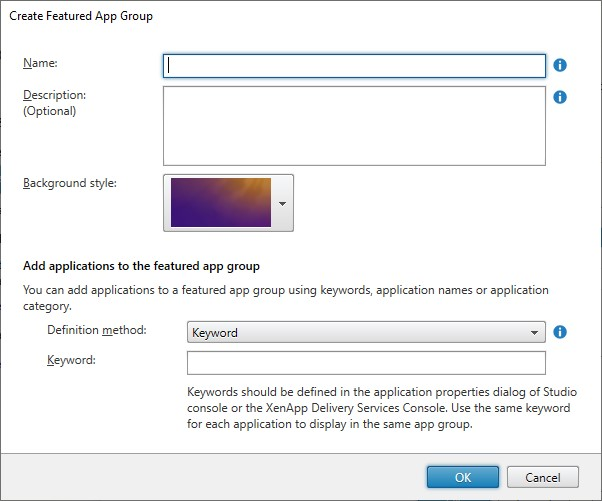
- [OK] をクリックします。
例:
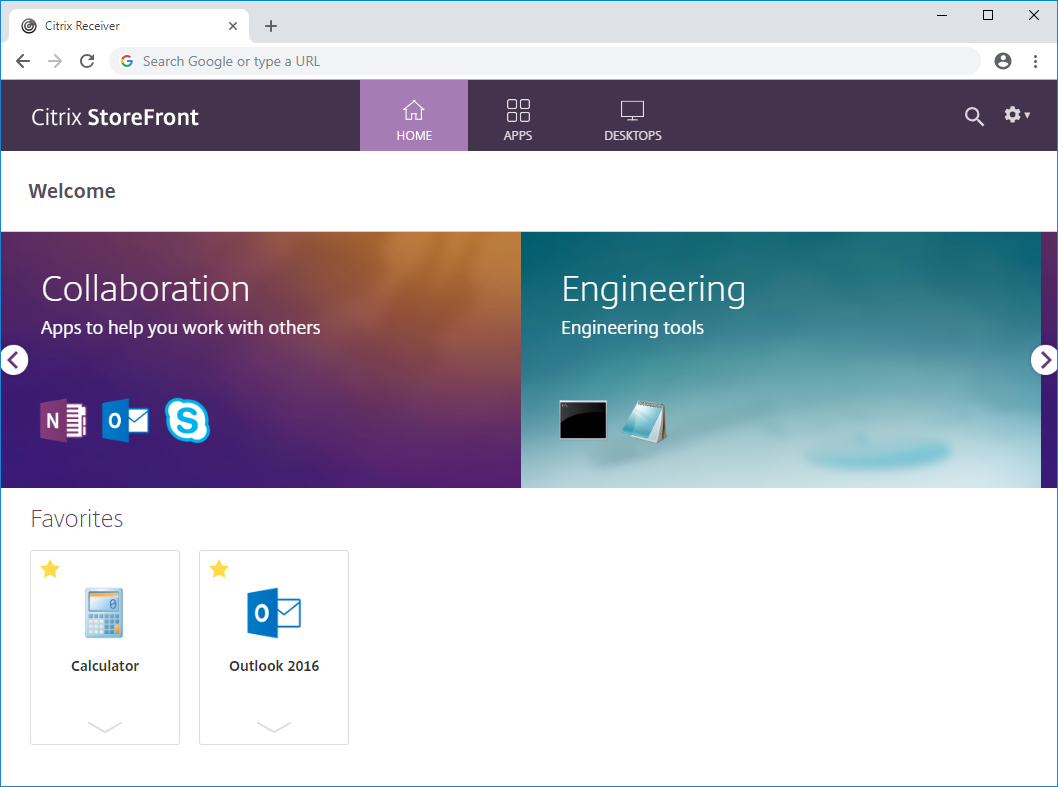
2つの特集アプリグループを作成しました。
- コラボレーション - Studioの[コラボレーション] カテゴリ内のアプリを照合して作成されました。
- エンジニアリング - アプリグループに名前を付け、アプリ名のコレクションを指定して作成されました。
PowerShellを使用した特集アプリグループの作成
PowerShellを使用して特集アプリグループを追加するには、コマンドレット New-STFWebReceiverFeaturedAppGroup を実行します。
特集アプリグループの編集
ストアWebサイトの編集画面で、[特集アプリグループ] タブを選択します。編集するグループを選択し、[編集…] をクリックします。
PowerShellを使用した特集アプリグループの編集
PowerShellを使用して特集アプリグループを変更するには、コマンドレット Set-STFWebReceiverFeaturedAppGroup を実行します。
特集アプリグループの削除
ストアWebサイトの編集画面で、[特集アプリグループ] タブを選択します。編集するグループを選択し、[削除…] をクリックします。
PowerShellを使用した特集アプリグループの削除
PowerShellを使用して特集アプリグループを削除するには、コマンドレット Remove-STFWebReceiverFeaturedAppGroup を使用し、すべての特集アプリグループを削除するには、コマンドレット Clear-STFWebReceiverFeaturedAppGroup を使用します。
共有
共有
This Preview product documentation is Citrix Confidential.
You agree to hold this documentation confidential pursuant to the terms of your Citrix Beta/Tech Preview Agreement.
The development, release and timing of any features or functionality described in the Preview documentation remains at our sole discretion and are subject to change without notice or consultation.
The documentation is for informational purposes only and is not a commitment, promise or legal obligation to deliver any material, code or functionality and should not be relied upon in making Citrix product purchase decisions.
If you do not agree, select I DO NOT AGREE to exit.