
Tasks in Task Center
Task Center provides a centralized view of scheduled and recurring tasks in Citrix Virtual Apps and Desktops™. You can track task status in real time and manage tasks from a single location in Studio.
Note:
In this release, Task Center supports Machine Creation Services (MCS) tasks. Support for additional task types will be introduced in future releases.
Access Task Center
-
Open the Studio console.
-
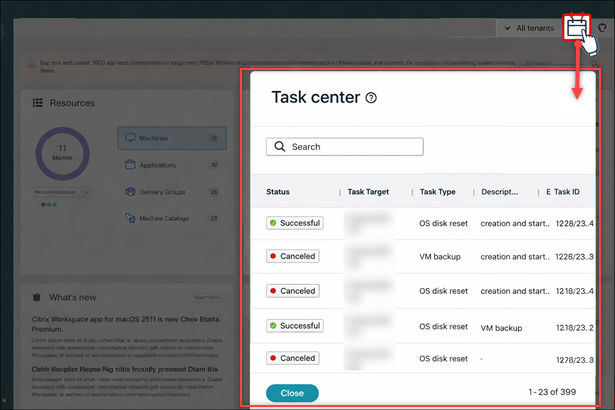
In the upper-right corner, select the Calendar icon.The Task Center panel opens, displaying task activity.
View and manage tasks
In Task Center, you can:
-
Search and filter tasks using the search bar.
-
Track real-time task status.
-
Perform actions on tasks, such as cancel or rerun.
Each task entry displays the following details:
| Field | Description |
|---|---|
| Status | Current state of the task: Successful, Canceled, In progress, or Failed |
| Task Target | Resource the task applies to |
| Task Type | Type of operation (for example, OS disk reset, VM backup) |
| Description | Summary of the operation |
| Task ID | Unique identifier for tracking |