
What's new
What's new in 2303
This release includes the following new features and addresses issues to improve the user experience:
Compressed recording
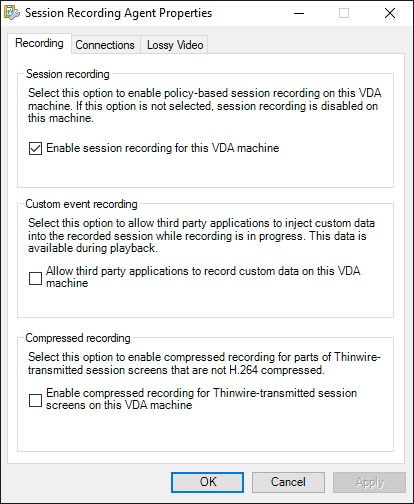
You can enable compressed recording for parts of Thinwire-transmitted session screens that are not H.264 compressed. This feature reduces recording file size significantly. To enable this feature, go to the Recording tab of Session Recording Agent Properties and select the check box in the Compressed recording section.
Note:
-
This feature is disabled by default.
-
The minimum version required for the VDA is 2303.
For more information, see Enable or disable recording.
Image resolution scaling for lossy video codec
Lossy video codec lets you adjust compression options to reduce the size of recording files and to accelerate navigation through recorded sessions during playback. This release adds a compression option, image resolution scaling, to the lossy video codec feature. Image resolution scaling lets you downscale the resolution of recorded screens.
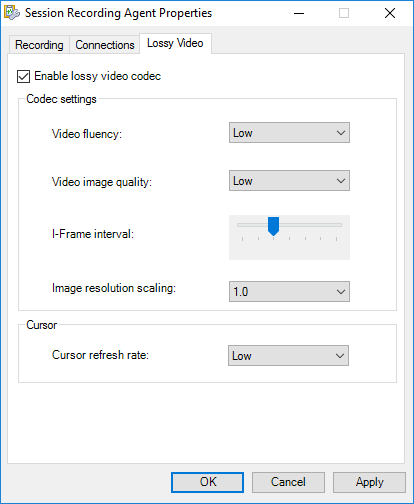
For more information, see Enable or disable lossy video codec.
Enhanced notification for event response actions
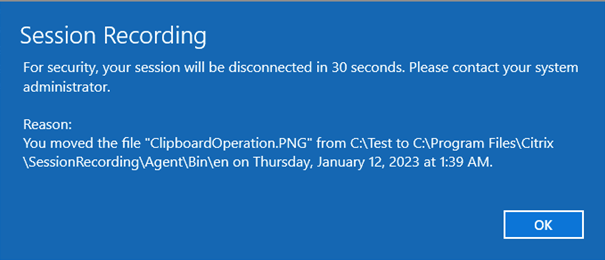
Starting with Session Recording 2206, you can disconnect, log off, or lock users from their virtual sessions when a specific event is detected. You can also notify users of the actions by setting the time interval between a notice and its execution. This release enhances the notification feature by giving users a clearer understanding of the reason behind the actions. For an example notice, see the following screen capture:
For more information, see Create a custom event response policy.
Google Analytics disabled for EU customers by default
Google Analytics is now disabled for EU customers by default. For more information, see CEIP and Google Analytics.
More optional parameters for ICLDB commands
This release introduces the RELOCATE parameter to the IMPORT command and the FILTER parameter to the ARCHIVE and REMOVE commands of the ICLDB utility.
-
The RELOCATE parameter for ICLDB IMPORTYou can move session recording files to different storage paths for load balancing or other purposes. To ensure that the files can still be played, you must update their new paths to the Session Recording database. To do so, use the ICLDB IMPORT command. To accelerate the import process, append the RELOCATE parameter to the ICLDB IMPORT command.Without the RELOCATE parameter, the ICLDB IMPORT command parses session recording files in their entirety, which takes time. With the RELOCATE parameter, the ICLDB IMPORT command simply locates the database records of session recording files and updates their file paths directly.
-
The FILTER parameter for ICLDB ARCHIVE and ICLDB REMOVEPreviously, only the RETENTION parameter was available for the ICLDB ARCHIVE and ICLDB REMOVE commands to specify target session recording files to manipulate. Starting with this release, you can add the FILTER parameter to manipulate session recording files that meet both RETENTION and FILTER. The FILTER parameter lets you filter file paths by using the
*and?wildcards.
For more information about the ICLDB utility, see Manage recordings.
What's new in earlier releases
For new features included in the releases that shipped after the 1912 LTSR through the 2212 CR, see What's new history.