
What's new in 2607 (initial release)
StoreFront 2607 LTSR includes the following new features and enhancements since StoreFront 2507 LTSR:
System requirements
StoreFront 2607 LTSR requires .NET 10. If it is not already installed then the installer automatically installs .NET 10.
For more information, see System requirements
Detailed desktop tile
When using the modern experience, you can enable display of a detailed desktop tile.
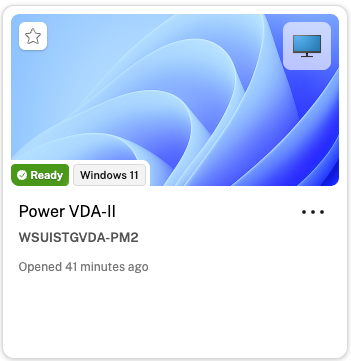
The tile contains the following information:
-
A thumbnail image, making it easier to identify and distinguish between multiple desktops at a glance.
-
The operating system running on the desktop.
-
The power status, which may include new states Under maintenance, Unavailable and Active.
-
When you last connected to the desktop. This provides users with a quick security reference — if they notice a connection they don't recognize, they can flag it to their IT team.
-
Active session duration if a session is currently running on this desktop.
This feature is disabled by default. To enable it, see detailed desktop tile.
Admin-Configurable Granular Power Actions for Persistent Desktops
Using PowerShell commands, administrators can now configure which power actions are shown to end users for persistent desktops. For more information, see power actions.
Launch failure troubleshooting
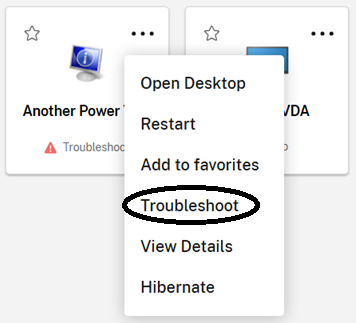
When a machine fails to launch, users can now quickly initiate a troubleshooting process directly from the UI. When an error occurs, the machine tile shows text Troubleshoot. Clicking the tile initiates the troubleshoot process. Also, the users can also select the Troubleshoot option from the three dots menu of the machine to initiate the process.
This feature is be available only for desktops and not for published apps and limited to certain types of launch failures.
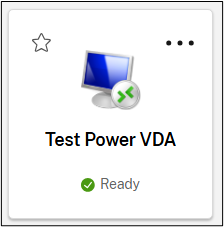
“Ready” power state
This release introduces a new power state called Ready to improve user launch expectations. The Ready state represents a machine that powers on and registers with the system. Machines in the Ready state launch faster than machines in Powered on or Powered off states.
New options in three dots menu
The three-dots menu on tiles for machines with active sessions now provides log off and disconnect options. These options function identically to the corresponding options in Activity Manager.
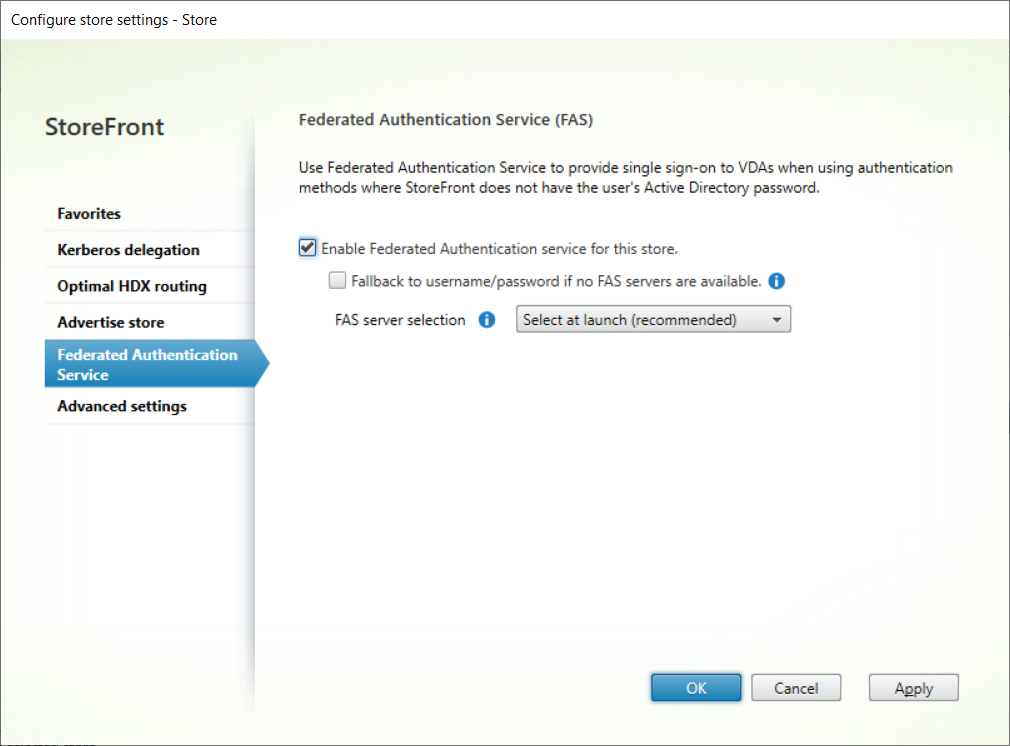
Configuration FAS in the StoreFront management console
This release enables you to view and modify Federated Authentication Service (FAS) settings for a store directly through the management console.
Support for users with Entra ID identities
Previously StoreFront required users to exist in Active Directory. With this release, if users authenticate using OIDC with Microsoft Entra ID at a Citrix Gateway, users with Entra ID can enumerate and launch Citrix DaaS resources that are assigned to their Entra ID identities. For users with hybrid identities, StoreFront also enumerates any resources that are assigned to their Active Directory identity.
-
Administrators can configure Entra settings using the StoreFront management console or PowerShell. For more information, see Entra ID using OIDC
-
StoreFront supports including Citrix Virtual Apps and Desktops sites for stores using Entra ID authentication via a NetScaler with OIDC. Users with hybrid identities can view resources from both DaaS and Citrix Virtual Apps and Desktops sites. Users with pure Entra ID identities can only view resources from DaaS sites.
It has the following limitations:
-
Users must authenticate via a Citrix Gateway rather than directly to StoreFront.
-
The Citrix Gateway must connect to Entra using OIDC rather than SAML. Users authenticating using SAML continue to be treated as having only Active Directory identities and cannot enumerate resources assigned to Entra ID identities.
-
When using multi-site aggregation, it is not possible to map users to sites using their Entra ID identity.
For more information, see Citrix Gateway Entra ID authentication via OIDC.
Entra ID single sign-on to VDAs
If users have authenticated using Entra ID then when they launch a resource hosted on an Entra joined VDA, they can single sign-on to Entra ID joined VDAs.
-
Administrators can configure Entra ID single sign-on to VDAs using the StoreFront management console or PowerShell.
-
StoreFront supports enabling Entra ID and FAS single sign-on on the same store. Depending on the delivery group's logon type, StoreFront instructs the client to use Entra ID or FAS based SSO.
-
StoreFront supports Entra ID single sign-on for resources managed by Citrix DaaS and by Citrix Virtual Apps and Desktops 2603 and above. Citrix Virtual Apps and Desktops VDAs must be hybrid joined.
This is only supported when authenticating via a Citrix Gateway, using a connection to Entra ID via OIDC rather than SAML.
For more information, see Single sign-on to VDAs.
Launch timing telemetry included in ICA file
ICA files now include timestamps of various stages of the launch process to assist with diagnosing launch performance issues. This is included in a section \[Session Launch Telemetry]. These timestamps are not included when ICA signing is enabled.
Support for Windows Server Core
You can install StoreFront on Windows Server Core, without the desktop experience. You must install StoreFront using the
-silent flag. The management console is not available so you must manage StoreFront using PowerShell.
Log improvements
This release improves the information logged in the diagnostics log for many common error conditions.
Command line install location change in behavior
When you initiate a command line install using the
INSTALLDIR parameter, previously this gave the StoreFront directory, defaulting to C:\Program Files\Citrix\Receiver StoreFront. With the new behavior, this gives the location of the Citrix directory, defaulting to C:\Program Files\Citrix. StoreFront is now always installed into a sub-directory called Receiver StoreFront. This brings StoreFront in line with other Citrix products and resolves an issue where specifying a root directory, for example D:\, caused uninstallation to fail.
Citrix Workspace app for HTML5 HDX Client
This release includes Citrix Workspace app for HTML5 HDX client 2603.10
Fixed issues
This release includes the following fixes since StoreFront 2507 LTSR:
-
Creating an anonymous store using PowerShell might fail with error "Add-STFStoreService : An error occurred creating the Store service Exception of type 'Citrix.DeliveryServices.Framework.Feature.Exceptions.FeatureClassNotFoundException'".
Fixes to the modern end user experience:
-
If allowRestart flag on the delivery group has been set to
false, users are able to restart or power off their machine using the tile menu or Activity Manager. With this change, users no longer see options to shut down, force shutdown, and restart option, which prevents users from restarting their machine.
Known issues
-
When using SAML authentication direct to StoreFront from Citrix Workspace app for iOS or Citrix Workspace app for Android, authentication fails with one of the following errors:
-
"You cannot have the \_ri parameter with any of the following: \_cx, \_id, \_cs, \_hf, \_rt or \_ps"
-
"For a browser, you must supply all of the following: \_cx, \_id, and \_cs, \_ps and \_hf are optional. For a native client \_rt must be supplied and \_ps is optional"
-