
Architecture Options
Backend Placement
Applies to: Splunk and alternative backends\.
The backend service required by uberAgent can be installed or consumed in any setup that is supported by the backend product vendor\. This includes:
-
On\-premises (physical or virtual machine)
-
Backend vendor cloud offering such as Splunk Cloud
-
Public cloud IaaS (virtual machine in a cloud such as AWS EC2, Azure VMs)
Endpoint to Backend Communication
Recommended: Direct
Applies to: Splunk and alternative backends\.
In this recommended configuration uberAgent talks directly to the backend servers\. This has the advantage that the overall footprint on the monitored endpoints is smaller compared to architecture options that require Splunk Universal Forwarder\.
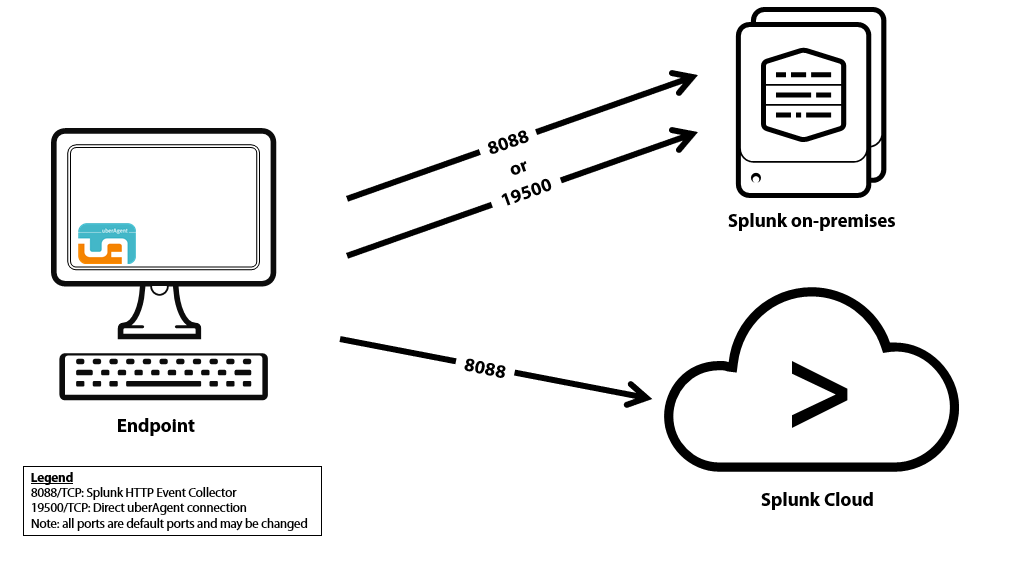
Configuration highlights
-
Communications: uberAgent® sends data directly from the endpoint to the backend servers
-
Splunk backends: on the indexers, either a TCP port is opened or HTTP Event Collector is configured
-
Alternative backends: uberAgent makes use of the backend's native REST API
Pros
-
Smallest footprint
-
Data can be transferred encrypted via HTTPS and authenticated with a REST token
Alternative: Via Splunk Universal Forwarder
Applies to: Splunk backends only\.
Note
Please note that with this configuration option, data is transmitted unencrypted over TCP from uberAgent to Splunks Universal Forwarder on the local machine\. Therefore, we recommend that you use the direct connection as described before, which enables encrypted and authenticated data transmission\.
Similar to Standalone mode, but uberAgent sends the data it collects to a locally installed Splunk Universal Forwarder\. If you have deployed Universal Forwarder on your monitored endpoints anyway you might want the forwarder to handle all Splunk communications\.
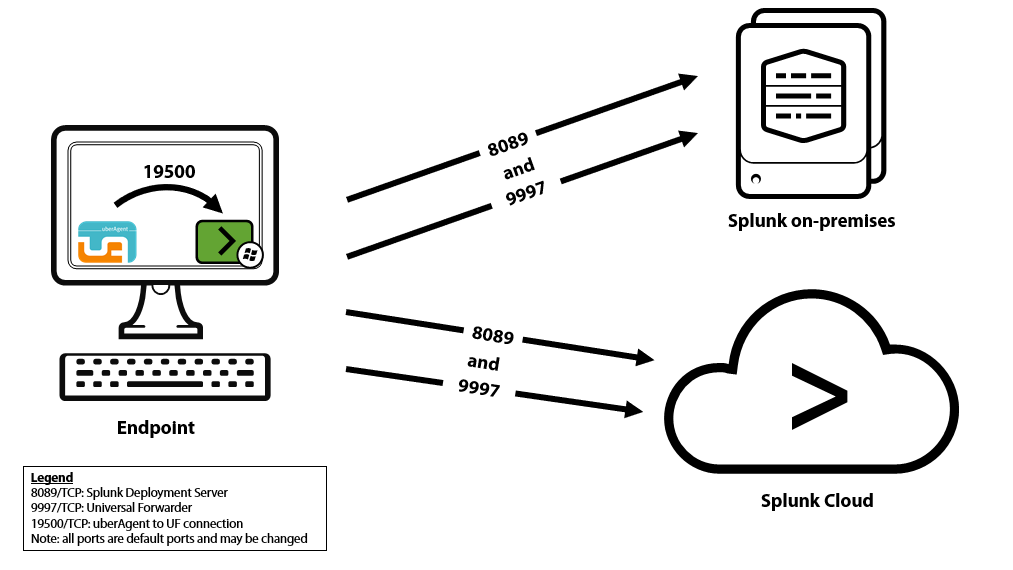
Configuration highlights
-
Communications: uberAgent sends data to the local forwarder's TCP port which in turn sends data to the Splunk indexers
-
Splunk Universal Forwarder: a TCP port is opened on each endpoint (for local access only)
Pros
-
All Splunk communications are handled by Splunk components
-
Additional data can be collected via Universal Forwarder (log files, Windows event logs, scripts)
-
Collected data can optionally be persisted to disk before sending off to Splunk
Cons
-
Larger footprint than the recommended architecture
-
On the local machine, data is sent unencrypted and unauthenticated over TCP