Configure allow list for the apps which use LD_PRELOAD functionalities
Note:
Configuring allow list using LD_PRELOAD functionality is only available for Citrix Workspace™ app for Linux.
App protection blocks the launch of a protected session if other apps running use LD_PRELOAD. If there are genuine apps or if approved by the admin, you can use the allow list feature. To permit the use of other apps which use LD_PRELOAD, you must configure the allow list.
App protection stops a protected session from starting if other apps using LD_PRELOAD are running. But if there are legitimate apps or if the admin approves, you can use the allow list feature. To allow these apps to run, you need to set up the allow list.
You can add apps with preload functionalities to the allow list using the following steps:
- Identify the process that is blocking the protected VDA/App session from starting.
- Create a configuration file for the allow list and add the identified process.
Identify the process preventing protected VDA launch
When AppProtection prevents the launch of a protected VDA due to LD_PRELOAD usage, verify processes using LD_PRELOAD. Genuine processes can be added to the allow list.
To identify processes using LD_PRELOAD, use the following script. Save it with a .sh extension and run it as sudo in a terminal window:
#!/bin/bash

declare -A map

append_kv() {
  local key="$1"
  local val="$2"
  local sep="$3"

  if [[ -v "map[$key]" && -n "${map[$key]}" ]]; then
    map["$key"]+="$sep$val"
  else
    map["$key"]="$val"
  fi
}

escape_json_string() {
    local str="$1"
    # Escape backslashes first, then quotes, then other control characters
    str="${str//\\/\\\\}"     # \ → \\
    str="${str//\"/\\\"}"     # " → \"
    str="${str//$'\t'/\\t}"   # tab → \t
    str="${str//$'\n'/\\n}"   # newline → \n
    str="${str//$'\r'/\\r}"   # carriage return → \r
    printf '%s' "$str"
}

print_procs_JSON() {
    printf "{\n"
    first=true
    for key in "${!map[@]}"; do
        if [ "$first" = true ]; then
            first=false
        else
            printf ",\n"
        fi
        printf "  \"%s\": \"%s\"" "$(escape_json_string "$key")" "$(escape_json_string "${map[$key]}")"
    done
    printf "\n}\n"
}

validate_json() {
    local json="$1"

    if command -v jq >/dev/null 2>&1; then
        printf '%s' "$json" | jq -e . >/dev/null 2>&1
        return $?
    fi

    if command -v python3 >/dev/null 2>&1; then
        printf '%s' "$json" | python3 -c 'import json, sys; json.load(sys.stdin)' >/dev/null 2>&1
        return $?
    fi

    # No validator available on PATH.
    return 2
}

for pid in /proc/*/; do
    pid=${pid%*/}
    pid=${pid##*/}

    # Only numeric /proc entries are process IDs.
    [[ "$pid" =~ ^[0-9]+$ ]] || continue

    environ_file="/proc/$pid/environ"
    cmdline_file="/proc/$pid/cmdline"

    if [[ ! -r "$environ_file" || ! -r "$cmdline_file" ]]; then
        continue
    fi

    # Check if the process has the LD_PRELOAD environment variable set
    ld_preload=$(cat "$environ_file" 2>/dev/null | tr '\0' '\n' | grep '^LD_PRELOAD=' | cut -d '=' -f 2-)
    if [ -n "$ld_preload" ]; then
        # Keep only argv[0] (the executable path/name) from cmdline.
        cmdline=$(cat "$cmdline_file" 2>/dev/null | tr '\0' '\n' | head -n 1)
        [ -n "$cmdline" ] || continue
        # Output the LD_PRELOAD value and the process cmdline in JSON format
        append_kv "LD_PRELOAD=$ld_preload" "$cmdline" "|"
    fi
done

# Generate and validate JSON output before printing.

json_output="$(print_procs_JSON)"

if ! validate_json "$json_output"; then
    status=$?
    if [ "$status" -eq 2 ]; then
        echo "Warning: could not validate JSON (no jq/python3 found)." >&2
        printf '%s\n' "$json_output"
        exit 0
    fi

    echo "Error: generated invalid JSON output." >&2
    exit 1
fi

printf '%s\n' "$json_output"
<!--NeedCopy-->
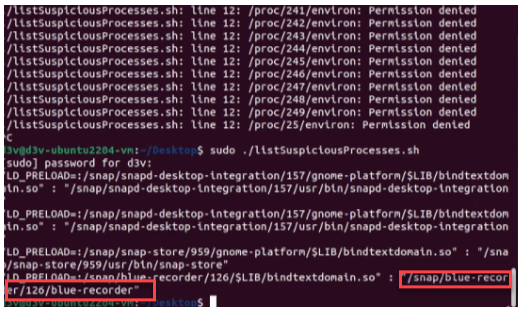
Based on the output of the preceding script, identify the processes that are causing the protected VDA launch to fail and add those processes to the allow list.
Here is a sample image displaying the output with a list of apps with a preload list.
Creating the allow list configuration file
The process allow list configuration file isn’t installed by default for security reasons. You need to create this configuration file the first time it’s needed.
- Create an empty file named AppProtection_Preload_Allowlist.json in the “$ICAROOT/config/” folder.
-
Add the process details in the following format. The second entry describes how to manage multiple processes that use the same library in LD_PRELOAD.
    {
        "LD_PRELOAD_PATH1" : "PROCESS_PATH1",
        "LD_PRELOAD_PATH2" : "PROCESS_PATH2|PROCESS_PATH3"
    }
<!--NeedCopy-->
Here is a sample image displaying the newly added configuration:

- Save the file and then set the permissions to the AppProtection_Preload_Allowlist.json file using the following command.
sudo chmod 644 $ICAROOT/config/AppProtection_Preload_Allowlist.json
Note:
Minimal regex expressions are allowed in configuration entries to prevent redundancy. Special regex characters must be checked and escaped with a double backslash (\).
- For example, consider that the script output is as follows:
LD_PRELOAD=:/snap/firmware-updater/226/gnome-platform/\\$LIB/bindtextdomain\\.so": "/snap/firmware-updater/226/bin/firmware-notifier
- To use variable elements like the number 126, regex expressions can be used for a more generic allow list entry:
LD_PRELOAD=:/snap/firmware-updater/\\d+/gnome-platform/\\$LIB/bindtextdomain\\.so": "/snap/firmware-updater/226/bin/firmware-notifier
- You can see that the output includes ‘.’, ‘$’ which are special characters in regex patterns, and have been escaped:
LD_PRELOAD=:/snap/firmware-updater/226/gnome-platform/\\$LIB/bindtextdomain\\.so": "/snap/firmware-updater/226/bin/firmware-notifier
- If there are other special characters like
"(quotation mark) or^(caret), escape them in the same way.