App Protection events to Director and Monitor
Introduction
Citrix Workspace app (CWA) for Windows introduces built-in security checks that automatically detect high-risk conditions on endpoints—such as Microsoft Recall—without requiring manual configuration. These detections provide real-time visibility by reporting events to Citrix Director and Monitor, enabling administrators to quickly assess risk and apply protective measures like App Protection policies.
While detection for select events (for example, Microsoft Recall) is automatic, protection from these events requires manual configuration of App Protection policies by the administrator.
By utilizing proactive risk management and policy reconfiguration, administrators can strengthen endpoint security in their environment and reduce exposure to emerging threats. This proactive approach furthers the Citrix® commitment to secure application delivery by helping organizations identify and respond to threats in real time.
Note:
Citrix Workspace app collects telemetry data about user and device usage through the product for license entitlement enforcement as well as to operate, manage, measure and improve the software, including the following:
- Device ID
- User name
- Timestamp
- IP address
Prerequisites
- Citrix Virtual Delivery Agent: VDA version 2507 or later.
- Citrix Director: Citrix Virtual Apps and Desktops 2603 or later.
- Citrix Monitor: DDC version 128 or later.
-
Citrix Workspace app (CWA) for Windows: Version 2603 or later is required on the endpoint.
- For protection events, the administrator must configure the relevant App Protection policies (for example, Anti-screen capture, Anti-DLL injection) through Citrix policy.
Event Types
Microsoft Recall Detection
Windows Recall is an AI agent running on the endpoint that continuously captures and stores snapshots of the user’s screen content locally for analysis. These snapshots can include sensitive information such as:
- Corporate credentials entered during sign-in.
- Confidential application data displayed in virtual desktops or published apps.
- Proprietary documents and intellectual property visible during a session.
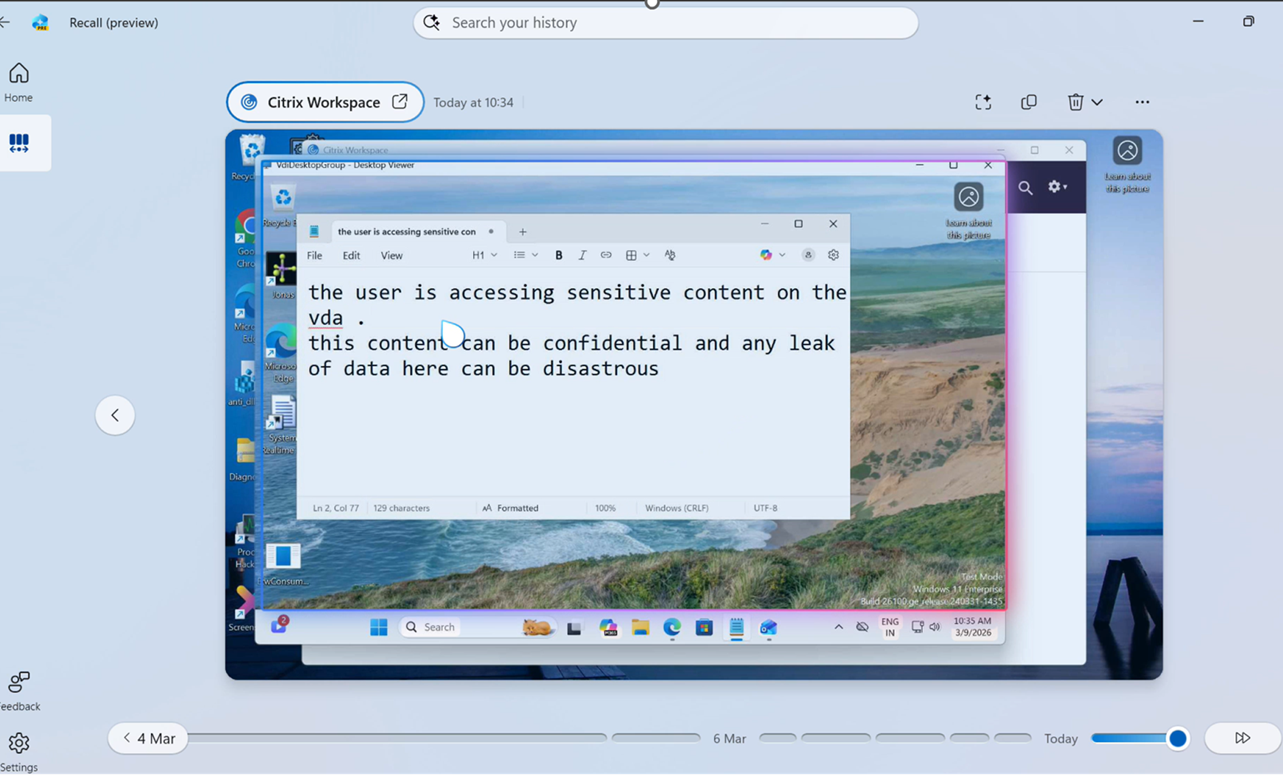
If exploited, this feature could allow attackers or unauthorized users to retrieve sensitive data from the device, even after the session ends.
When is this event sent?
During session launch, CWA automatically detects whether Windows Recall is active on the endpoint.
- Detection Event: Sent if Recall is detected and the session does not have the Anti-screen capture policy enabled.
- Protection Event: Sent if Recall is detected and the session has the Anti-screen capture policy enabled.
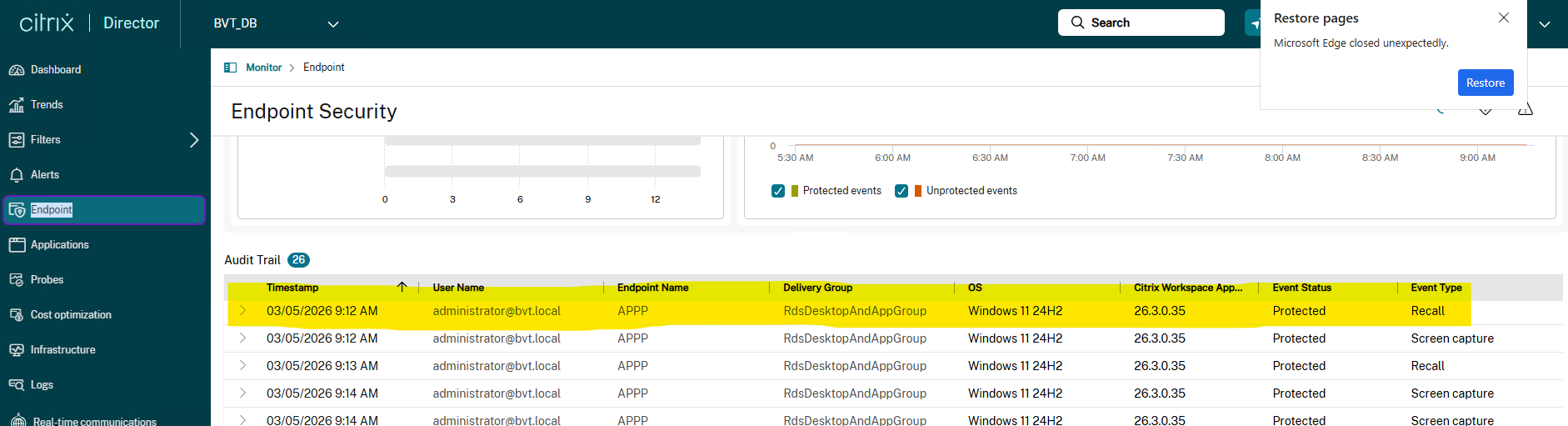
Event-Specific Data
This event uses only the common fields; it includes no additional fields beyond resourceType and resourceName.
Screen Capture Detection
A screen capture event is raised when a user or tool attempts to take a screenshot of the endpoint desktop. If the App Protection Anti-screen capture policy is enabled, the content of the session is blacked out for the capture tool. The tool can still capture the desktop region outside the session, but the session content itself is obscured.
When is this event sent?
A screenCaptureEvent is sent when CWA detects a screen capture tool actively attempting to capture the screen while a session with Anti-screen capture policy is enabled and running. The event includes the name and path of the tool, along with its signing status.

DLL Injection Detection
A DLL (Dynamic Link Library) is an executable library. DLL Injection occurs when a process injects DLLs into Citrix processes. These DLLs could be injected for various reasons — both genuine (e.g., graphics drivers, antivirus software) and malicious (e.g., intercepting network traffic, intercepting credentials).
App Protection Anti-DLL Injection prevents unsigned DLLs from being injected into specific Citrix processes. An unsigned DLL being injected into a Citrix process is considered a DLL injection event.
When is this event sent?
A DLL injection event is sent when CWA detects an unsigned DLL being injected into a protected Citrix process while the Anti-DLL injection policy is enabled.

Details of Data and Events
Common Event Schema
All endpoint security events share a common envelope reported to Director and Monitor:
| Field | Description | Example |
|---|---|---|
deviceName |
Endpoint computer name. | WORKSTATION-01 |
username |
Logged-in user (UPN format). | john@example.com |
timestamp |
Unix epoch timestamp in milliseconds. | 1733805466000 |
osVersion |
Endpoint operating system version. | Windows 11 Pro |
cwaVersion |
Citrix Workspace app version on the endpoint. | 25.3.2.196 |
ipAddress |
Endpoint IP address. | 123.45.67.89 |
version |
Event schema version. | 1.0 |
eventType |
Identifier for the security event type. | recallEvent |
payloadType |
0 = Detection (threat identified); 1 = Protection (mitigated). | 0 |
component |
CWA component that generated the event. | AppProtection |
Every event also includes an EndpointSecurityAdditionalData object containing:
| Field | Description | Example |
|---|---|---|
resourceType |
Type of resource associated with the event. | ICA session |
resourceName |
Friendly name of the published resource. | Prod_Win11_Session |
Screen Capture Event-Specific Data
In addition to common fields, EndpointSecurityAdditionalData includes:
| Field | Description | Example |
|---|---|---|
screenCaptureToolName |
Executable name of the detected tool. | obs64.exe |
screenCaptureToolPath |
Full file-system path to the tool executable. | C:\Program Files\obs-studio\bin\64bit |
signed |
Whether the detected executable is digitally signed. | true |
DLL Injection Event-Specific Data
In addition to common fields, administrators can see the path of the DLL:
| Field | Description | Example |
|---|---|---|
dllPath |
Full file-system path to the injected unsigned DLL. | C:\Program Files\abc.dll |