Image Portability
Overview
The Image Portability feature uses a multi-phase workflow to export, upload, and prepare a master catalog image from one compute platform to a different one (e.g. from VMware to Azure). Using the Citrix.AppLayering PowerShell module, Image Portability exports the image from the source hypervisor platform, copying the image to a shared storage. Next, the exported image is uploaded to the target platform using the Citrix.Image.Uploader PowerShell module. After being uploaded to the target platform, Image Portability prepares the image to be compatible with your destination platform. Once prepared, the image is ready for use as a new machine catalog with MCS, or to be published to a shared PVS storage.
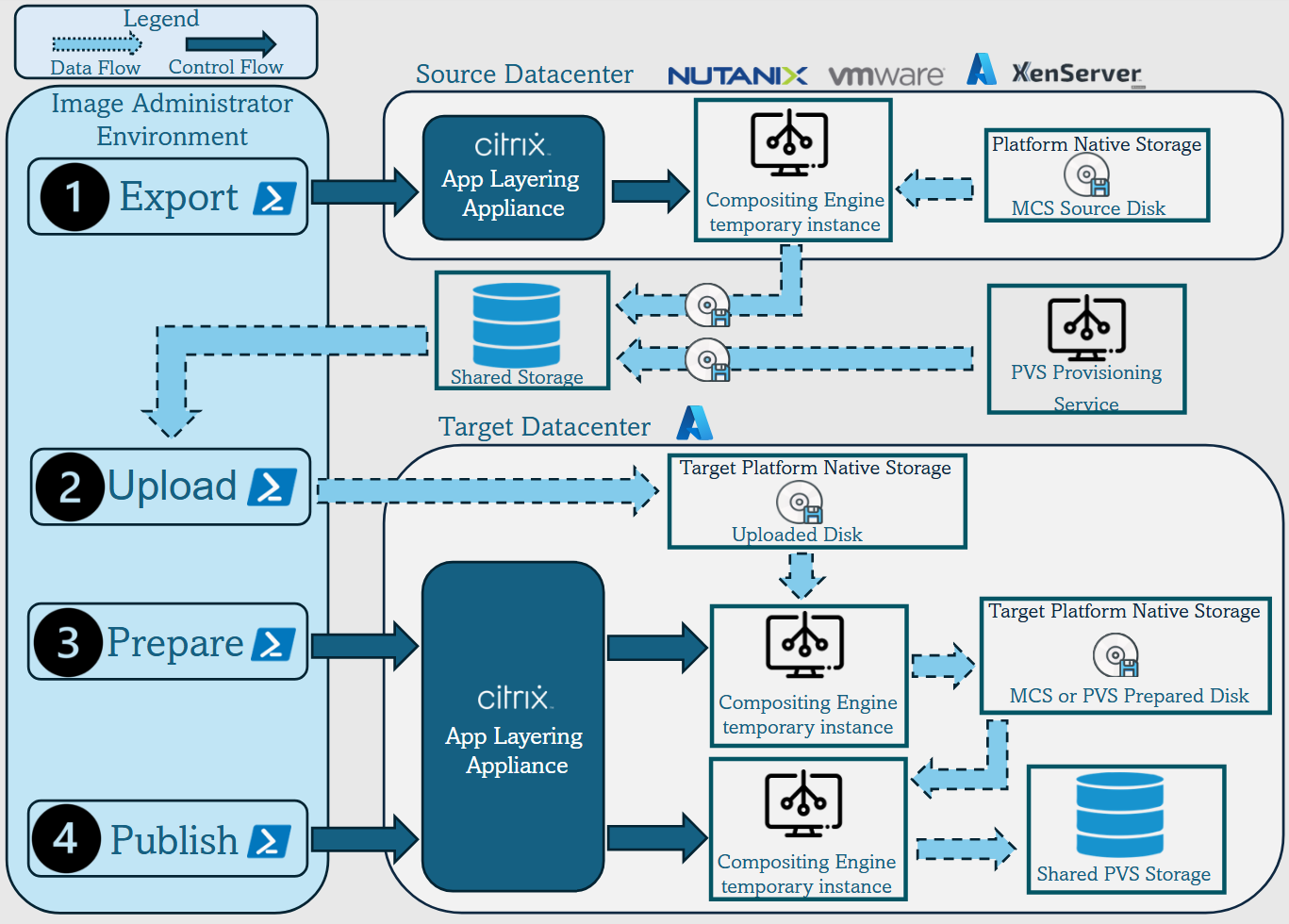
These high-level workflows are based on the image’s source and target provisioning configuration (Machine Creation or Citrix Provisioning™). The chosen workflow determines which Image Portability tasks are required.
Refer to the following table to understand which tasks are required for each of the supported IPS workflows.
| Workflow (Source to Target) | Export | Upload | Prepare | Publish |
|---|---|---|---|---|
| MCS to MCS | ✓ | ✓ | ✓ | |
| PVS to MCS* | ✓ | ✓ | ||
| PVS to PVS* | ✓ | ✓ | ✓ | |
| MCS to PVS | ✓ | ✓ | ✓ | ✓ |
*Assumes you have the original image as a Citrix Provisioning vDisk and do not need to export it directly out of the source platform hypervisor.
Note:
The Citrix Provisioning connector is currently not compatible with Image Portability tasks.
To publish an image for PVS, run the publish task using the Windows File Share connector configured with a share that corresponds to the PVS server’s store location. This will create a VHD(x) containing the image within the PVS store. You can then register the disk with PVS manually, using the PVS console or PowerShell cmdlets.
Components
Image Portability includes the following components:
- App Layering appliance
- Compositing Engine VM
- PowerShell modules
- Citrix.AppLayering
- Citrix.Image.Uploader
App Layering appliance
The App Layering appliance runs in your environment (both on-premises and in your public cloud subscription) and acts as a controller for individual tasks. It creates and manages the Compositing Engine VMs. The appliance controlling IPS tasks must have bi-directional connectivity with the Compositing Engine (CE) in the target platform (e.g., an appliance in VMware needs to connect to an Azure CE, and the Azure CE needs to connect back to the ELM, typically via ExpressRoute). You will need to set up an IPS-compatible connector within the App Layering appliance to perform IPS tasks.
Note:
A user must be granted the ‘Administrator’ or ‘Image Porter’ role to use this feature. Refer to Assign roles for more information.
Compositing Engine
The Compositing Engine is the workhorse of the Image Portability feature. The Compositing Engine (CE) is a single VM created at the start of an Image Portability export or prepare task. These VMs are created in the environment defined by the connector configuration provided for the task. For example, when exporting a disk from vSphere, the CE is created in the vSphere datacenter. Likewise, when running a prepare task in Azure, the CE is created in Azure. The App Layering appliance attaches a copy or read-only version of your disk to the CE VM, and the required manipulations to the disk are performed without modifying the original disk. Upon completion of the prepare or export task, the CE VM and all of its components are deleted.
PowerShell modules
Two Powershell modules are required to use the Image Portability feature:
- Citrix.AppLayering
- Citrix.Image.Uploader
Refer to the Requirements documentation for environment compatibility prior to installing both modules. For information on installation/uninstallation, refer to the Powershell modules documentation.
Citrix.AppLayering
The Citrix.AppLayering PowerShell module provides several cmdlets to perform the following:
- Connect and Disconnect to an App Layering appliance
- List existing connector configurations
- Monitor, wait for, and stop tasks
- Get details of the items associated with a task
- Start Export, Prepare, and Publish tasks
- Start Diagnostics tasks
For more information on the cmdlets and examples on how to use them, refer to the developer documentation.
Citrix.Image.Uploader
The Citrix.Image.Uploader Powershell module provides functionality for uploading images to the destination platform. For details and examples on how to use the module to automate the image upload process, refer to the developer documentation.