Features in Technical Preview
Features in Technical Preview are available to use in non-production or limited production environments, and to give customers an opportunity to share feedback. Citrix® does not accept support cases for features in technical preview but welcomes feedback for improving them. Citrix might act on feedback based on its severity, criticality, and importance.
List of features in Technical Preview
The following table lists the features in technical preview. These features are request-only preview features. To enable and provide feedback for any of these features, fill out the respective forms.
| Title | Available from version | Enablement form (Click the icon) | Feedback form (Click the icon) |
|---|---|---|---|
| Improved reconnection experience for mobile VDI users | 25.11.0 |  |
|
| Single sign-on for Microsoft Entra ID enabled VM | 24.5.0 | |
|
| Audio redirection with external microphones | 24.5.0 | |
|
| Support for an enhanced Single sign-on (SSO) experience for web and SaaS apps | 22.3.5 | |
|
Improved reconnection experience for mobile VDI users - Technical Preview
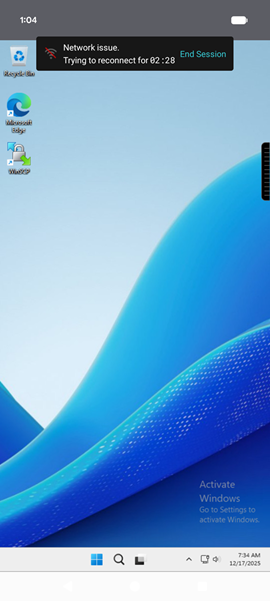
Citrix Workspace app for Android version 25.11.0 introduces enhancements that make Virtual Desktop Infrastructure (VDI) session connections more predictable and user-friendly on mobile devices. These updates reduce uncertainty during connection interruptions and provide users with more control over their session experience.
Note:
To request access to this feature or share feedback, complete the Google form. For a complete list of Technical Preview features, visit the Features in Technical Preview page.
Enhanced features
The following are the improved features:
-
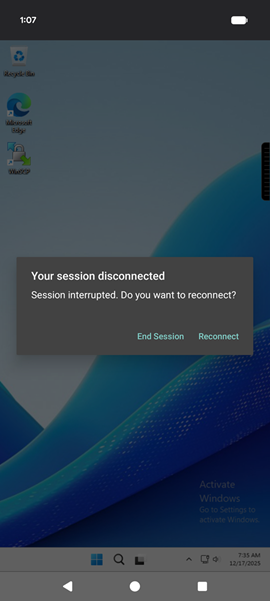
Clear reconnection status across mobile platforms: Citrix Workspace app for Android clearly displays when it attempts to reconnect to a disconnected session. Users need not switch apps or minimize the screen to trigger or view reconnection status. The app handles all reconnection activities transparently within the application.
-
Improved session control for Android: Users can cancel or close a VDI session directly. This feature provides greater flexibility and control when reconnection attempts are unnecessary or unexpected.
-
Informative error messaging: When a session disconnects, the app displays meaningful and actionable messages instead of generic alerts.
The app provides specific information for these scenarios:
- Network connection interruptions
- Server communication failures
- Idle session timeouts
- Session disconnections during device lock and unlock events
These messages help users understand what occurred and identify necessary next steps.
Benefits
These enhancements provide the following improvements:
- Reduce uncertainty during unexpected disconnections
- Improve transparency through real-time status updates
- Minimize frustration during mobile VDI usage
- Build confidence in connection stability and recovery
Together, these enhancements provide a smoother, more intuitive experience — especially for users working on the go.
Single sign-on for Microsoft Entra ID enabled VM
This feature is in technical preview from 24.5.0 release.
Citrix Workspace app for Android supports users signing in to Azure AD-joined VM devices using single sign-on authentication. For the first launch of Azure AD-joined virtual machines (VMs) in Citrix Workspace app, users are prompted to enter Azure account credentials for authentication. The subsequent VDA sign-ins happen automatically without prompting for credentials until the authentication token expires.
Notes:
- This feature is applicable only for Azure AD joined cloud stores.
- By, default, this feature is disabled. This feature is a request-only preview. To get it enabled in your environment, fill out the Google form.
- You can provide feedback for this technical preview by using the Google form.
Audio redirection with external microphones
This feature is in technical preview from 24.5.0 release.
Previously, you could use only one audio device in the session. Starting with the 24.5.0 version, Citrix Workspace app for Android displays all available local audio devices in a session with their names. In addition, plug-and-play audio devices are also supported.
Notes:
- By, default, this feature is disabled. This feature is a request-only preview. To get it enabled in your environment, fill out the Google form.
- You can provide feedback for this technical preview by using the Google form.
Support for an enhanced Single sign-on (SSO) experience for web and SaaS apps
This feature is in technical preview from 22.3.5 release.
This feature simplifies the configuration of SSO for internal web apps and SaaS apps while using third-party identity providers (IdPs).
The enhanced SSO experience reduces the entire process to a few commands. It eliminates the mandatory prerequisite to configure Citrix Secure Private Access in the IdP chain to set up SSO. It also improves the user experience, provided the same IdP is used for authentication to both the Workspace app and the particular web or SaaS app being launched.
You can register for this technical preview by using this Google form.
Technical Preview to General Availability (GA)
| Feature name | General availability version |
|---|---|
| DPI matching | 24.1.0 |
| Push Citrix Workspace app settings through UEM | 24.3.5 |
| Document scanner | 24.5.0 |
| Support for adaptive audio | 24.7.0 |
| Support for multi-window session sharing apps on Samsung DeX | 24.7.0 |
| Separate session window from Citrix Workspace app for Samsung DeX | 24.7.0 |
| Add many stores using UEM | 24.7.0 |
In this article
- List of features in Technical Preview
- Improved reconnection experience for mobile VDI users - Technical Preview
- Single sign-on for Microsoft Entra ID enabled VM
- Audio redirection with external microphones
- Support for an enhanced Single sign-on (SSO) experience for web and SaaS apps
- Technical Preview to General Availability (GA)