
Proxy Support for VDA Upgrade Agent
Proxy Support for VDA Upgrade Agent has been added in 2311 VDA.
VDA Upgrade Agent from 2311 VDA i,e Version: 7.40 can recognize and send traffic through the Proxy.
VDA Upgrade Agent (VUA) Supports Proxy in the form of Hostname:Port (IP:Port) and PAC file.
Only HTTP proxies are supported. Packet decryption and inspection are not supported.
Proxy authentication is not supported. SOCKS5 is not supported.
Configuring VDA Upgrade Agent Proxy
VDA Upgrade Agent Proxy can be configured in 2 ways:
-
Configuring VDA Upgrade Agent Policy using Webstudio Policy.
-
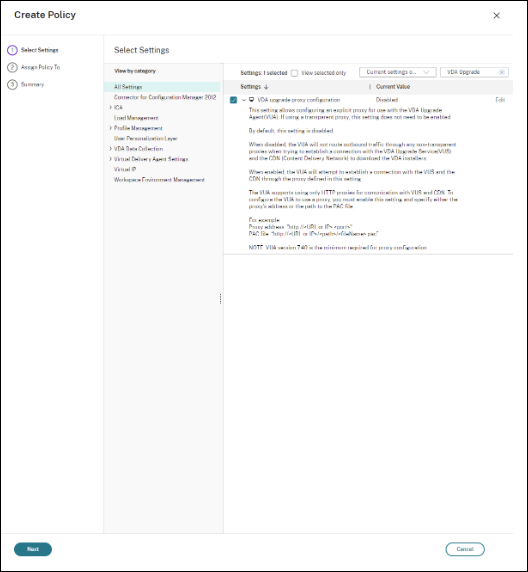
Select VDA upgrade proxy configuration from the Settings on the Create Policy page.
-
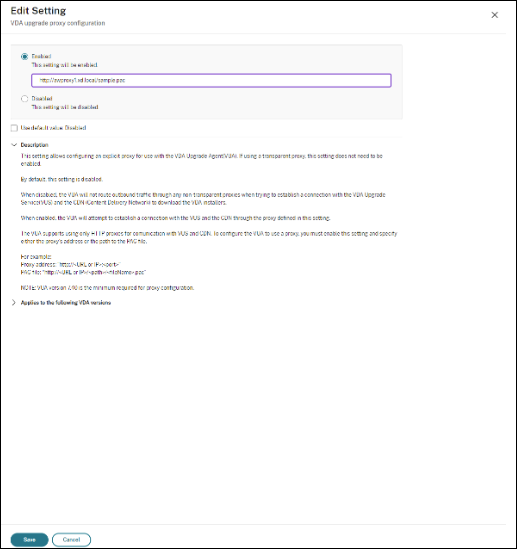
Enable the setting. By default, the setting is disabled.
-
Configuring VDA Upgrade Agent using Registry Key.The registry Key is set to Meta-Installer during VDA Installation.Registry:Key:
HKEY_LOCAL_MACHINE\SOFTWARE\Citrix\VirtualDesktopAgentValue type: StringValue name: ProxySettingsValue data: Proxy address or path to pac file.For Example:-
Proxy address:
http://<URL or IP>:<port> -
Pac file:
http://<URL or IP>/<path/<filename>.pac
-