
Monitor MCS-provisioned machines in Search > Hardware view
This article guides you through how to view MCS-provisioned machines and their properties using the Hardware view within the Search node.
Learn about the hardware view
Hardware view within the Search node displays your MCS-provisioned machines and their critical properties, including machine security settings, network details, images, and machine profile details.
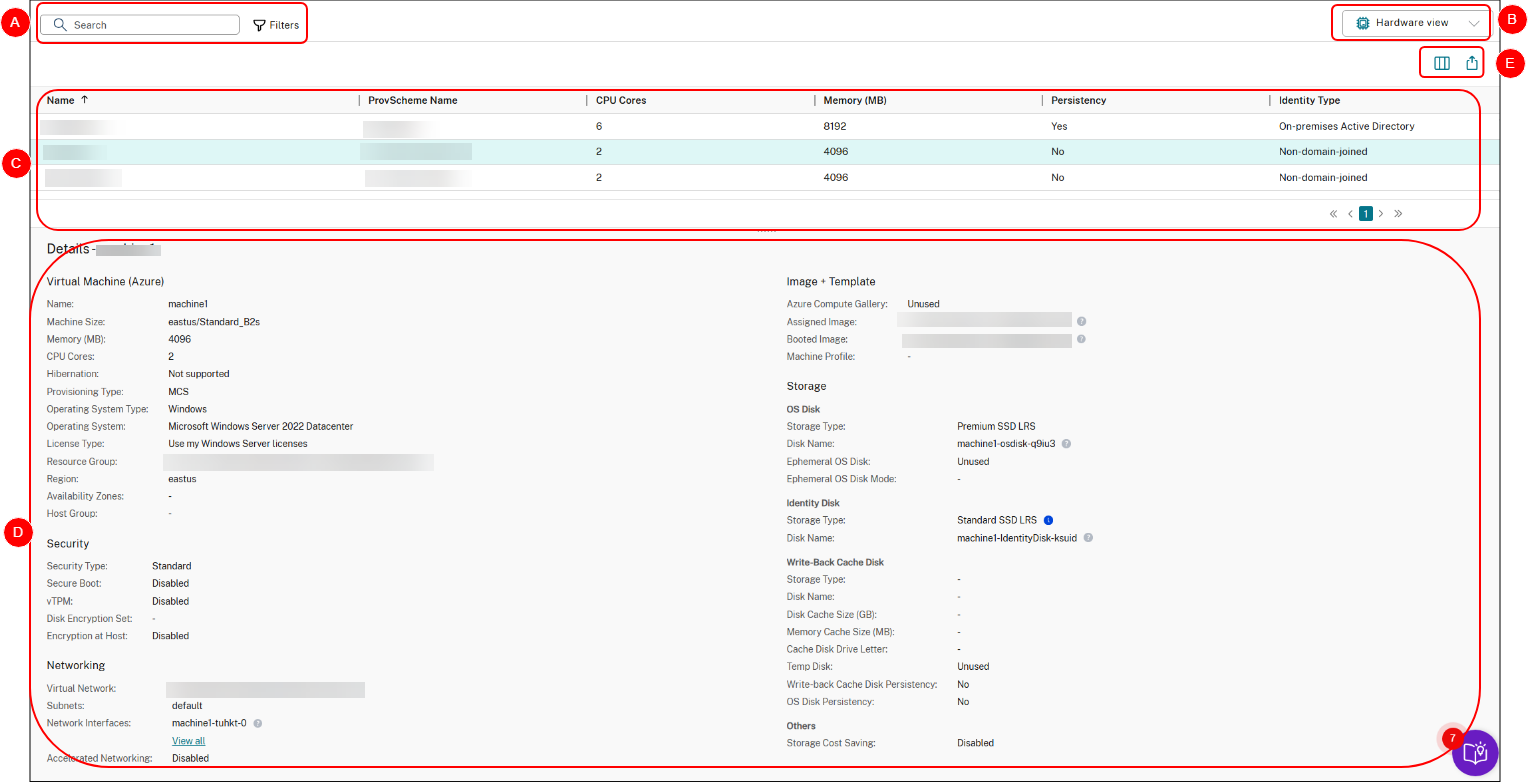
| Callout | Area | Description |
|---|---|---|
| A | Search bar | Provides a quick search and a filter-based search that allows you to define complex search criteria. For more information, see Search for machines.
Tip: Use filters to quickly narrow down machines by specific properties. For example, combine Pending Image Update = Yes and Identity Type = ActiveDirectory to view all Active Directory machines that are pending image updates.
|
| B | Switch to Default view | Switch from Hardware view to Default view. |
| C | Main view | Displays your MCS-provisioned machines and their critical properties. You can customize the view by selecting the Column to display icon. For more information about available columns, see Machine columns. |
| D | Details pane | Displays details information for the selected machine. |
| E | List-level actions |
Displays actions that you can perform on the the entire displayed list:
|
Reference: Machine columns
This table lists all columns in Hardware view and their descriptions.
| Column | Description |
|---|---|
| Name | The DNS host name of the machine. |
| Provisioning Scheme Name | The name of the provisioning scheme used to provision the machine. |
| CPU Cores | The number of CPU cores allocated to the machine. |
| Memory (MB) | The amount of memory (in MB) allocated to the machine. |
| Persistency | Indicates whether the machine’s disk and data persist across restarts. |
| Identity Type | The identity type of the machine. |
| Pending Image Update | Indicates whether the VM image for the machine is outdated and due to be updated to a new image at the machine’s next reboot. |
| Last Boot Time (UTC) | The date and time (in UTC) when the machine was last started. |
| Use WBC | Indicates whether the machine is configured with WBC (aka MCSIO). |
| WBC Disk Size (GB) | The MCSIO disk-cache size of the machine. |
| WBC Memory Size (MB) | The MCSIO memory-cache size of the machine. |
| Identity Provider | The identity provider of the machine. |
| Activation Type | Valid only for Windows VDAs. The Windows license activation type of the machine. Values include: Unsupported VDA, Key Management Service, Multiple Activation Key, and Not valid. |