This content has been machine translated dynamically.
Dieser Inhalt ist eine maschinelle Übersetzung, die dynamisch erstellt wurde. (Haftungsausschluss)
Cet article a été traduit automatiquement de manière dynamique. (Clause de non responsabilité)
Este artículo lo ha traducido una máquina de forma dinámica. (Aviso legal)
此内容已经过机器动态翻译。 放弃
このコンテンツは動的に機械翻訳されています。免責事項
이 콘텐츠는 동적으로 기계 번역되었습니다. 책임 부인
Este texto foi traduzido automaticamente. (Aviso legal)
Questo contenuto è stato tradotto dinamicamente con traduzione automatica.(Esclusione di responsabilità))
This article has been machine translated.
Dieser Artikel wurde maschinell übersetzt. (Haftungsausschluss)
Ce article a été traduit automatiquement. (Clause de non responsabilité)
Este artículo ha sido traducido automáticamente. (Aviso legal)
この記事は機械翻訳されています.免責事項
이 기사는 기계 번역되었습니다.책임 부인
Este artigo foi traduzido automaticamente.(Aviso legal)
这篇文章已经过机器翻译.放弃
Questo articolo è stato tradotto automaticamente.(Esclusione di responsabilità))
Translation failed!
Server auf Werkseinstellungen zurücksetzen
In einigen Situationen ist es erforderlich, eine StoreFront-Installation auf ihren ursprünglichen Installationszustand zurückzusetzen. Dies ist beispielsweise notwendig, bevor Sie einen StoreFront-Server erneut zu einer Servergruppe hinzufügen können. Eine manuelle Deinstallation und Neuinstallation kann durchgeführt werden, ist aber zeitaufwändiger und kann andere unvorhergesehene Probleme verursachen. Stattdessen können Sie PowerShell-Module verwenden, um die Konfiguration auf die Standardwerte zurückzusetzen.
-
Stellen Sie sicher, dass die StoreFront-Verwaltungskonsole geschlossen ist.
-
Öffnen Sie eine PowerShell-Konsole.
-
Führen Sie das Cmdlet Clear-STFDeployment aus.
Clear-STFDeployment -Confirm $False <!--NeedCopy--> -
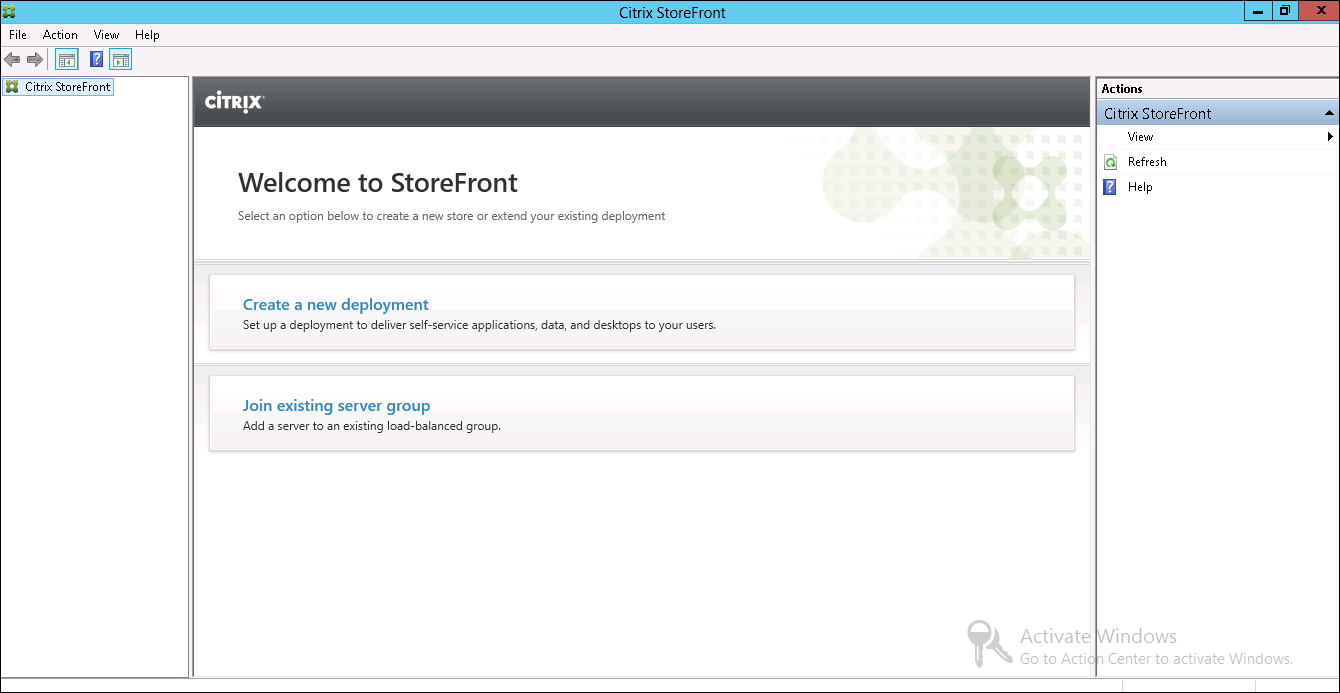
Wenn der Befehl erfolgreich abgeschlossen wurde, öffnen Sie die StoreFront-Verwaltungskonsole und bestätigen Sie, dass alle Einstellungen zurückgesetzt wurden. Die Optionen Neue Bereitstellung erstellen oder Vorhandener Servergruppe beitreten sind verfügbar.
Teilen
Teilen
In diesem Artikel
This Preview product documentation is Citrix Confidential.
You agree to hold this documentation confidential pursuant to the terms of your Citrix Beta/Tech Preview Agreement.
The development, release and timing of any features or functionality described in the Preview documentation remains at our sole discretion and are subject to change without notice or consultation.
The documentation is for informational purposes only and is not a commitment, promise or legal obligation to deliver any material, code or functionality and should not be relied upon in making Citrix product purchase decisions.
If you do not agree, select I DO NOT AGREE to exit.