
Authenticate
Support for Microsoft Entra ID single sign-on
Starting with version 2511, Citrix Workspace app for HTML5 supports Microsoft Entra ID single sign-on to achieve single sign-on when using Microsoft Entra ID credentials to access virtual applications and desktops on Microsoft Entra joined or Microsoft Entra hybrid joined session hosts.
With this feature, users with Entra ID-joined VDAs get seamless authentication and do not need to enter credentials each time they launch a VDA. For seamless single sign-on (SSO) to Entra VDAs, enable pop-ups in your browser settings because blocked pop-ups can prevent successful SSO.
For details on system requirements and configuration, see Microsoft Entra ID single sign-on for DaaS.
Known issues
-
A pop-up window opens during session launch. The pop-up behavior varies depending on your browser and browsing mode (normal or incognito).
Logs to troubleshoot Entra ID single sign-on support for VDA with Azure AD credentials setup
This article describes the logs that you can collect when SSO fails and users receive unexpected credential prompts after the session launches.
To collect logs:
-
Collect the basic Citrix Workspace app logs. For more information, see How to collect logs.
-
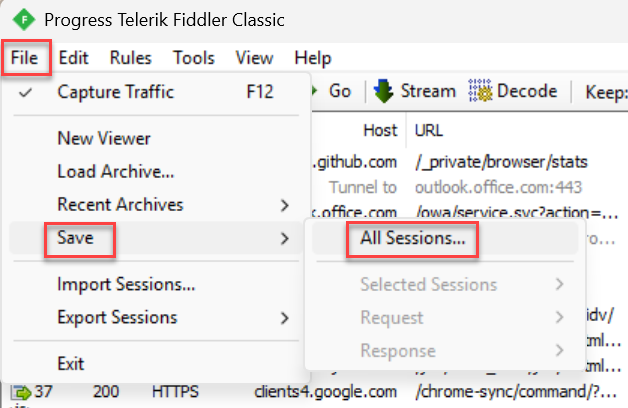
Collect the network traces for Microsoft Authentication Library (MSAL) token fetch status:i. Install Charles or Fiddler on the endpoint. ii. Log in to the Microsoft Entra ID Store in the browser where the issue is occurring. iii. Start the Charles or Fiddler app. iv. Start Citrix Workspace app for HTML5 session. After you reproduce the issue, export the Fiddler traces by clicking File > Save > All sessions. This downloads the traces that you share with Citrix. For more information, see the following screenshot:
-
Collect Citrix Diagnostic Facility (CDF) traces from the VDA for all modules and startup tracing. Follow the steps to collect a CDF trace at system startup because SSO can fail even with successful capability negotiation from Citrix Workspace app.
Support for single-tenant Microsoft Entra ID
This feature lets you use single sign-on (SSO) with Microsoft Entra ID credentials to access virtual apps and desktops on Microsoft Entra hybrid-joined session hosts. To configure VDA SSO, use your customer-specific single-tenant Entra ID client app. For more information, see Microsoft Entra single sign-on.