StoreFront
You need to verify the ownership of your Store URL to get started with Client app management.
-
Navigate to Client app management > Stores > StoreFront.
-
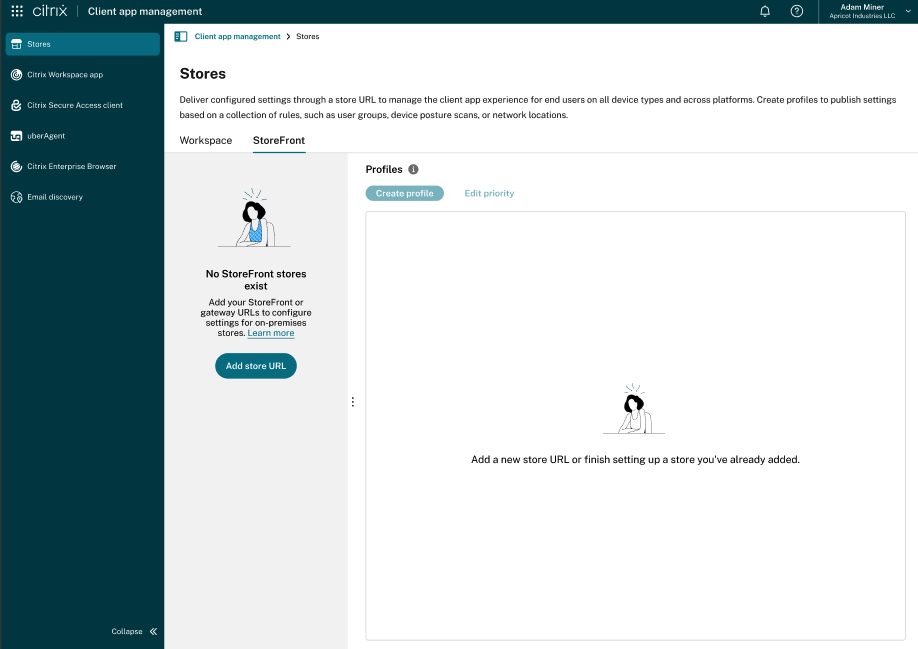
If you don’t have any StoreFront URL claimed, you are presented with the following screen:
You can claim the URLs for the following store access mechanism:
-
Gateway URL (Recommended) - Using Gateway URL is the preferred method for claiming a store’s URL. It acts as a single point of entry, simplifying access for users and providing a consistent experience.
-
Internal StoreFront URL - Used for internal access, this URL is typically for employees or administrators within a private network.
-
Custom Web store - Custom Web store URL must be claimed if a customer has a highly customized StoreFront store.
Claim a gateway URL for StoreFront stores
To claim a Gateway URL:
-
Sign in to Citrix Cloud.
-
From the main menu, navigate to Client app management > Stores.
-
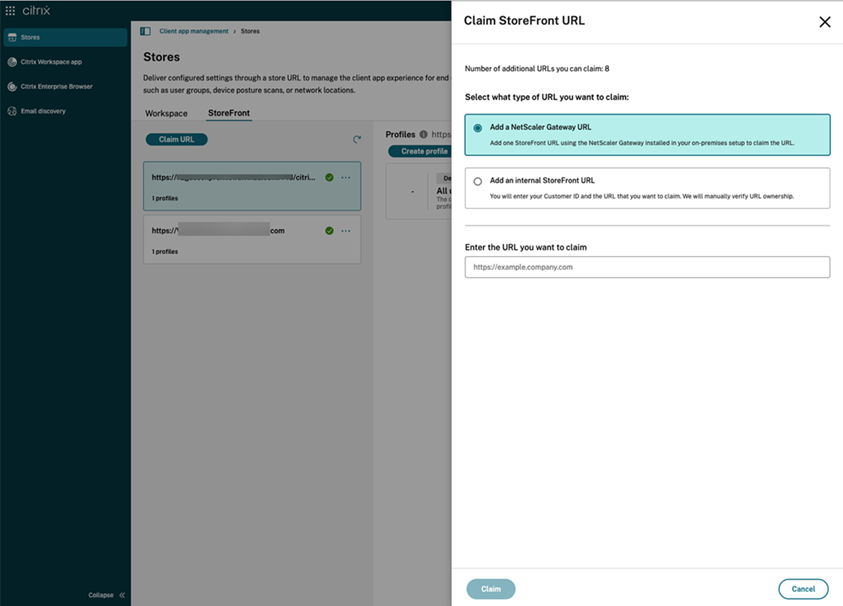
Click StoreFront > Claim URL.
-
Select Add a NetScaler Gateway URL.
-
Enter the URL in the given text field and click Claim. The URL is added, and it is in the ‘Verification not started’ state.
-
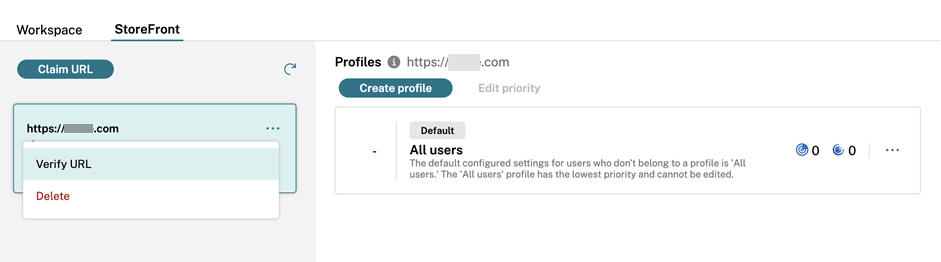
To verify the URL, select the URL and click Verify URL.
-
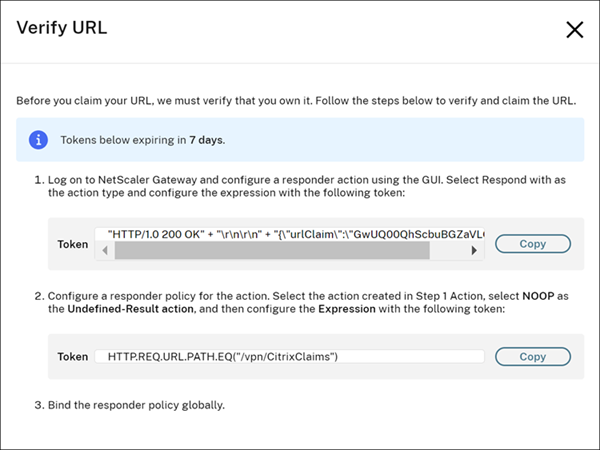
The Verify URL screen contains the steps that guide you to create and configure a responder action and responder policy within your NetScaler.
-
Bind your responder policy globally.
-
Go to https://<customergatewayurl>/vpn/CitrixClaims to verify if your responder policy is configured correctly.
-
Navigate back to Workspace configuration > App configuration, and locate the URL that you added.
-
Select the URL and click Verify URL.
-
Click Verify URL to start the verification process.
Note:
The URL verification process is initiated once you click Verify URL and takes approximately 15 minutes to complete.
To claim an internal StoreFront URL
If your store cannot be accessed over the internet or through a public gateway URL, you might request for an exception with your store details. You can raise a support ticket with Citrix if necessary.
To claim a custom webstore URL
Citrix Workspace app supports custom web stores that allow end user to connect to stores that are customized based on their company themes.
If you want to configure settings against a custom web store URL, you can claim the URL via a direct request using the Client app management API endpoints. Learn more here.
The official version of this content is in English. Some of the Cloud Software Group documentation content is machine translated for your convenience only. Cloud Software Group has no control over machine-translated content, which may contain errors, inaccuracies or unsuitable language. No warranty of any kind, either expressed or implied, is made as to the accuracy, reliability, suitability, or correctness of any translations made from the English original into any other language, or that your Cloud Software Group product or service conforms to any machine translated content, and any warranty provided under the applicable end user license agreement or terms of service, or any other agreement with Cloud Software Group, that the product or service conforms with any documentation shall not apply to the extent that such documentation has been machine translated. Cloud Software Group will not be held responsible for any damage or issues that may arise from using machine-translated content.
DIESER DIENST KANN ÜBERSETZUNGEN ENTHALTEN, DIE VON GOOGLE BEREITGESTELLT WERDEN. GOOGLE LEHNT JEDE AUSDRÜCKLICHE ODER STILLSCHWEIGENDE GEWÄHRLEISTUNG IN BEZUG AUF DIE ÜBERSETZUNGEN AB, EINSCHLIESSLICH JEGLICHER GEWÄHRLEISTUNG DER GENAUIGKEIT, ZUVERLÄSSIGKEIT UND JEGLICHER STILLSCHWEIGENDEN GEWÄHRLEISTUNG DER MARKTGÄNGIGKEIT, DER EIGNUNG FÜR EINEN BESTIMMTEN ZWECK UND DER NICHTVERLETZUNG VON RECHTEN DRITTER.
CE SERVICE PEUT CONTENIR DES TRADUCTIONS FOURNIES PAR GOOGLE. GOOGLE EXCLUT TOUTE GARANTIE RELATIVE AUX TRADUCTIONS, EXPRESSE OU IMPLICITE, Y COMPRIS TOUTE GARANTIE D'EXACTITUDE, DE FIABILITÉ ET TOUTE GARANTIE IMPLICITE DE QUALITÉ MARCHANDE, D'ADÉQUATION À UN USAGE PARTICULIER ET D'ABSENCE DE CONTREFAÇON.
ESTE SERVICIO PUEDE CONTENER TRADUCCIONES CON TECNOLOGÍA DE GOOGLE. GOOGLE RENUNCIA A TODAS LAS GARANTÍAS RELACIONADAS CON LAS TRADUCCIONES, TANTO IMPLÍCITAS COMO EXPLÍCITAS, INCLUIDAS LAS GARANTÍAS DE EXACTITUD, FIABILIDAD Y OTRAS GARANTÍAS IMPLÍCITAS DE COMERCIABILIDAD, IDONEIDAD PARA UN FIN EN PARTICULAR Y AUSENCIA DE INFRACCIÓN DE DERECHOS.
本服务可能包含由 Google 提供技术支持的翻译。Google 对这些翻译内容不做任何明示或暗示的保证,包括对准确性、可靠性的任何保证以及对适销性、特定用途的适用性和非侵权性的任何暗示保证。
このサービスには、Google が提供する翻訳が含まれている可能性があります。Google は翻訳について、明示的か黙示的かを問わず、精度と信頼性に関するあらゆる保証、および商品性、特定目的への適合性、第三者の権利を侵害しないことに関するあらゆる黙示的保証を含め、一切保証しません。
ESTE SERVIÇO PODE CONTER TRADUÇÕES FORNECIDAS PELO GOOGLE. O GOOGLE SE EXIME DE TODAS AS GARANTIAS RELACIONADAS COM AS TRADUÇÕES, EXPRESSAS OU IMPLÍCITAS, INCLUINDO QUALQUER GARANTIA DE PRECISÃO, CONFIABILIDADE E QUALQUER GARANTIA IMPLÍCITA DE COMERCIALIZAÇÃO, ADEQUAÇÃO A UM PROPÓSITO ESPECÍFICO E NÃO INFRAÇÃO.