This content has been machine translated dynamically.
Dieser Inhalt ist eine maschinelle Übersetzung, die dynamisch erstellt wurde. (Haftungsausschluss)
Cet article a été traduit automatiquement de manière dynamique. (Clause de non responsabilité)
Este artículo lo ha traducido una máquina de forma dinámica. (Aviso legal)
此内容已经过机器动态翻译。 放弃
このコンテンツは動的に機械翻訳されています。免責事項
이 콘텐츠는 동적으로 기계 번역되었습니다. 책임 부인
Este texto foi traduzido automaticamente. (Aviso legal)
Questo contenuto è stato tradotto dinamicamente con traduzione automatica.(Esclusione di responsabilità))
This article has been machine translated.
Dieser Artikel wurde maschinell übersetzt. (Haftungsausschluss)
Ce article a été traduit automatiquement. (Clause de non responsabilité)
Este artículo ha sido traducido automáticamente. (Aviso legal)
この記事は機械翻訳されています.免責事項
이 기사는 기계 번역되었습니다.책임 부인
Este artigo foi traduzido automaticamente.(Aviso legal)
这篇文章已经过机器翻译.放弃
Questo articolo è stato tradotto automaticamente.(Esclusione di responsabilità))
Translation failed!
MonitorでのdeviceTRUST®統合
deviceTRUST®統合により、コンテキストセキュリティ情報がMonitorに直接もたらされます。この機能は、Citrix Virtual Apps and Desktops™環境にdeviceTRUSTコンポーネントがインストールされ、構成されている場合にのみ表示されます。
deviceTRUSTはデバイスコンテキストを継続的に監視し、Citrix環境に接続するリモートデバイスが組織のセキュリティポリシーを満たしていることを保証します。デバイスがコンプライアンスに違反した場合、deviceTRUSTはセッションの切断やサインアウトなどのアクションを自動的に実行できます。
ユーザー詳細ページで強調表示されるセッションの中断
deviceTRUSTアクションによって中断または終了されたセッションは、ユーザー詳細ページで強調表示されます。これは、切断が意図的なセキュリティ対策であったことを示します。
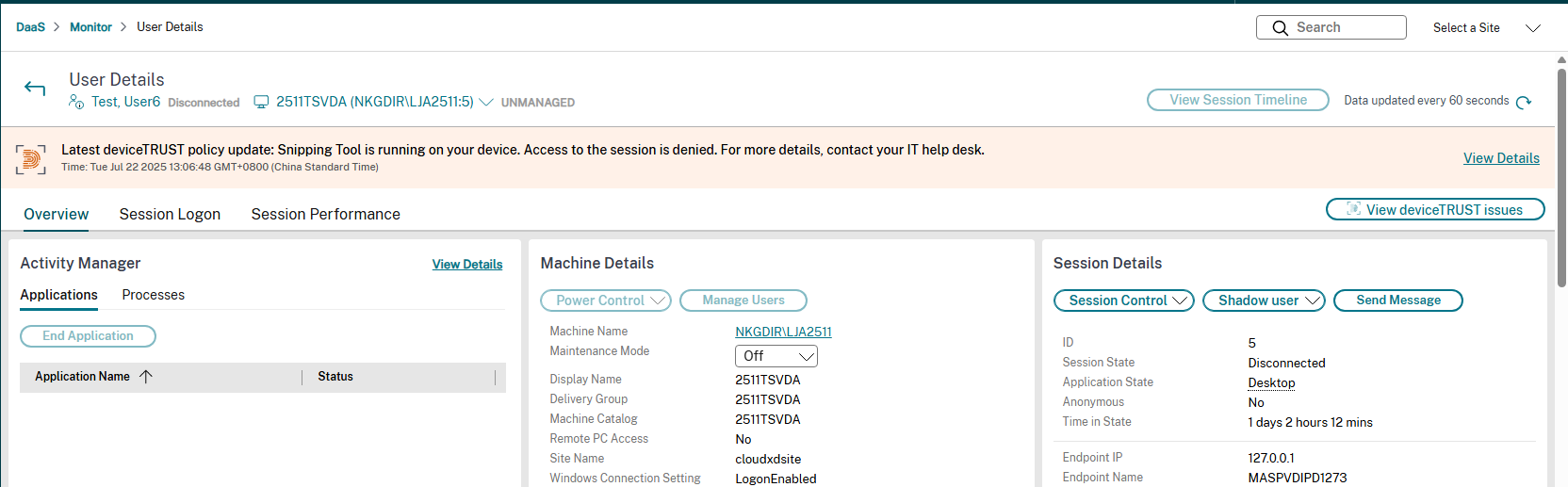
ユーザー詳細ページにあるdeviceTRUSTの問題を表示ボタン
ユーザー詳細ページには、deviceTRUSTの問題を表示ボタンがあります。過去2日間にセッションのdeviceTRUSTの問題がある場合、このボタンをクリックすると、管理者はアクセス拒否タブに移動します。過去2日間にセッションのdeviceTRUSTの問題がない場合、ボタンはグレー表示されます。
deviceTRUSTの障害に関する詳細情報
管理者は、強調表示された問題バナーから詳細を表示をクリックすることで、deviceTRUSTの問題によるアクセス拒否の正確な理由を表示できます。次の詳細が表示されます。
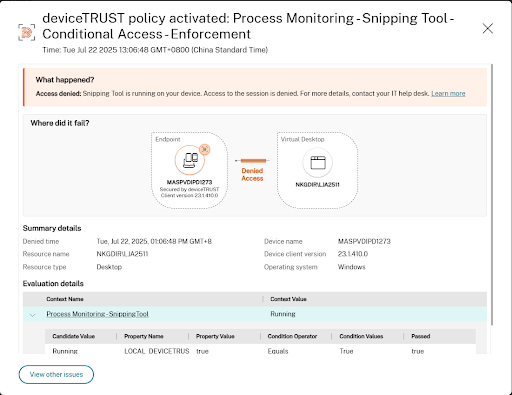
- アクセス拒否の理由。
- ユーザーのエンドポイントデバイスと仮想デスクトップの間で接続がブロックされた場所の視覚的な表現。
- アクセス拒否の概要詳細。問題発生時刻、リソース名、リソースタイプ、接続試行が行われたデバイス、およびdeviceTRUSTクライアントバージョンが含まれます。
- ポリシー評価の詳細。満たされなかったプロパティと条件が含まれます。
「その他の問題を表示」をクリックして、アクセス拒否タブに移動します。
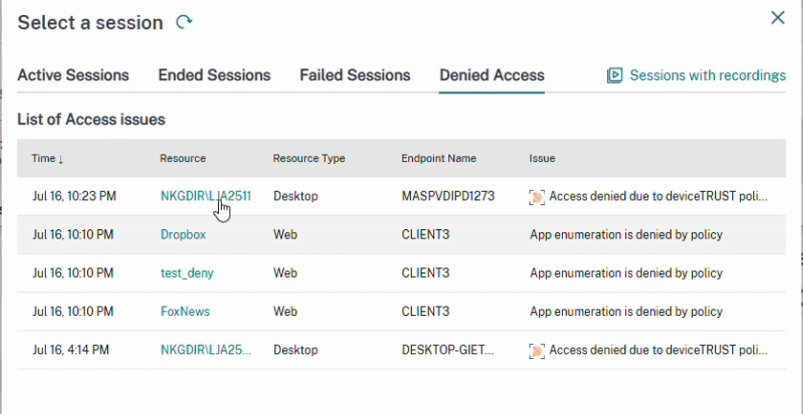
更新されたアクセス拒否タブ
アクセス拒否タブが更新され、deviceTRUSTの問題が含まれるようになりました。このタブには、deviceTRUSTおよびSecure Private Accessからのすべてのアクセス拒否の履歴リストが表示されます。管理者は、deviceTRUST項目をクリックすることで、詳細なdeviceTRUSTの失敗情報を表示できます。
共有
共有
This Preview product documentation is Citrix Confidential.
You agree to hold this documentation confidential pursuant to the terms of your Citrix Beta/Tech Preview Agreement.
The development, release and timing of any features or functionality described in the Preview documentation remains at our sole discretion and are subject to change without notice or consultation.
The documentation is for informational purposes only and is not a commitment, promise or legal obligation to deliver any material, code or functionality and should not be relied upon in making Citrix product purchase decisions.
If you do not agree, select I DO NOT AGREE to exit.