This content has been machine translated dynamically.
Dieser Inhalt ist eine maschinelle Übersetzung, die dynamisch erstellt wurde. (Haftungsausschluss)
Cet article a été traduit automatiquement de manière dynamique. (Clause de non responsabilité)
Este artículo lo ha traducido una máquina de forma dinámica. (Aviso legal)
此内容已经过机器动态翻译。 放弃
このコンテンツは動的に機械翻訳されています。免責事項
이 콘텐츠는 동적으로 기계 번역되었습니다. 책임 부인
Este texto foi traduzido automaticamente. (Aviso legal)
Questo contenuto è stato tradotto dinamicamente con traduzione automatica.(Esclusione di responsabilità))
This article has been machine translated.
Dieser Artikel wurde maschinell übersetzt. (Haftungsausschluss)
Ce article a été traduit automatiquement. (Clause de non responsabilité)
Este artículo ha sido traducido automáticamente. (Aviso legal)
この記事は機械翻訳されています.免責事項
이 기사는 기계 번역되었습니다.책임 부인
Este artigo foi traduzido automaticamente.(Aviso legal)
这篇文章已经过机器翻译.放弃
Questo articolo è stato tradotto automaticamente.(Esclusione di responsabilità))
Translation failed!
ストアの管理
Citrix StoreFrontでは、エンドユーザーがリソースにアクセスできるように、1つ以上のストアを作成します。各ストアは、ユーザーの認証方法、集約されるリソース、および表示方法を定義します。エンドユーザーは、Webブラウザーを介してこれらのストアを開くか、ローカルにインストールされているCitrix Workspaceアプリに追加することで、これらのストアにアクセスできます。
ストアの表示
- 管理コンソールから、左ペインの [ストア] ノードを選択します。
- 表示するストアを選択します。
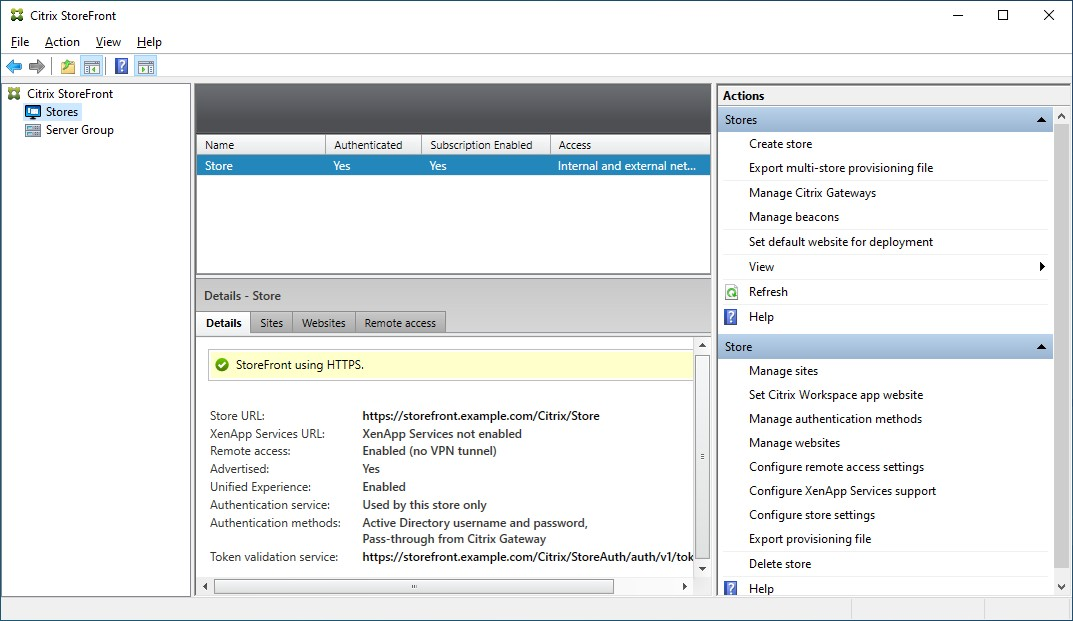
[詳細] ペインには、次のタブが表示されます。
| タブ | 詳細 |
|---|---|
| 詳細 | URLや認証方法など、ストアの詳細を表示します |
| サイト | ストア用に構成されているすべてのサイトを一覧表示します |
| Webサイト | Webサイトを一覧表示します |
| リモートアクセス | Citrix Gatewayを使用してリモートアクセスが有効になっているかどうかの詳細 |
ストアの作成
[操作] ペインの [ストア] セクションで、[ストアの作成] を押します。詳細については、「ストアの作成」を参照してください。
ストアの構成
[操作] ペインの [ストア] セクションから、次のストア構成アクションを実行できます。
| アクション | 詳細 |
|---|---|
| サイトの管理 | サイトの追加と削除 |
| Citrix WorkspaceアプリのWebサイトの設定 | Citrix Workspaceアプリを使用してストアにアクセスするときに使用するWebサイトを構成します |
| 認証方法の管理 | ユーザーがストアへの認証に使用できる方法を選択します |
| Webサイトの管理 | ストアへのアクセスに使用するWebサイトを管理します |
| リモートアクセス設定の構成 | パブリックネットワークから接続するユーザー向けに、Citrix Gatewayを介したストアへのアクセスを構成します |
| XenApp®サービスサポートの構成 | XenAppサービスURLを有効または無効にします |
| ストア設定の構成 | ストア設定の構成ウィンドウを開き、お気に入り、Kerberos委任、最適なHDXルーティング、ストアの宣伝、および詳細設定を構成できます |
管理コンソール以外で、次の高度なストア構成を実行できます。
| タスク | 詳細 |
|---|---|
| Default ICA設定 | default.icaに追加してHDX設定を構成します |
| Citrix Workspaceアプリの構成 | StoreFrontを使用してCitrix Workspaceアプリを構成します |
| フェデレーション認証サービスの構成 | VDAへのシングルサインオンのためにフェデレーション認証サービス(FAS)を構成します |
プロビジョニングファイルのエクスポート
ストア用に構成されたCitrix Gatewayの展開やビーコンを含む、1つまたは複数のストアの接続詳細を含むファイルを生成できます。詳細については、「プロビジョニングファイルのエクスポート」を参照してください。
ストアの削除
ストアを削除するには:
- Citrix StoreFront管理コンソールの左ペインで [ストア] ノードを選択します。
- [操作] ペインで [ストアの削除] をクリックします。
- 確認ウィンドウで [はい] をクリックします。
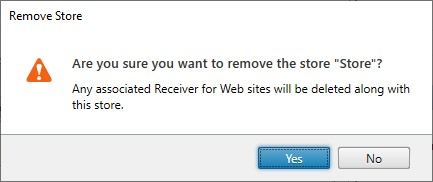
ストアを削除すると、関連付けられているWebサイトも削除されます。
共有
共有
この記事の概要
This Preview product documentation is Citrix Confidential.
You agree to hold this documentation confidential pursuant to the terms of your Citrix Beta/Tech Preview Agreement.
The development, release and timing of any features or functionality described in the Preview documentation remains at our sole discretion and are subject to change without notice or consultation.
The documentation is for informational purposes only and is not a commitment, promise or legal obligation to deliver any material, code or functionality and should not be relied upon in making Citrix product purchase decisions.
If you do not agree, select I DO NOT AGREE to exit.