
Non-domain-joined
This article describes the requirements to create non-domain-joined catalogs using using Citrix Virtual Apps and Desktops in addition to the requirements outlined in the System Requirements section.
Requirements
-
Control plane: See Supported Configurations
-
VDA type: Single-session (desktops only) or multi-session (apps and desktops)
-
VDA version: 2311 or later
-
Provisioning type: Machine Creation Services™ (MCS), Persistent and Non-persistent
-
Assignment type: Dedicated and pooled
-
Hosting platform: All platforms supported by MCS
-
Rendezvous V2 must be enabled
Limitations
-
Service continuity is not supported.
-
Whenever we use a multi session non domain joined VDA, the local user's profile data is not retained and is deleted on logoff.
VDA installation and configuration
Follow the steps for installing the VDA:
-
Make sure to select the following options in the installation wizard:
-
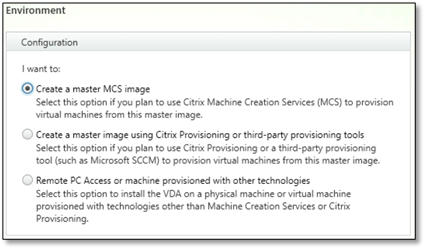
In the Environment page, select Create a master MCS image.
-
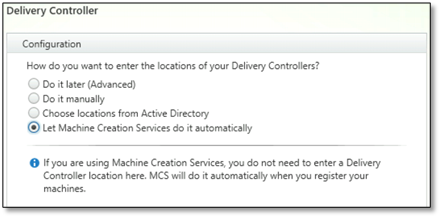
In the Delivery Controller™ page, select Let Machine Creation Services do it automatically.
-
Where to go next
Once the resource location and hosting connection are available, proceed to create the identity pool. For more information on creating identity pool of non-domain-joined machine identity, see Identity pool of non-domain-joined machine identity.