Known issues
Profile Management 2511 includes the following known issues:
-
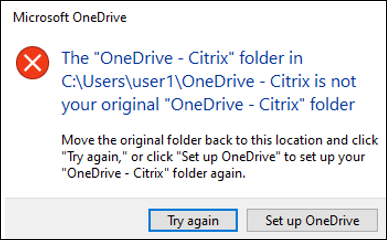
With the full profile container or the OneDrive container enabled, the following message appears when a user logs on to a machine:
-
The user has been using the OneDrive folder before the container is enabled, and
-
This is the first time that the user logs on to a machine after the container is enabled.
-
-
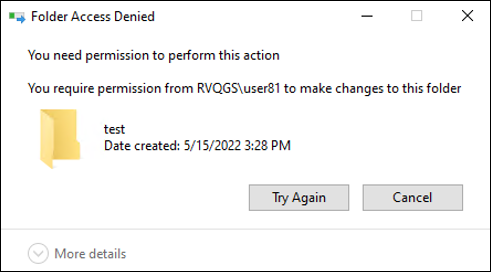
The message "Folder Access Denied" appears when users move a folder to the Recycle Bin in the following situations:
-
With the partial profile container or the OneDrive container enabled, users try to delete a folder from either container.
-
With the full profile container enabled, users try to delete a folder that is not in the user profile folder but on the same disk as the profile.
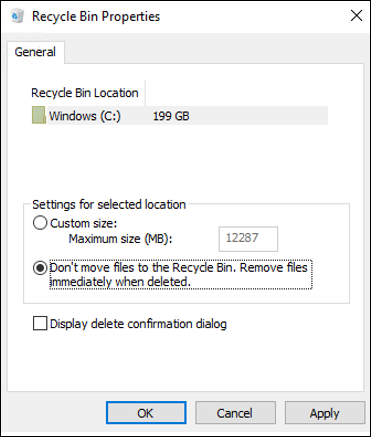
To work around this issue, perform permanent deletion instead: -
-
This issue affects only existing Citrix Profile Management (CPM) user profiles. If Folder redirection (Microsoft or CPM) is newly enabled for a folder while Enable profile streaming for folders is also enabled, subfolders might not migrate to the new location.For example, if a subfolder (FolderA) exists under Documents, and Documents is not yet redirected, enabling folder redirection normally migrates the Documents folder to the new redirected location during the next logon. However, with Enable Profile streaming for folders turned on, FolderA and its contents might not migrate and will be lost.Workaround:
-
Disable the Enable Profile streaming for folders policy before enabling Folder redirection for existing user profiles.
-
After the next user logon, confirm that the redirected folders have successfully migrated to the new location.
-
Re-enable the Enable Profile streaming for folders policy.
-