Citrix Aidrien™ overview
Citrix Aidrien is an AI-powered service available within Citrix Cloud, designed to provide in-product support and assistance for Citrix and NetScaler solutions. The system enables administrators to submit natural language questions and receive contextual answers relevant to their specific environments on Citrix DaaS, NetScaler Console service, and Citrix SecurAccess™ ZTNA.
Citrix Aidrien's knowledge is enhanced by the Citrix knowledge base, product documentation, Citrix community articles, Citrix blogs, troubleshooting knowledge base, and key Citrix environment data such as VDAs/Machines, user sessions, and NetScaler infrastructure, Citrix SecurAccess™ ZTNA applications and access policies. As an AI-powered service, Citrix Aidrien provides contextual guidance to questions around Citrix environments with detailed responses to help administrators understand and navigate complex concepts more easily.
Note:
On‑premises Studio and Citrix Director now integrate with Citrix Aidrien through Citrix Cloud. Starting with the CR 2603 release, a Citrix Aidrien button is available in their Studio and Citrix Director consoles. With a single click, administrators can launch Citrix Aidrien in Citrix Cloud by signing in with their Citrix Cloud credentials and access Citrix Aidrien capabilities.
For more information about Citrix Cloud access, see How to use Citrix Aidrien?.
Benefits
Citrix administrators frequently face challenges when seeking immediate answers to technical questions related to Citrix and NetScaler® environments. As a result, extensive time is spent searching across multiple knowledge resources, support channels, and technical teams. Citrix Aidrien delivers significant value by transforming how administrators interact with Citrix and NetScaler environments, offering a range of benefits that enhances efficiency and problem-solving within the product.
-
Improved productivity and streamlined operations: Citrix Aidrien’s conversational and contextual assistance streamlines operations by facilitating a more intuitive way to retrieve information and guidance. Citrix Aidrien allows administrators to focus on more complex tasks rather than tedious information retrieval, which boosts overall productivity.For example, an admin wants to quickly understand the steps to configure a specific security policy on NetScaler. Instead of manually navigating through documentation and other resources, the admin asks Citrix Aidrien, "How do I configure an A+ SSL profile on NetScaler for enhanced security?" Citrix Aidrien provides a concise summary of relevant steps empowering the admin to apply them faster and move on to other tasks.
-
Faster issue resolution: Administrators frequently require immediate answers to technical queries related to Citrix and NetScaler. Citrix Aidrien addresses this request by providing instant responses to questions in natural language.For example, an administrator encounters an unfamiliar error message or code in Citrix DaaS. Instead of spending valuable time searching through multiple online forums, documentation sites, or opening a support ticket, they can ask Citrix Aidrien, "What does the error code “bka.prepare.session.failure.rejected” in Citrix DaaS mean and how do I resolve it?" Citrix Aidrien provides an immediate explanation and potential troubleshooting steps, significantly reducing resolution time.
-
Trusted and accurate information: Administrators can access accurate responses collated from verified Citrix knowledge sources. Citrix Aidrien's knowledge is enhanced by the Citrix knowledge base, product documentation, Citrix blogs, and key Citrix environment data. As a result, administrators receive reliable and up-to-date information, fostering greater confidence in the resolution and answers from Citrix Aidrien.For example, an administrator wants to verify the feature matrix for Citrix Workspace app with their current Citrix DaaS Monitor environment to use a specific feature. They ask Citrix Aidrien, "Is Citrix Workspace app version 2503.10 compatible with Citrix DaaS Monitor’s Session topology feature?" Citrix Aidrien provides an answer directly sourced from official Citrix compatibility documentation, ensuring the information is accurate and reliable.
-
Enhanced understanding of complex concepts: Citrix Aidrien provides contextual guidance, deployment-related information, and AI-driven responses to help admins understand and navigate complex configuration concepts easily. The concepts include clarifying configuration terms and supported features, and accessing guided workflows directly within the console interface.For example, a new administrator is trying to understand the purpose and configuration of Global Server Load Balancing (GSLB) in NetScaler. They can ask Citrix Aidrien, "Explain Global Server Load Balancing (GSLB) in NetScaler and its primary use cases." Citrix Aidrien provides a clear, simplified explanation of the concept, its benefits, and typical scenarios where it's deployed, aiding in faster learning and application.
Architecture
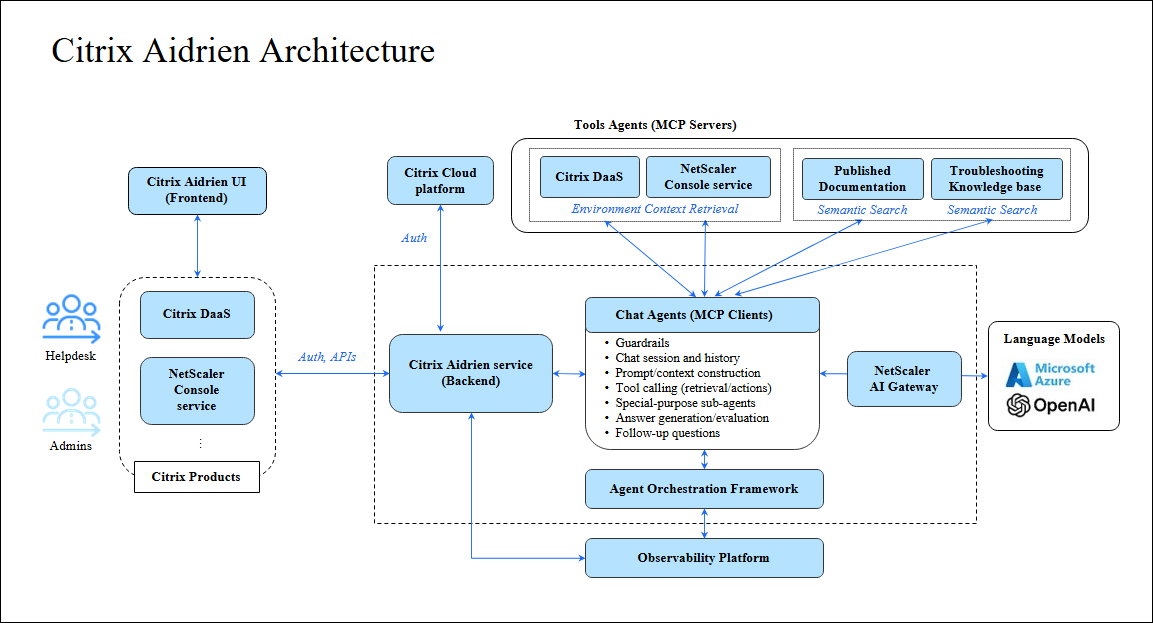
The overall logical architecture of Citrix Aidrien is shown in the following diagram.
Data flow
The typical data flow is as follows:
-
The Citrix admin accesses Citrix Cloud by typing
<https://citrix.cloud.com/>in a web browser. -
The admin navigates to a Citrix Aidrien-enabled product console, such as the Citrix Cloud home page, Citrix DaaS, or NetScaler Console service.
-
The admin opens the Citrix Aidrien sidebar by clicking the relevant icon, which loads the Citrix Aidrien UI (front-end).
-
The Citrix Aidrien service (backend) authorizes access from the Citrix Aidrien UI by verifying the authorization token with the Citrix Cloud platform.
-
The Citrix Aidrien UI invokes Citrix Aidrien service APIs to retrieve the history of previous conversations.
-
The admin submits a new question to Citrix Aidrien by using the relevant input box (either in a new chat session or in a previous one).
-
The Citrix Aidrien service routes the submitted question to the Chat Agent.
-
The Chat Agent creates a chat thread (or restores the state of a previous chat thread), in which it processes the question submitted by the admin.
-
The Chat Agent validates that the question doesn’t violate any guardrails.
-
The Chat Agent adds the system instructions and list of available tools to the request: Citrix and NetScaler documentation search, troubleshooting knowledge base search, and various tools for retrieving environment context, discovered from per-product MCP servers.
-
The Chat Agent sends the request to the large language model (LLM). NetScaler AI Gateway implements load balancing for all such requests across Azure OpenAI Service instances. Responsible AI moderation and security filters analyze and admit such requests.
-
The LLM analyzes the admin’s question (user’s intent) and responds that either:
-
The documentation and/or troubleshooting knowledge base search tool must be called, also providing the search arguments, or
-
One or more environment context retrieval tools must be called, also providing respective call arguments, or
-
The request must be processed by a special-purpose sub-agent, each with their own custom workflow. For information on supported use cases, see Citrix specialized use cases and NetScaler specialized use cases.
-
-
The Chat Agent runs the tools specified, except in the case of point 12.b where the Chat Agent acts as an MCP client and invokes tools offered by the Citrix DaaS, NetScaler Console service, and Citrix SecurAccess™ ZTNA MCP servers.
-
The Chat Agent sends the request, which now includes the results from the tool calling, to the LLM again.
-
The LLM generates the response, sent in streaming fashion through NetScaler AI Gateway to Chat Agent, while applying AI content safety guardrails.
-
The Chat Agent evaluates the quality of the response and, if it doesn’t fulfill the user’s intent, it might send it back to step 10, with feedback to be addressed.
-
The Chat Agent adds a few follow-up questions to the response.
-
The Citrix Aidrien service sends the response in streaming fashion to the Citrix Aidrien UI, which renders it (incrementally).
-
Orchestration and instrumentation of Chat Agent workflows is performed by the Agent Orchestration Framework.
-
In the context of steps 8–17, the Chat Agent sends distributed traces containing metadata of each interaction to the Observability platform.
-
The admin optionally provides positive or negative feedback to the last Citrix Aidrien response through the Citrix Aidrien UI.
-
The Citrix Aidrien UI sends feedback to the Citrix Aidrien service, which in turn sends the metadata to the Observability platform.
Data used in Citrix Aidrien
Citrix Aidrien draws information from various sources to provide comprehensive responses:
-
Citrix published documentation
-
Troubleshooting knowledge base
-
Environment context
Citrix published documentation
This set includes Support Knowledge Base (KB) articles, Citrix Community articles, Tech Zone, Citrix, NetScaler product documentation, and Citrix blogs.
Troubleshooting knowledge base
Citrix Aidrien leverages an internal expert guidance system built on a PII‑sanitized support resolution intelligence layer. This indexed knowledge base aggregates patterns from anonymized support cases to enhance issue recognition, conversational troubleshooting, and personalized recommendations. As a result, Citrix Aidrien more effectively surfaces known issues and provides you with guided, context‑aware assistance.
Environment context
Citrix Aidrien uses key contextual information from your environment to provide relevant answers. Contextual information includes selected Citrix DaaS infrastructure and session details (machine states, failures, resource utilization and associated configurations), Host Configuration, VDA registration and communication, end user session details (session logon, performance). It also includes NetScaler inventory infrastructure, such as build version, health, state, form factor, enabled features, resource utilization (CPU, Memory, Disk Usage, HTTP Req/sec, RX, TX, SSL cards, SSL Cores Up), Security advisory and vulnerability assessments, EOM/EOL, pre-upgrade checks.
Citrix Aidrien also includes Citrix SecurAccess™ ZTNA configuration. The configured applications and their access settings, the access policies and access rules that govern them in evaluation order, and the modeled access outcomes produced by evaluating those access policies against a given target.
For more information on retrieved data and use-cases, see Citrix specialized use cases, NetScaler specialized use cases, and Citrix SecurAccess™ ZTNA.
Key capabilities
Citrix Aidrien offers the following capabilities based on its ability to access Citrix-published content and supported environmental details:
| Capability | Description | Use Case Examples |
|---|---|---|
| Troubleshooting Guidance | Helps admins to troubleshoot issues and provide detailed guidance | Citrix: “How do I troubleshoot user connection failures that have occurred in last 1 day” |
| NetScaler: “how do I troubleshoot NetScaler upgrade failure issues” | ||
| Citrix SecurAccess™ ZTNA: "A Citrix SecurAccess™ ZTNA user who belongs to 'group name' is blocked from accessing application 'application name', while another user, 'user name', is able to access it. What is going wrong? Any suggestions to fix this?". | ||
| Knowledge Base Integration | Retrieves answers from official Citrix published documentation (Support Knowledge Base articles, Citrix Community articles, Tech Zone, Product Documentation, Citrix Blogs). | Citrix: "What are the recommended port requirements for Citrix DaaS™?" |
| Citrix: "How to troubleshoot VDA registration issues." | ||
| NetScaler: "How to enforce password complexity in NetScaler?" | ||
| Concept Explanation | Helps admins understand various technical concepts relevant to Citrix and NetScaler, clarifying their purpose and usage. | Citrix: "What is the difference between an application group and a delivery group?" |
| NetScaler: "Explain the concept of 'SNIP' in NetScaler and when it is used." | ||
| Context Aware Help (Supported only for Citrix DaaS use cases, NetScaler use cases, and Citrix SecurAccess™ ZTNA use cases) | Citrix environment data, such as VDAs/Machines, User sessions, NetScaler infrastructure information, and Citrix SecurAccess™ ZTNA applications and access policies. | Citrix: "How many active sessions do my DomainName\VDA-US-123KG have?" |
| NetScaler: "How many of my NetScalers are lower than 14.1-38.x?" | ||
| NetScaler: "What features are enabled on my NetScaler?" | ||
| Citrix SecurAccess™ ZTNA: "Can you give me a summary of my configured Citrix SecurAccess™ ZTNA applications and policies?" / Citrix SecurAccess™ ZTNA: "What Citrix SecurAccess™ ZTNA applications does the group 'group name' have access to based on the configured access policies?" | ||
| Configuration Guidance and Feature Enablement | Guides on enabling features and configuring policies within Citrix DaaS and NetScaler Console service. | Citrix : "How do I configure group policies for my delivery group 'HR-Apps'?" |
| NetScaler: "How do I enable content switching on NetScaler?" | ||
| Step-by-Step Guidance | Offers sequential instructions for performing configurations or workflows in the product UI. | Citrix: "Give me step-by-step instructions to configure multifactor authentication for Citrix DaaS users." |
| NetScaler: "Guide me through configuring SSL offload on NetScaler." |
Important:
Citrix Aidrien does not modify configurations.
Network requirements
Citrix Aidrien is available in the US and EU region for NetScaler Console service and Citrix DaaS. The Citrix Aidrien region selection is aligned with customers' Citrix Cloud preferences. Ensure that the listed network connectivity and service requirements are met. Ensure that network connectivity and service requirements are met.
-
Citrix Cloud services requirements: To use the Citrix Cloud services, you must be able to connect to the required Citrix addresses through the HTTPS port 443. For more information, see Internet Connectivity requirements.
-
Citrix Aidrien requirements: In addition to the Citrix Cloud requirements, the following endpoint addresses must be accessible through the HTTPS port 443 to use Citrix Aidrien.
| Endpoint | United States region | European Union region |
|---|---|---|
| Citrix Aidrien UI and APIs | <https://copilot.cloud.com/> |
<https://copilot-eu.cloud.com/> |
How to use Citrix Aidrien?
To access Citrix Aidrien:
-
Log into Citrix Cloud: Log in using your Citrix Cloud credentials.
-
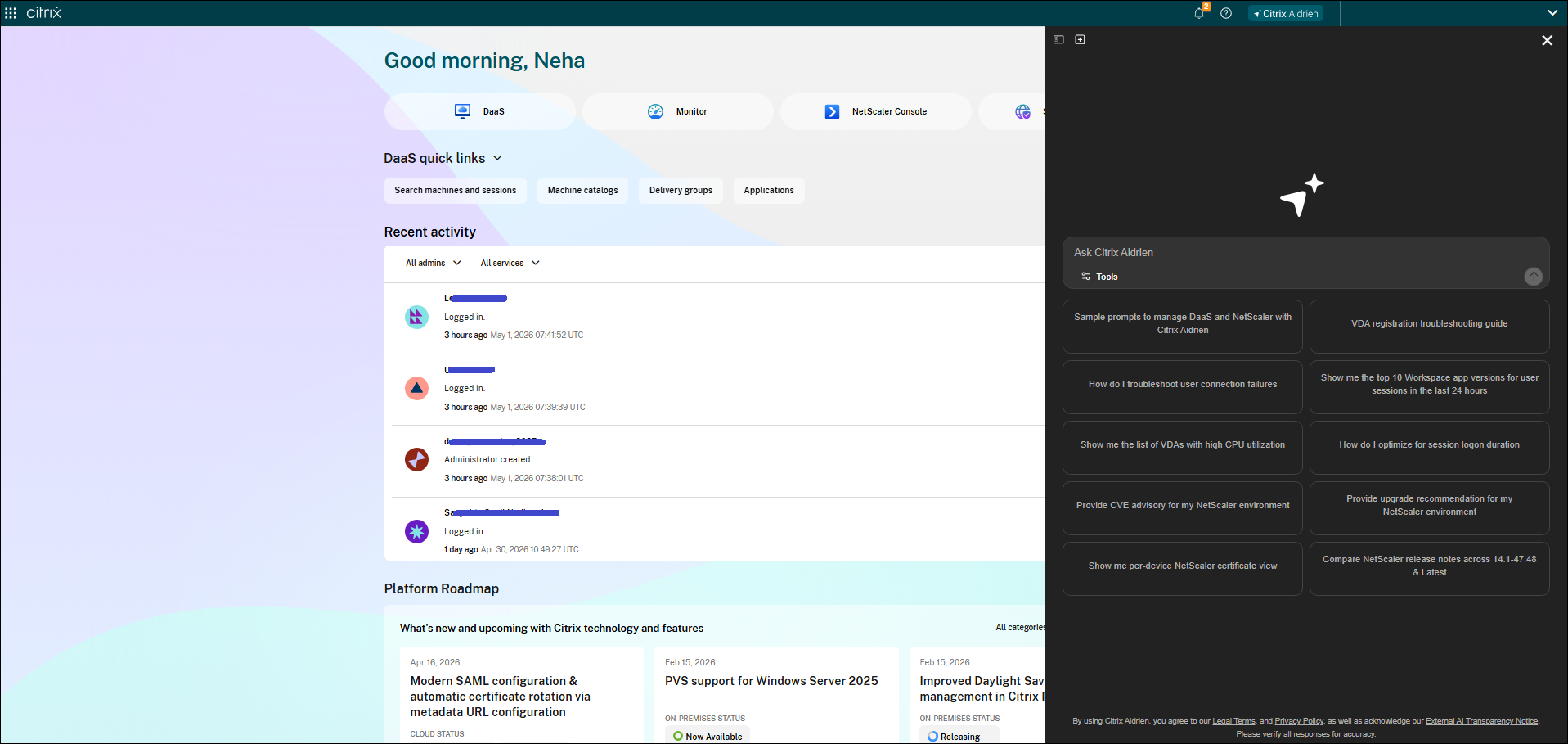
Access Citrix Aidrien: Click the “Citrix Aidrien” icon in the top navigation bar within the Citrix Cloud home page, Citrix DaaS service, or NetScaler Console service interface.
-
Initiate Conversation: You can initiate a conversation by selecting a default prompt or by asking specific questions about NetScaler and Citrix products.
-
Resume Conversation: Continue the conversation and its context from the chat history.
Note:
Citrix Aidrien is most effective when queries are specific to supported modules and deployment scenarios. If the query is unsupported, Citrix Aidrien offers fallback suggestions or a reference.
Manage access to Citrix Aidrien
Enable Citrix Aidrien in Citrix Cloud
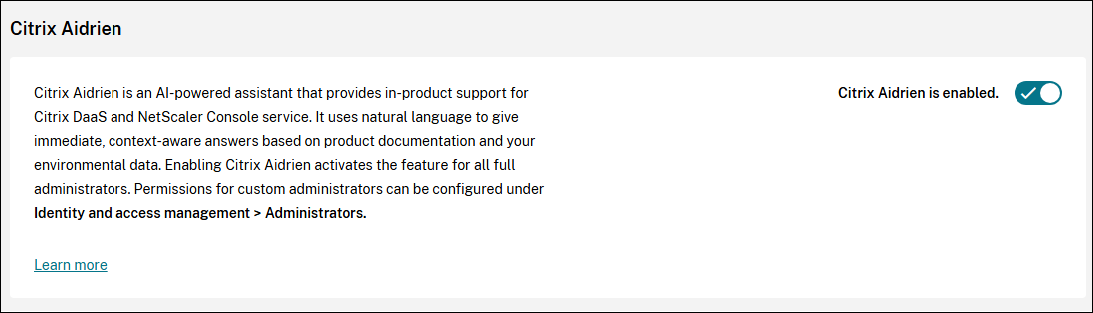
Full administrators can enable or disable Citrix Aidrien under Account Settings. To enable Citrix Aidrien, perform the following steps:
-
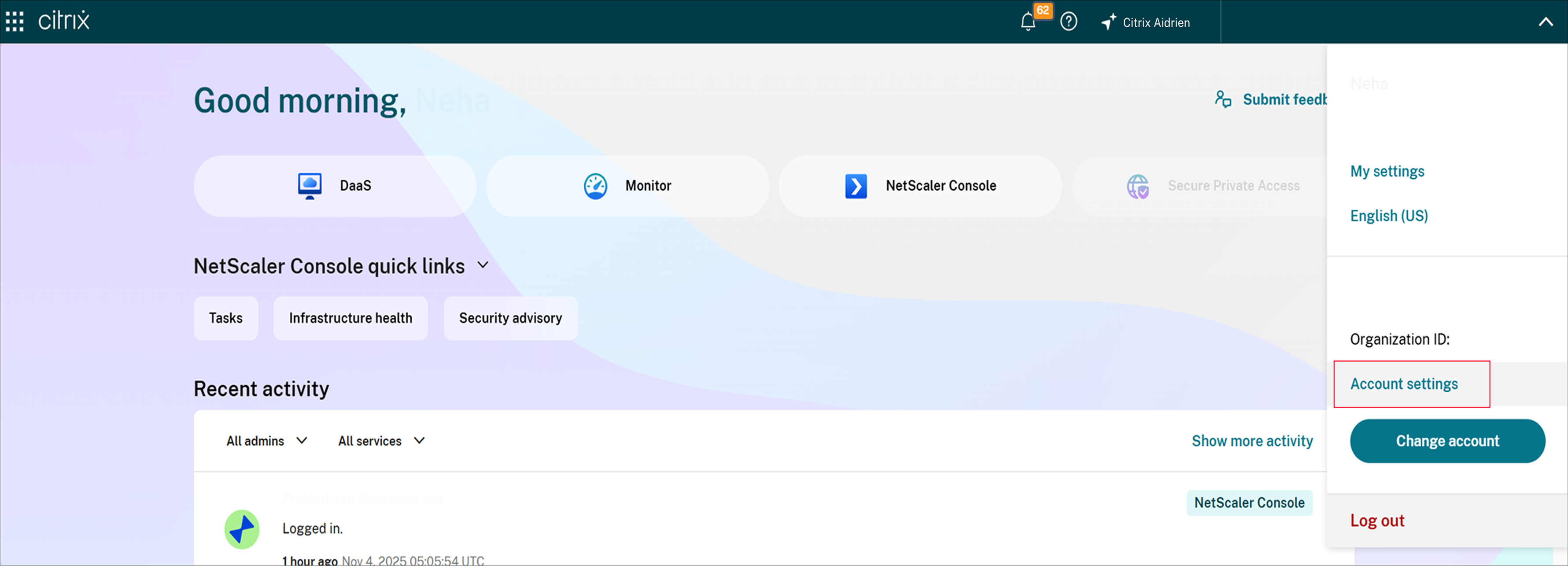
Click the top right corner of the Citrix Cloud navigation bar.
-
Click Account Settings and scroll down to the Citrix Aidrien section.
-
Slide the toggle to enable Citrix Aidrien for all full access administrators.
-
Refresh the page once to reflect the changes in the account settings.
-
Changes to these account settings for Citrix Aidrien are available under the Citrix Cloud system log section. Click the hamburger icon on the top left corner of the Citrix Cloud navigation bar and navigate to System log.

The administrators with full administrator access or authorized access to Citrix Aidrien can see Citrix Aidrien in the Citrix Cloud navigation bar.
Administrator access to Citrix Aidrien
Administrator access to Citrix Aidrien is managed in your Citrix Cloud account. By default, Citrix Cloud uses the Citrix Identity provider for user identity management. Alternatively, other identity providers listed in Identity and access management can be used.
-
All Full access administrators in Citrix Cloud get access to Citrix Aidrien when the feature is enabled.
-
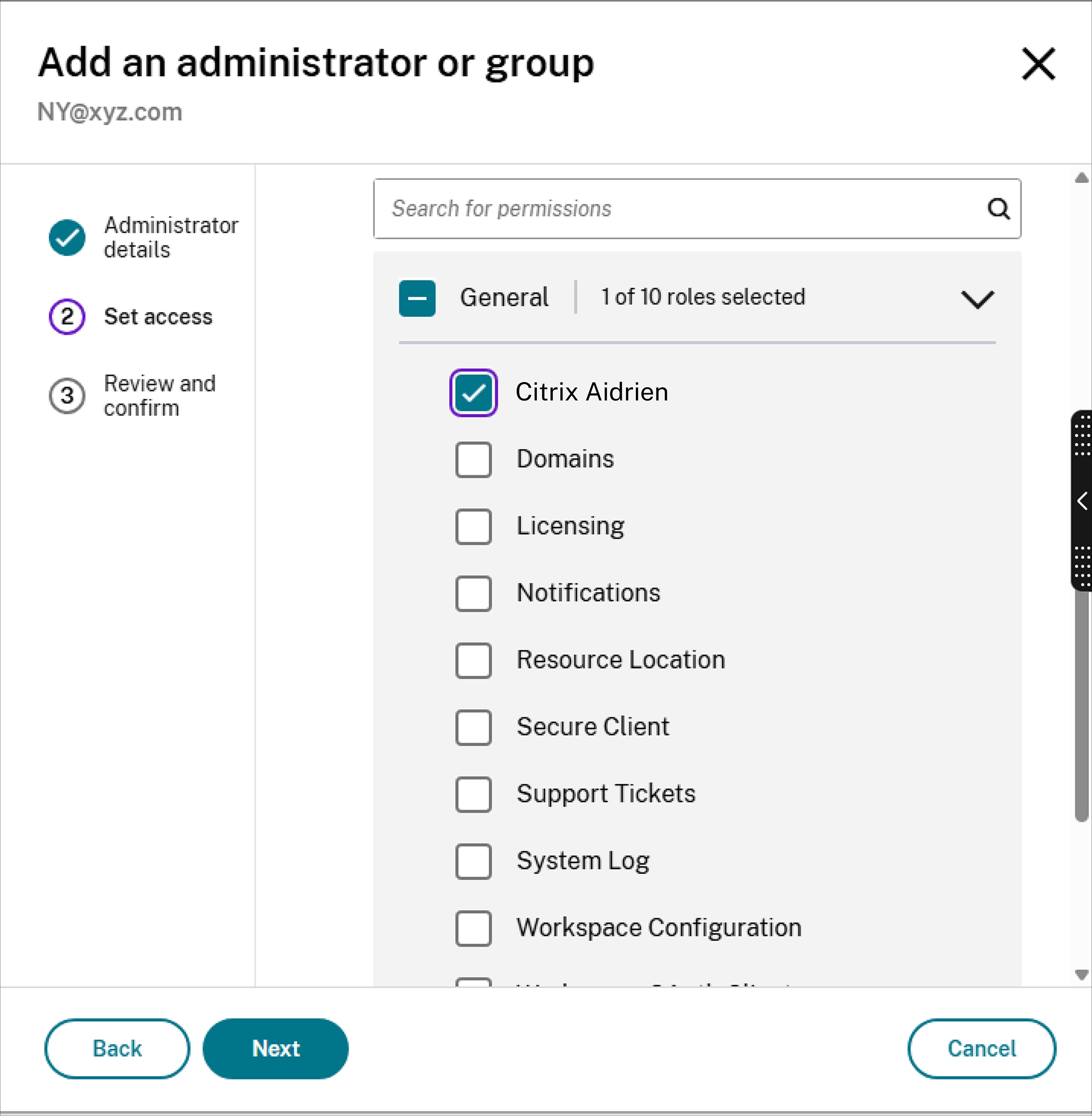
For existing or new custom admin roles, you can edit the roles to enable Citrix Aidrien. Click the hamburger icon in the top left corner of Citrix Cloud navigation bar and navigate to Identity and access management > Administrators > Edit Access to enable Citrix Aidrien under General category.
-
Changes to these Identity and access management access settings for Citrix Aidrien are available under the Citrix Cloud system log section. Click the hamburger icon on the top left corner of the Citrix Cloud navigation bar and navigate to System log.

Access to environment context in Citrix Aidrien
Administrators must possess the necessary permissions for Citrix Cloud services (Citrix DaaS and NetScaler Console service) to retrieve the environment context through Citrix Aidrien. Administrator scopes set in Citrix Cloud are honored when any prompt related to the environment is asked. For example, if an administrator's role is scoped to Delivery Group 1, and a tenant has two Delivery Groups, Citrix Aidrien displays information only about Delivery Group 1, and not Delivery Group 2.
If an administrator’s role is scoped to three NetScaler instances, and a tenant has 10 NetScaler instances, Citrix Aidrien displays information only for the three NetScaler instances that the administrator has access to.
The same applies to Citrix SecurAccess™ ZTNA. Citrix Aidrien returns only the applications and access policies that the administrator's own Citrix Cloud permissions allow them to read, so two administrators with different scopes can receive different answers to the same question.
For more information about role-based access control (RBAC), see Manage administrator access to Citrix Cloud, Citrix DaaS Delegated Administration, and NetScaler Console service Role-Based Access Control.
Security and data handling
-
Prompts, responses, and data accessed through Citrix Aidrien through APIs/tools are not used for training any Large Language Models (LLMs).
-
Citrix Aidrien accesses and stores customer-identifiable data.
-
Responses are based on approved documentation and metadata.
-
All interactions remain within the Citrix secure environment.
-
Prompts and responses are stored to support user chat history.
For more information, see Architecture and Data Security.
Prompt Library
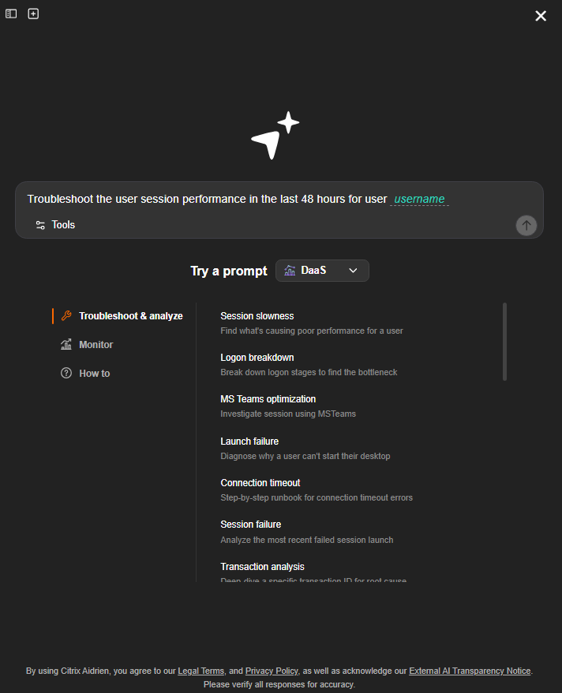
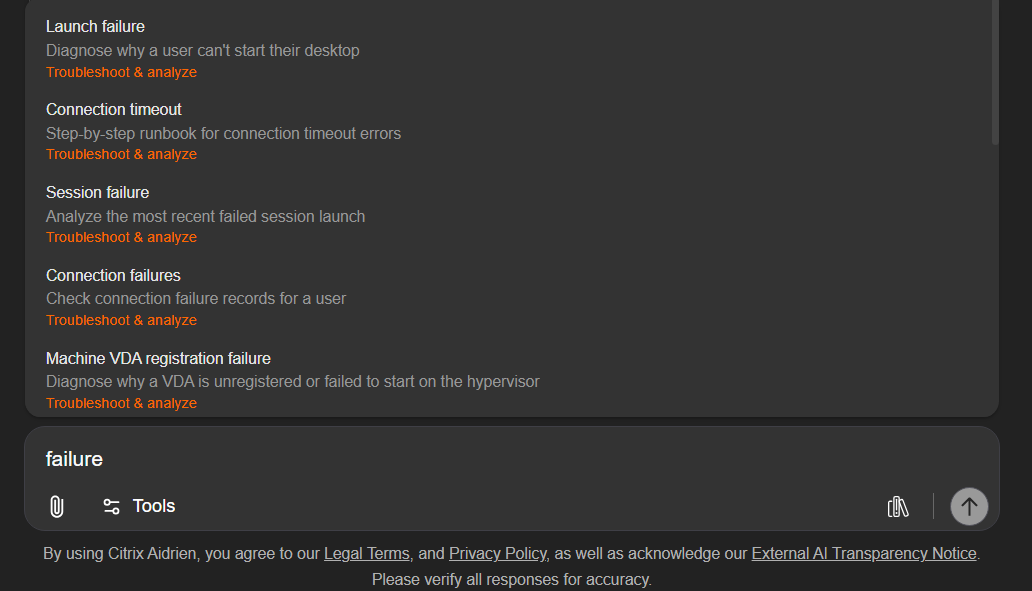
Browse ready-to-use prompts for Citrix DaaS, NetScaler and SPA use cases across multiple categories. Select a prompt, fill in details such as the user name, CVE ID or group name, and enter your prompt. This feature aims to provide the customers with an understanding of the use cases Citrix Aidrien supports today.
Here are the types of prompts available in the prompt library today:
-
Citrix DaaS: Troubleshoot & analyze
-
Session slowness: Find what's causing poor performance for a user
-
Logon breakdown: Break down logon stages to find the bottleneck
-
Microsoft Teams optimization: Investigate session using MSTeams
-
Launch failure: Diagnose why a user can't start their desktop
-
Connection timeout: Step-by-step runbook for connection timeout errors
-
Session failure: Analyze the most recent failed session launch
-
Transaction analysis: Deep-dive a specific transaction ID for the root cause
-
Connection failures: Check connection failure records for a user
-
VDA unregistered: Diagnose why a VDA isn't registering with the broker
-
VDA health check: Trigger a health check on the machine for key issue identification
-
Machine VDA registration failure: Diagnose why a VDA is unregistered or failed to start on the hypervisor
-
Machine catalog provisioning failure: Diagnose machine catalog creation failure due to missing images or provisioning errors
-
Image preparation failure: Troubleshoot image version preparation failures during catalog creation or image updates
-
Delivery group machine fault state: Diagnose machines in faulted or unregistered state within a delivery group
-
Service account secret expired: Diagnose expired credentials for Microsoft Entra ID service accounts
-
Hosting connection failure: Troubleshoot hosting connection initialization and hypervisor connectivity issues
-
App package discovery failure: Diagnose App-V package discovery session failures due to unavailable machines
-
Zone resource limit warning: Diagnose resource location capacity warnings and performance degradation risks
-
Background task failure (single): Analyze failed asynchronous operations with execution timeline and configuration
-
Background task failure (batch): Analyze batch operation failures with per-item error breakdown and error patterns
-
Blocking API error (error popup): Diagnose synchronous API failures with structured error fingerprint and technical details
-
-
Citrix DaaS: Monitor
-
Usage summary: Get an overview of user session activity
-
Top loaded VDAs: Spot VDAs with high CPU or memory usage
-
Frequent reconnects: Find users with repeated disconnect/reconnect cycles
-
High latency sessions: Find sessions with ICA RTT above a threshold
-
Endpoint versions: Find clients with older or unsupported Citrix Workspace app
-
Launch failures: Group recent session launch failures by reason
-
Unregistered VDAs: List all VDAs not currently registered with the broker
-
-
Citrix DaaS: How to
-
Triage connection failures: Understand how to troubleshoot various user connection failures
-
VDA registration guide: Create a guide to comprehensively troubleshoot for registration errors
-
MCS in Azure: Understand how Machine Creation Services provisions in Azure
-
Citrix Advisor: Learn what Advisor checks and how to act on recommendations
-
Group policies: Set up Citrix policies for a delivery group
-
Entra SSO: Configure Microsoft Entra ID single sign-on for Citrix DaaS
-
Connector resilience: Set up Cloud Connector failover across regions
-
Intelligent Autoscale: Configure data-driven autoscaling with performance targets
-
VDA Upgrade Service: Set up automated VDA upgrades and prerequisites
-
Image sharing: Share prepared images across Azure subscriptions or tenants
-
Teams call quality: Enable the Teams call quality dashboard in Director
-
Always On Tracing: Forward AOT logs to a centralized log server
-
Monitor data for troubleshooting: Understand session topology, hop view, and launch diagnostics
-
Cost optimization: Track savings, rightsize workloads, and model reservations
-
Workspace app error: Identify causes for app launch errors
-
-
NetScaler: SSL & certificates
-
Expiring certificates: Assess certificate expiry
-
Weak certificates: Showcase certificates with weak algorithm
-
Deprecated protocols: Check vservers with deprecated TLS version
-
SSL config analysis: Analyze SSL configuration
-
-
NetScaler: Instances & features
-
Firmware: Analyze instance firmware
-
Down instances: Assess instance state
-
Enabled features: View features enabled
-
Deployment type: View instance deployment type
-
Instance analysis: Analyze instance health, feature and security
-
-
NetScaler: Health and performance
-
Real-time metrics: Pull real-time resource utilization across your fleet
-
HTTP traffic: Assess traffic pattern across your fleet
-
Disk usage: Check high disk usage instances
-
Interface status: Know interface state
-
Environment summary: Analyze overall deployment health
-
-
NetScaler: Software versions
-
Version inventory: Check firmware version
-
Version compliance: Assess against target firmware version
-
-
NetScaler: Upgrades
-
EOL / EOM check: Understand EOM & EOL builds
-
Build comparison: Compare firmware versions
-
Upgrade readiness: Check upgrade readiness
-
Release analysis: Assess release impact
-
Release notes: Release note assessment
-
-
NetScaler: Security and CVEs
-
CVE scan: Known CVE assessment across instances
-
CVE impact: Recent CVE assessment
-
CVE remediation: CVE fix assessment
-
-
SPA: Application and Policies
-
List applications: Review configured applications
-
List access policies: Review configured access policies
-
Configuration summary: Summarize configured applications and policies
-
-
SPA: Policy review
-
Conflicting policies: Find policies that collide and need re-prioritizing
-
Missing location rules: Spot policies with no location restriction
-
Reusable group policy: Check whether an existing policy already covers a group
-
Policies blocking an app: Find what policy is denying access to an application
-
-
SPA: Access troubleshooting
-
Group application access: See what a group can reach under the current policies
-
User access simulation: Check allowed and denied applications for a user
-
User blocked from an app: Diagnose why one user is denied while another is allowed
-
-
SPA: Users and groups
-
Find a group: Check whether a group exists in your identity providers
-
User identities: List the identities matching a user name query
-
User details: Look up the details and claims of a user
-
Here are the two ways you can access prompt library:
-
"Try a prompt" option in a new chat: You will find a clear text of the "Try a prompt" option when you open a new chat. Select the product and you can explore all the prompts supported by Citrix Aidrien for those products.
-
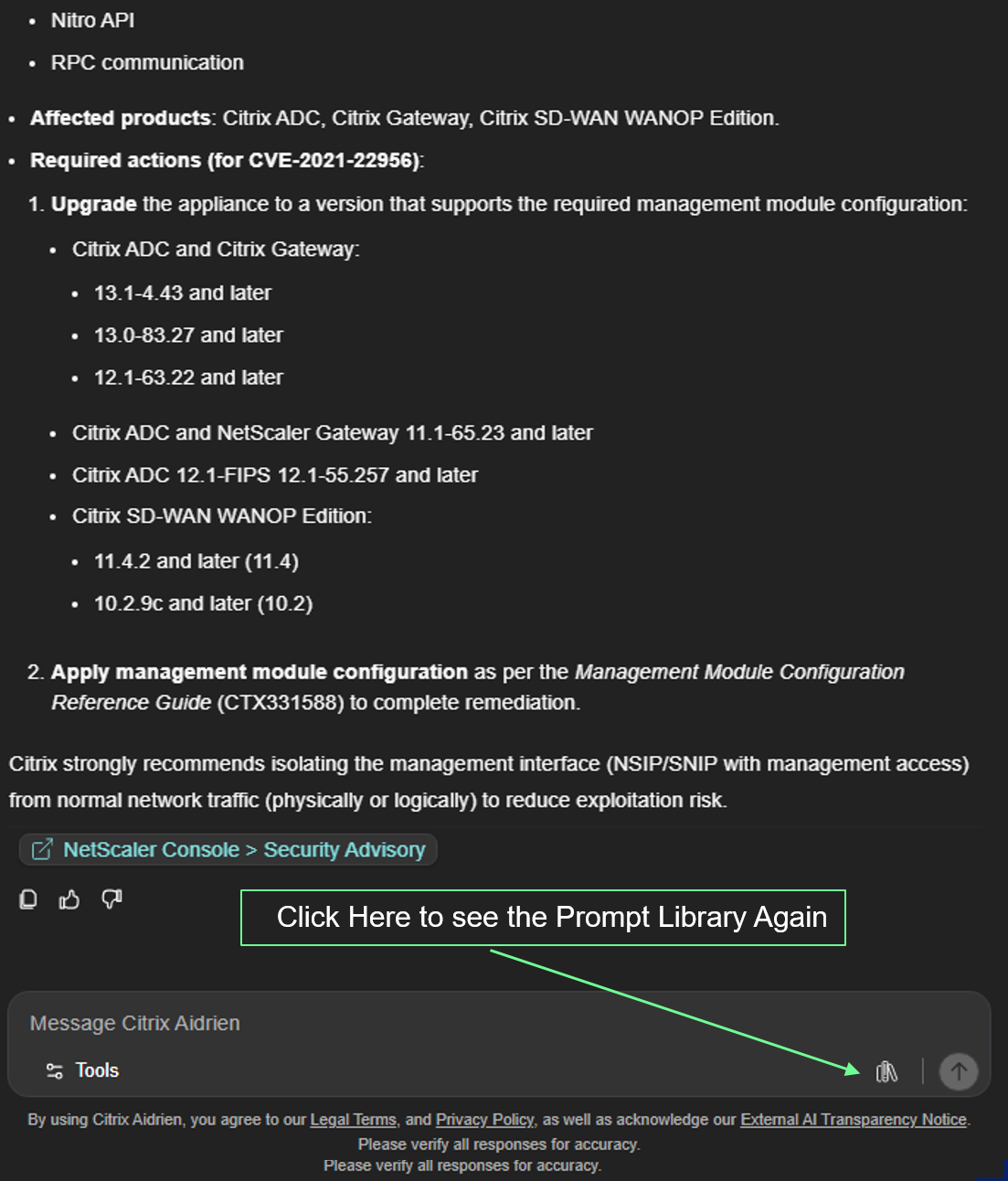
Library icon: You will find an icon at the bottom right of the UI prompt window. Once you click on it, you will see the complete list of prompts Citrix Aidrien supports today.
Dynamic Prompts
Citrix Aidrien has released the support for dynamic prompts, wherein it will showcase possible prompts from the prompt library, which matches the text you entered in the UI prompt window.
Limitations
-
Limited environment context: Only select details of your environment, as specified in Environment context, are supported within Citrix Aidrien.
-
Citrix SecurAccess™ ZTNA context is configuration data. Citrix Aidrien reads your Citrix SecurAccess™ ZTNA applications and access policies and models access outcomes from them; it does not read live session, connection, or usage telemetry, and it does not modify your Citrix SecurAccess™ ZTNA configuration.
Share your feedback
We highly value your feedback and insights to shape our roadmap.
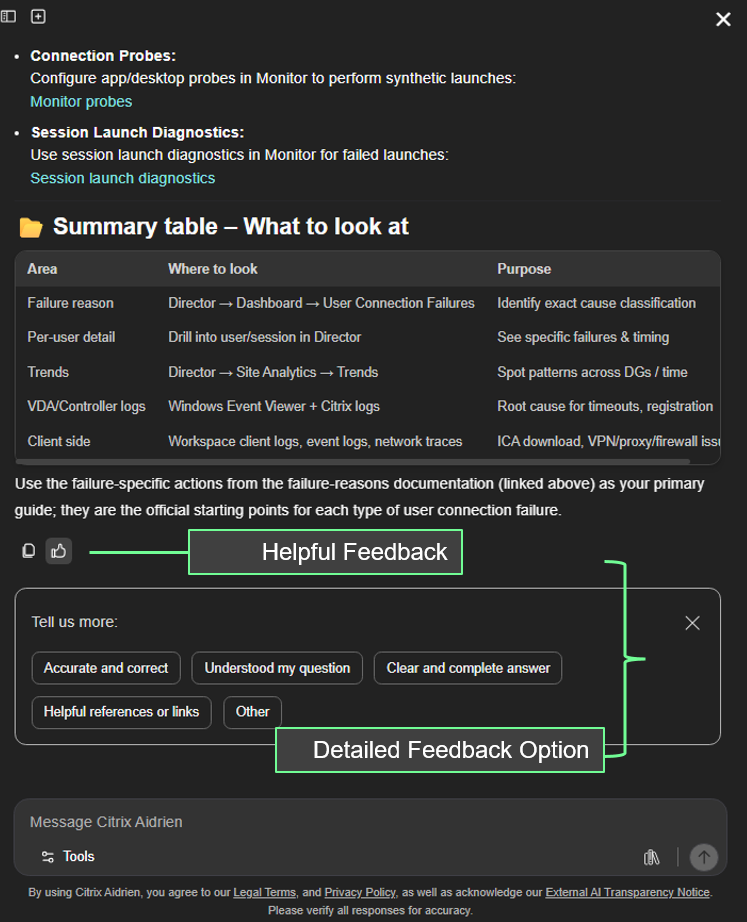
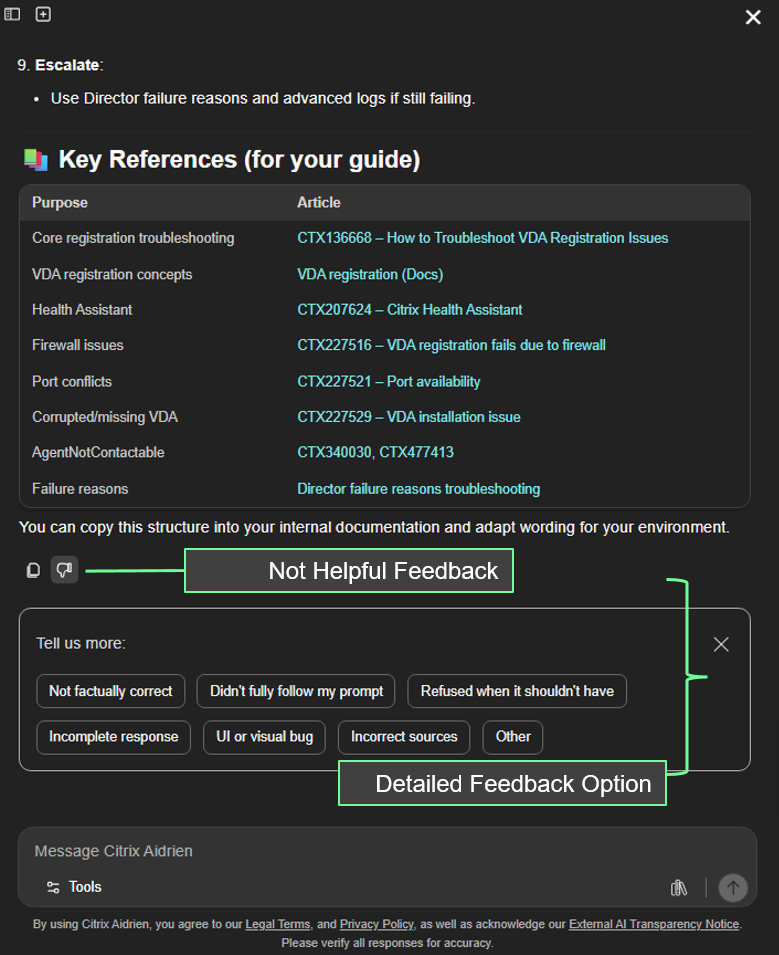
Use the Helpful/Not Helpful icons at the end of each response within the Citrix Aidrien chat interface, then provide more detailed feedback about what worked or what needs improvement, such as accuracy, completeness, or reference quality.
-
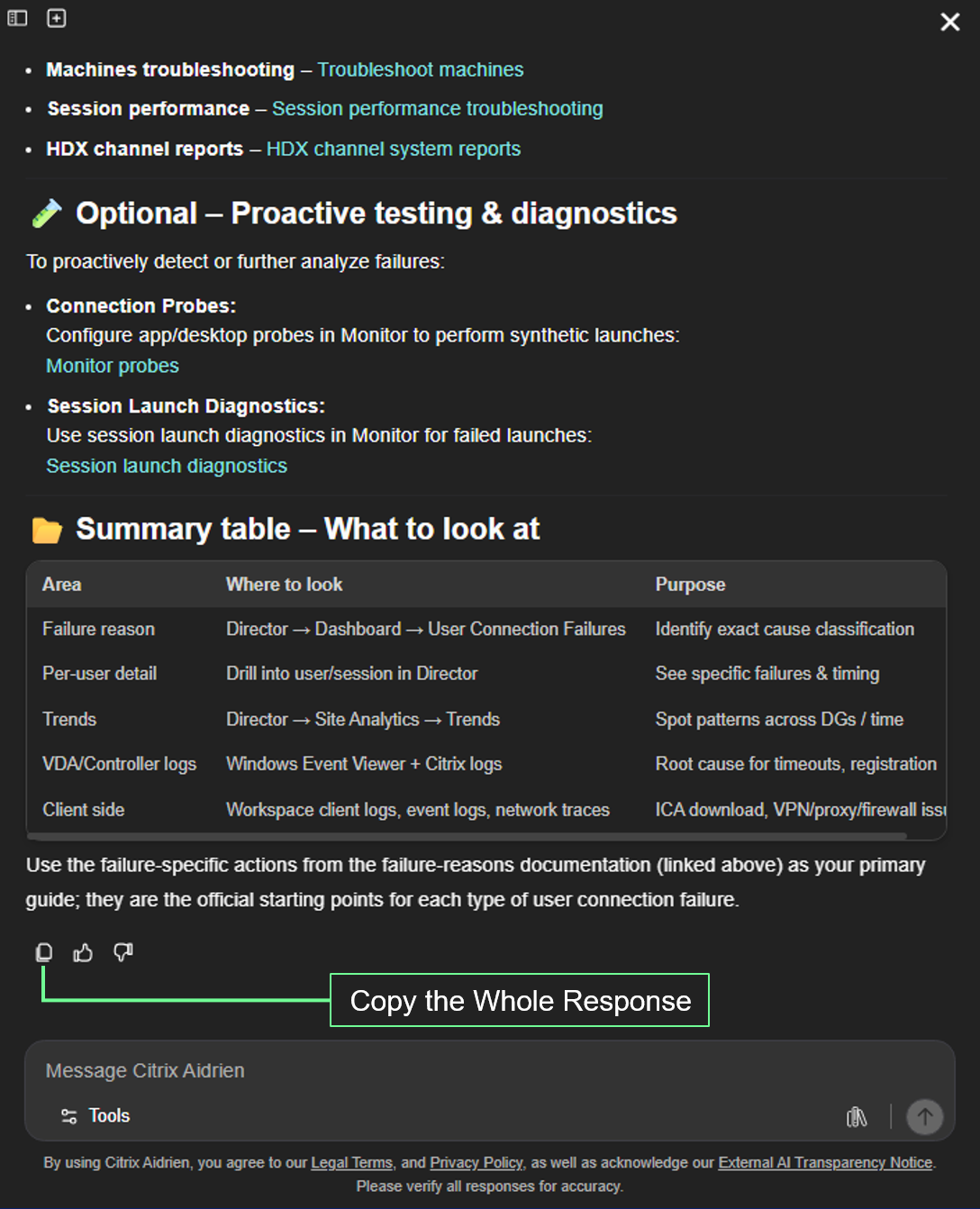
Copy ResponseUse the copy icon beneath an answer to copy the entire response for reuse elsewhere.
-
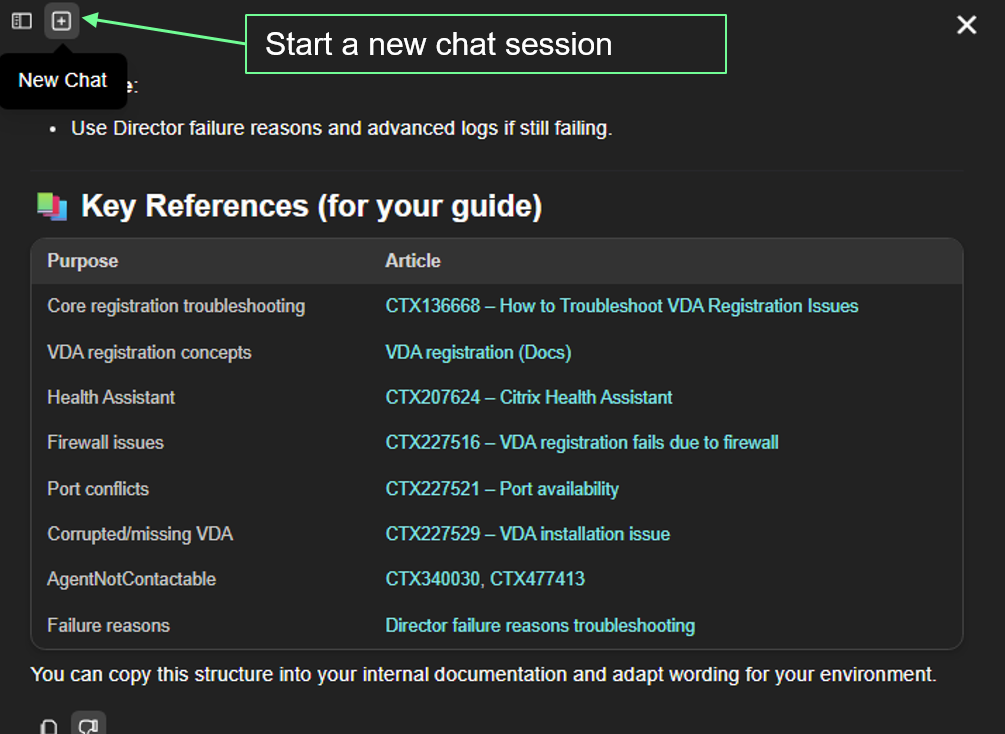
Start a new chatStart a new chat when switching to new subjects or topics. Citrix Aidrien considers conversation context only within the current chat session.
-
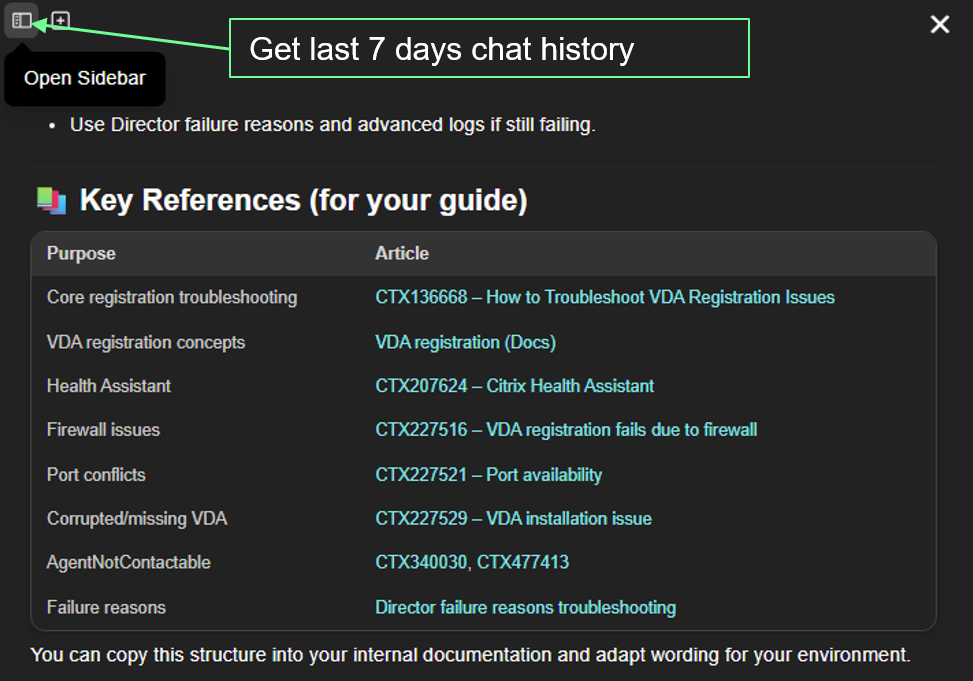
Chat historyOpen Chat History to revisit recent conversations. Citrix Aidrien displays the last seven days of chat history.