
System requirements
While waiting for Citrix to provision Citrix Endpoint Management, be sure to prepare for your Citrix Endpoint Management deployment by installing Cloud Connector. Although Citrix hosts and delivers your Citrix Endpoint Management solution, some communication and port setup is required. That setup connects the Citrix Endpoint Management infrastructure to corporate services, such as Active Directory.
Cloud Connector requirements
Citrix uses Cloud Connector to integrate the Citrix Endpoint Management architecture into your existing infrastructure. Cloud Connector integrates the following resource locations to Citrix Endpoint Management securely over port 443: LDAP, PKI Server, internal DNS queries, and Citrix Workspace enumeration.
-
At least two dedicated Windows Server machines that are joined to your Active Directory domain. The machines can be virtual or physical. The machine where you're installing the Connector must be in sync with UTC time for proper installation and operation. For a full list of the latest requirements, see the deployment materials provided by your Citrix Account team.The onboarding wizard guides you through installing Cloud Connector on those machines.
-
For more platform system requirements, see Citrix Cloud Connector.
Supported Active Directory functional levels
For use with Citrix Endpoint Management, the Citrix Cloud Connector supports the following forest and domain functional levels in the Active Directory.
| Forest Functional Level | Domain Functional Level | Supported Domain Controllers |
|---|---|---|
| Windows Server 2016 | Windows Server 2016 | Windows Server 2016, Windows Server 2019 |
| Windows Server 2016 | Windows Server 2019 | Windows Server 2019 |
| Windows Server 2019 | Windows Server 2019 | Windows Server 2019 |
Note:
Windows Servers 2012 R2, 2012, and 2008 R2 are no longer supported as they have reached end of life. For more information, see Microsoft products life cycle documentation.
NetScaler Gateway requirements
Citrix Endpoint Management requires a NetScaler Gateway installed in your resource location for the following scenarios:
-
You require a micro VPN for access to internal network resources for line-of-business apps. Those apps are wrapped with Citrix MDX technology. The micro VPN needs NetScaler Gateway to connect to internal back-end infrastructures.
-
You plan to use Citrix mobile productivity apps, such as Citrix Secure Mail.
-
You plan to integrate Citrix Endpoint Management with Microsoft Endpoint Manager.
The requirements:
-
Domain (LDAP) authentication
-
NetScaler Gateway 12.1 or above, with a Platform/Universal license
For details, see Licensing.
-
Public SSL Certificate.
For details, see Create and Use SSL Certificates on a Citrix ADC Appliance.
-
Unused public IP address for NetScaler Gateway Virtual Server
-
Publicly resolvable Fully Qualified Domain Name (FQDN) for NetScaler Gateway Virtual Server
-
Cloud-hosted Citrix Endpoint Management Intermediate and Root certificates (provided in the script bundle)
-
Unused internal private IP address for the proxy load balancer IP
-
For port requirements, see NetScaler Gateway port requirements later in this article.
For information about NetScaler Gateway requirements, see the deployment materials provided by your Citrix Account team.
For information about Android Enterprise requirements, see the Android Enterprise section.
Citrix Files requirements
Citrix Files file sync and sharing services are available in the Citrix Endpoint Management Premium Service offering. Storage zones controller extends the Citrix Files software as a service (SaaS) cloud storage by giving private data storage to your Citrix Files account.
Storage zones controller requirements:
-
A dedicated physical or virtual machine
-
Windows Server 2012 R2 (Datacenter, Standard, or Essentials), Windows Server 2016, Windows Server 2019, or Windows Server 2022
-
2 vCPUs
-
4 GB RAM
-
50 GB hard disk space
-
Server roles for Web Server (IIS):
-
Application Development: ASP. NET 4.5.2
-
Security: Basic Authentication
-
Security: Windows Authentication
-
Citrix Files platform requirements:
-
The Citrix Files installer requires administrative privileges on the Windows Server
-
Citrix Files Admin user name
Port requirements
To enable devices and apps to communicate with Citrix Endpoint Management, you open specific ports in your firewalls. The following diagram shows the traffic flow for Citrix Endpoint Management.
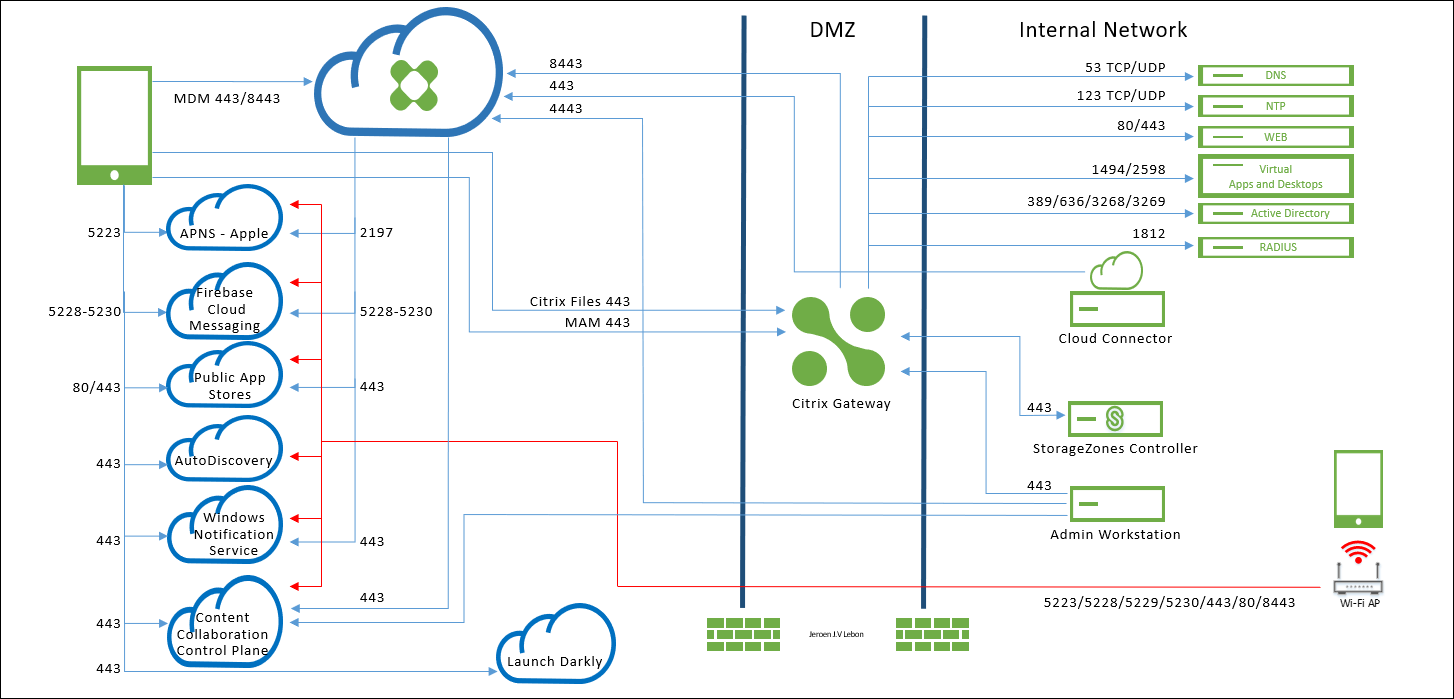
The following sections list the ports that you must open. For information about the URLs that mobile productivity apps use, see Feature flag management.
NetScaler Gateway port requirements
Open ports to allow user connections from Citrix Secure Hub and Citrix Workspace through NetScaler Gateway to:
-
Citrix Endpoint Management
-
StoreFront
-
Other internal network resources, such as intranet websites
For more information about NetScaler Gateway, see Configuring Settings for your Citrix Endpoint Management Environment in the NetScaler Gateway documentation. For information about IP addresses, see How NetScaler Gateway uses IP addresses in the NetScaler Gateway documentation.
| TCP Port | Description | Source | Destination |
|---|---|---|---|
| 53 (TCP and UDP) | Used for DNS connections. | NetScaler Gateway SNIP | DNS server |
| 80/443 | NetScaler Gateway passes the micro VPN connection to the internal network resource through the second firewall. | NetScaler Gateway SNIP | Intranet websites |
| 123 (TCP and UDP) | Used for Network Time Protocol (NTP) services. | NetScaler Gateway SNIP | NTP server |
| 389 | Used for insecure LDAP connections. | NetScaler Gateway NSIP (or, if using a load balancer, SNIP) | LDAP authentication server or Microsoft Active Directory |
| 443 | Used for connections to StoreFront from Citrix Workspace to Citrix Virtual Apps and Desktops. | Internet | NetScaler Gateway |
| 443 | Used for connections to Citrix Endpoint Management for web, mobile, and SaaS app delivery. | Internet | NetScaler Gateway |
| 443 | Used for Cloud Connector communication – LDAP, DNS, PKI & Citrix Workspace enumeration | Cloud Connector Servers | https://*.citrixworkspacesapi.net, https://*.cloud.com (commercial), https://*.blob.core.windows.net/, https://*.servicebus.windows.net |
| 443 | Used for accessing the Citrix Endpoint Management Self-Help Portal, if enabled, through the browser. | Access point (browser) | Citrix Endpoint Management (https://<sitename>/zdm/shp) |
| 636 | Used for secure LDAP connections. | NetScaler Gateway NSIP (or, if using a load balancer, SNIP) | LDAP authentication server or Active Directory |
| 1494 | Used for ICA connections to Windows-based applications in the internal network. Citrix recommends keeping this port open. | NetScaler Gateway SNIP | Citrix Virtual Apps and Desktops |
| 1812 | Used for RADIUS connections. | NetScaler Gateway NSIP | RADIUS authentication server |
| 2598 | Used for connections to Windows-based applications in the internal network using session reliability. Citrix recommends keeping this port open. | NetScaler Gateway SNIP | Citrix Virtual Apps and Desktops |
| 3269 | Used for Microsoft Global Catalog secure LDAP connections. | NetScaler Gateway NSIP (or, if using a load balancer, SNIP) | LDAP authentication server or Active Directory |
| 4443 | Used for accessing the Citrix Endpoint Management console by an administrator through the browser. | Access point (browser) | Citrix Endpoint Management |
| 8443 | Used for enrollment, app store, and mobile app management (MAM). | NetScaler Gateway SNIP | Citrix Endpoint Management |
| 8443 | Secure Ticket Authority (STA) port used for Citrix Secure Mail authentication token | NetScaler Gateway SNIP | Citrix Endpoint Management |
Network and firewall requirements
To enable devices and apps to communicate with Citrix Endpoint Management, you open specific ports in your firewalls. The following tables list those ports.
Open ports from the internal network to Citrix Cloud:
| TCP port | Source IP | Description | Destination | Destination IP | |
|---|---|---|---|---|---|
| 443 | Cloud Connector | https://*.citrixworkspacesapi.net, https://*.cloud.com (commercial), https://*.sharefile.com, https://cwsproduction.blob.core.wind ows.net/downloads, https://*.servicebus.windows.net |
|||
| 443 | Administrative Console | https://*.citrixworkspacesapi.net, https://*.cloud.com (commercial), https://*.citrix.com, https://cwsproduction.blob.core.windows.net/downloads |
|||
| 443 | Citrix Endpoint Management Self-Help Portal access through a browser (if the portal is enabled) | Citrix Endpoint Management | |||
| 4443 | Citrix Endpoint Management console access through a browser | Citrix Endpoint Management |
Open ports from the Internet to the DMZ:
| TCP port | Description | Source IP | Destination | Destination IP |
|---|---|---|---|---|
| 443 | Citrix Endpoint Management Client Device | NetScaler Gateway IP | ||
| 443 | Citrix Endpoint Management Client Device | NetScaler Gateway VIP | ||
| 443 | Citrix Files Public IP | CTX208318 | NetScaler Gateway VIP |
Open ports from the DMZ to the internal network:
| TCP port | Description | Source IP | Destination | Destination IP |
|---|---|---|---|---|
| 389 or 636 | NetScaler Gateway NSIP | Active Directory IP | ||
| 53 (UDP) | NetScaler Gateway NSIP | DNS Server IP | ||
| 443 | NetScaler Gateway SNIP | Exchange (EAS) Server IP | ||
| 443 | NetScaler Gateway SNIP | Internal Web Apps/Services | ||
| 443 | NetScaler Gateway SNIP | Storage zones controller IP |
Open ports from the internal network to the DMZ:
| TCP port | Description | Source IP | Destination | Destination IP |
|---|---|---|---|---|
| 443 | Admin Client | NetScaler Gateway NSIP |
Open ports from the internal network to the Internet:
| TCP port | Description | Source IP | Destination | Destination IP |
|---|---|---|---|---|
| 443 | Exchange (EAS) Server IP | Citrix Endpoint Management Push Notification Listeners (1) | ||
| 443 | Storage zones controller IP | Citrix Files Control Plane | CTX208318 |
(1) us-east-1.mailboxlistener.xm.citrix.com, eu-west-1.mailboxlistener.xm.citrix.com, ap-southeast-1.mailboxlistener.xm.citrix.com
Open ports from the corporate Wi-Fi to the Internet:
| TCP port | Description | Source IP | Destination | Destination IP |
|---|---|---|---|---|
| 8443 / 443 | Citrix Endpoint Management Client Device | Citrix Endpoint Management | ||
| 5223 | Citrix Endpoint Management Client Device | Apple APNS Servers | 17.0.0.0/8 |
|
| 5228 | Citrix Endpoint Management Client Device | Firebase Cloud Messaging | android.apis.google.com, fcm.googleapis.com |
|
| 5229 | Citrix Endpoint Management Client Device | Firebase Cloud Messaging | android.apis.google.com, fcm.googleapis.com |
|
| 5230 | Citrix Endpoint Management Client Device | Firebase Cloud Messaging | android.apis.google.com, fcm.googleapis.com |
|
| 443 | Citrix Endpoint Management Client Device | Firebase Cloud Messaging | fcm.googleapis.com |
|
| 443 | Citrix Endpoint Management Client Device | Windows Push Notification Service | *.notify.windows.com |
|
| 443 / 80 | Citrix Endpoint Management Client Device | Apple iTunes App Store | ax.apps.apple.com, *.mzstatic.com, vpp.itunes.apple.com |
|
| 443 / 80 | Citrix Endpoint Management Client Device | Google Play | play.google.com, android.clients.google.com, android.l.google.com, android.com, google-analytics.com |
|
| 443 / 80 | Citrix Endpoint Management Client Device | Microsoft App Store | login.live.com, *.notify.windows.com |
|
| 443 | Citrix Endpoint Management Client Device | Citrix Endpoint Management AutoDiscovery service for iOS and Android | discovery.cem.cloud.us |
|
| 443 | Citrix Endpoint Management Client Device | Citrix Endpoint Management AutoDiscovery service for Windows | enterpriseenrollment.mycompany.com, discovery.cem.cloud.us |
|
| 443 | Storage zones controller IP | Citrix Files Control Plane | CTX208318 | |
| 443 | Citrix Endpoint Management Client Device | Google Mobile Management, Google APIs, Google Play Store APIs | *.googleapis.com |
|
| 443 | Citrix Endpoint Management Client Device | Connectivity checks for CloudDPC versions earlier than v470. Android connectivity checks starting with N MR1 requires https://www.google.com/generate_204 to be reachable, or for the given Wi-Fi network to point to a reachable PAC file) |
connectivitycheck.android.com, www.google.com |
Port requirement for AutoDiscovery service connectivity
This port configuration makes sure that Android devices connecting from Citrix Secure Hub for Android can access the Citrix Endpoint Management AutoDiscovery service (ADS) from within the internal network. The ability to access the ADS is important when downloading any security updates made available through the ADS.
Note:
ADS connections might not support your proxy server. In this scenario, allow the ADS connection to bypass the proxy server.
If you want to enable certificate pinning, complete the following prerequisites:
-
Collect Citrix Endpoint Management server and NetScaler Gateway certificates: The certificates must be in PEM format and must be a public certificate and not the private key.
-
Contact Citrix Support and place a request to enable certificate pinning: During this process, you're asked for your certificates.
Certificate pinning requires that devices connect to ADS before the device enrolls. This requirement makes sure that the latest security information is available to Citrix Secure Hub. For Citrix Secure Hub to enroll a device, the device must reach the ADS. So opening ADS access within the internal network is critical to enabling devices to enroll.
To allow access to the ADS for Citrix Secure Hub for Android/iOS, open port 443 for the following FQDN :
| FQDN | Port | IP and port usage |
|---|---|---|
discovery.cem.cloud.us |
443 | Citrix Secure Hub - ADS Communication via CloudFront |
For information on supported IP addresses, see Cloud-based storage centers from AWS.
Android Enterprise network requirements
For information about the outbound connections to consider when setting up network environments for Android Enterprise, see the Google support article, Android Enterprise Network Requirements.
App requirements
Citrix Endpoint Management supports adding and maintaining up to 300 apps. Going over this limit causes your system to become unstable.