
nFactor authentication
nFactor authentication allows you to use all the authentication modes currently possible with the NetScaler when you’re using Citrix Secure Hub. It enhances the security of an application by requiring the users to provide more proofs of identity to gain access. For more information about nFactor authentication, see nFactor authentication.
Also, for more information about different authentication and authorization methods and how to configure them, see Authentication and Authorization.
Citrix Endpoint Management supports the following authentication types with nFactor authentication:
-
Local
-
Lightweight Directory Access Protocol (LDAP)
-
RADIUS
-
SAML
-
Client certificate authentication
Prerequisites
To configure Citrix Endpoint Management to use nFactor authentication, make sure that the following prerequisites are met:
-
Make sure that you are using NetScaler 13.0 or later.
-
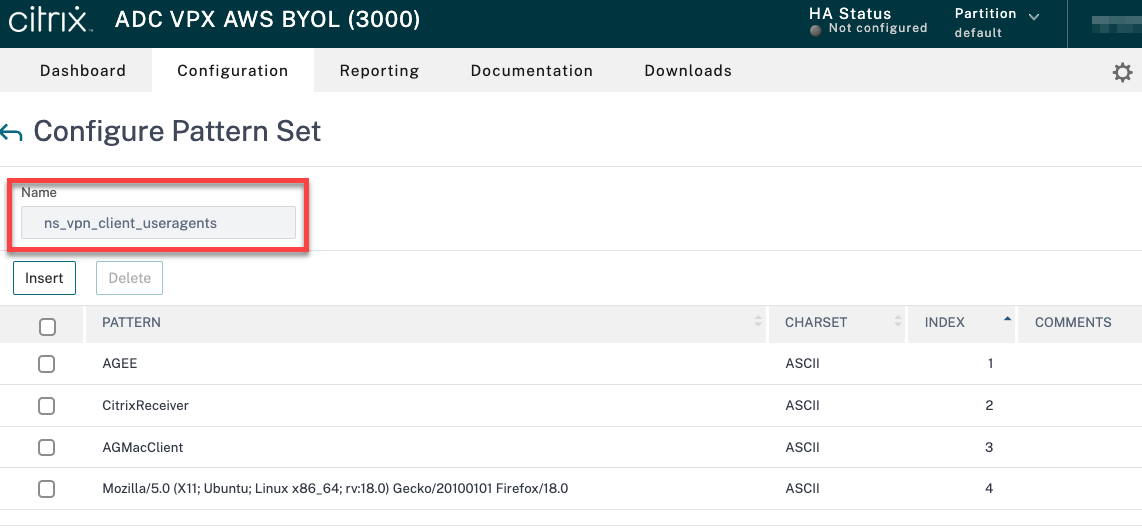
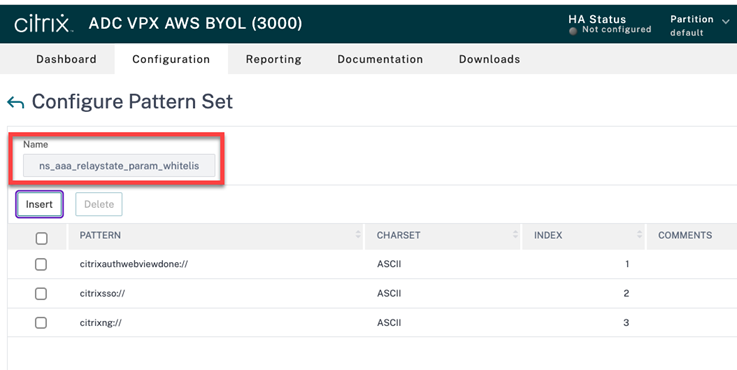
Make sure that you have configured the following pattern set settings in the NetScaler® for your Android and iOS devices:
-
Ns_vpn_client_useragents
-
Ns_aaa_relaystate_param_whitelist
-
-
Make sure that you installed the latest version of Citrix Secure Hub from Apple or Google Play.
-
Make sure that you are using the Advanced authentication policy in the NetScaler Gateway.
-
Make sure that you set the client property ENABLE_MAM_NFACTOR_SSO as True for both on-premises and cloud. For more information about the ENABLE_MAM_NFACTOR_SSO property, see Client property reference.Note:If the client property Enable nFactor SSO is set to False, then make sure that the classic authentication policies are bound to the NetScaler Gateway.
Configure nFactor authentication
Configure nFactor authentication for Citrix Endpoint Management depending on how your NetScaler Gateway is set up as follows:
-
Citrix Endpoint Management is already set up with the NetScaler Gateway using the Classic authentication policy. For more information, see Update the Classic policy to the Advanced authentication policy in the existing NetScaler Gateway.
-
Citrix Endpoint Management setup with the NetScaler Gateway using the Advanced authentication policy. For more information, see Configure the NetScaler Gateway setup using the Advanced policy.
Update the Classic policy to the Advanced authentication policy in the existing NetScaler Gateway
If your Citrix Endpoint Management is already setup using the Classic authentication policy in the NetScaler Gateway, then you must update the Classic authentication policy to the Advanced authentication policy using one of the following methods:
-
Create an Advanced authentication policy and change the gateway configuration to use the Advanced authentication policy. For more information, see Authentication policies.
-
Update the Classic authentication policy to the Advanced authentication policy. For more information see, Converting policy expressions using the NSPEPI tool.
Configure the NetScaler Gateway setup using the Advanced policy
To configure the nFactor authentication for Citrix Endpoint Management in the NetScaler Gateway using the Advanced authentication policy, see Configure nFactor authentication.
Note:
-
You can choose the relevant authentication type from the supported authentication types.
-
If you are using SAML authentication type, then you can configure SAML using MAM IdP using one of the following methods:
-
To configure using Azure Active Directory, see Authentication with Azure Active Directory through NetScaler Gateway for MAM enrollment.
-
To configure using Okta, see Authentication with Okta through NetScaler Gateway for MAM enrollment.
-