
Executing commands
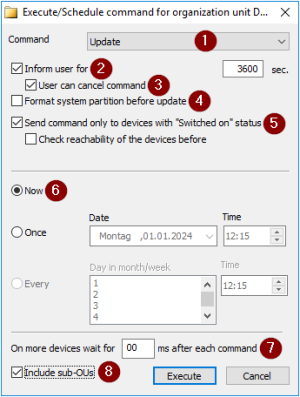
| 1 | Allows to switch to other commands |
| 2 | Users are informed before command execution, see Command options. |
| 3 | Users are allowed to prevent the command execution. |
| 4 | Command-specific option |
| 5 | Only switched-on devices[1[[ ]from Scout 15 2204]] |
| 6 | Time of command execution, see Scheduling commands |
| 7 | Delay of execution between devices |
| 8 | Apply command additionally on devices in subordinate OUs |
-
For the relevant device, OU or Dynamic Client Group, from the context menu, choose Commands.
-
From the sub-menu, choose a command.The Command dialog opens. The options shown depend on the selected command.
-
Check the target devices to which the command is sent: To show the complete title with relevant device or OU, move the mouse pointer over the title bar.
-
Edit the relevant options. For further information, see Command options and Scheduling commands.
-
Confirm with Execute or Schedule.
The command is executed at the specified time. Depending on the command, you are asked to confirm.