
SAML 身份验证
SAML(安全断言标记语言)是一种开放标准,由身份和身份验证产品使用。使用 SAML,您可以将 StoreFront 配置为将用户重定向到外部身份提供程序进行身份验证。
注意
配置 StoreFront 以使用 SAML 身份验证进行内部访问。对于外部访问,请使用 SAML 身份验证配置 Citrix Gateway,然后配置 StoreFront 以使用Gateway 直通身份验证。
StoreFront 需要符合 SAML 2.0 的身份提供程序 (IdP),例如:
SAML 断言必须包含一个
<saml:NameID> 元素,其中填充了用户的用户主体名称 (UPN)。StoreFront 会在 Active Directory 中查找此 UPN。StoreFront 不支持其他目录中的用户。使用 Entra ID 时,用户必须具有混合身份。
StoreFront™ SAML 端点
要配置 SAML,您的身份提供程序可能需要以下端点:
-
实体 ID 的 URL。这是应用商店身份验证服务的路径,通常为
https://[storefront host]/Citrix/[StoreName]Auth -
断言消费者服务的 URL,通常为
https://[storefront host]/Citrix/[StoreName]Auth/SamlForms/AssertionConsumerService -
元数据服务,通常为
https://[storefront host]/Citrix/[StoreName]Auth/SamlForms/ServiceProvider/Metadata
此外还有一个测试端点,通常为
https://[storefront host]/Citrix/[StoreName]Auth/SamlTest
您可以使用以下 PowerShell 脚本列出指定应用商店的端点。
# Change this value for your Store
 $storeVirtualPath = "/Citrix/Store"

 $auth = Get-STFAuthenticationService -Store (Get-STFStoreService -VirtualPath $storeVirtualPath)
 $spId = $auth.AuthenticationSettings["samlForms"].SamlSettings.ServiceProvider.Uri.AbsoluteUri
 $acs = New-Object System.Uri $auth.Routing.HostbaseUrl, ($auth.VirtualPath + "/SamlForms/AssertionConsumerService")
 $md = New-Object System.Uri $auth.Routing.HostbaseUrl, ($auth.VirtualPath + "/SamlForms/ServiceProvider/Metadata")
 $samlTest = New-Object System.Uri $auth.Routing.HostbaseUrl, ($auth.VirtualPath + "/SamlTest")
 Write-Host "SAML Service Provider information:
 Entity ID: $spId
 Assertion Consumer Service: $acs
 Metadata: $md
 Test Page: $samlTest"
输出示例:
SAML Service Provider information:
 Entity ID: https://storefront.example.com/Citrix/StoreAuth
 Assertion Consumer Service: https://storefront.example.com/Citrix/StoreAuth/SamlForms/AssertionConsumerService
 Metadata: https://storefront.example.com/Citrix/StoreAuth/SamlForms/ServiceProvider/Metadata
 Test Page: https://storefront.example.com/Citrix/StoreAuth/SamlTest
使用元数据交换进行配置
To simplify configuration, you can exchange metadata (identifiers, certificates, endpoints and other configuration) between the Identity Provider and the Service Provider, which is StoreFront in this case.
如果您的身份提供程序支持元数据导入,则可以将其指向 StoreFront 元数据终结点。注意:此操作必须通过 HTTPS 完成。
要使用来自身份提供程序的元数据配置 StoreFront,请使用 Update-STFSamlIdPFromMetadata cmdlet,例如:
Get-Module "Citrix.StoreFront*" -ListAvailable | Import-Module

 # Remember to change this with the virtual path of your Store.
 $StoreVirtualPath = "/Citrix/Store"

 $store = Get-STFStoreService -VirtualPath $StoreVirtualPath
 $auth = Get-STFAuthenticationService -StoreService $store

 # To read the metadata directly from the Identity Provider, use the following:
 # Note again this is only allowed for https endpoints
 Update-STFSamlIdPFromMetadata -AuthenticationService $auth -Url https://example.com/FederationMetadata/2007-06/FederationMetadata.xml

 # If the metadata has already been download, use the following:
 # Note: Ensure that the file is encoded as UTF-8
 Update-STFSamlIdPFromMetadata -AuthenticationService $auth -FilePath "C:\Users\exampleusername\Downloads\FederationMetadata.xml"
配置身份提供程序
-
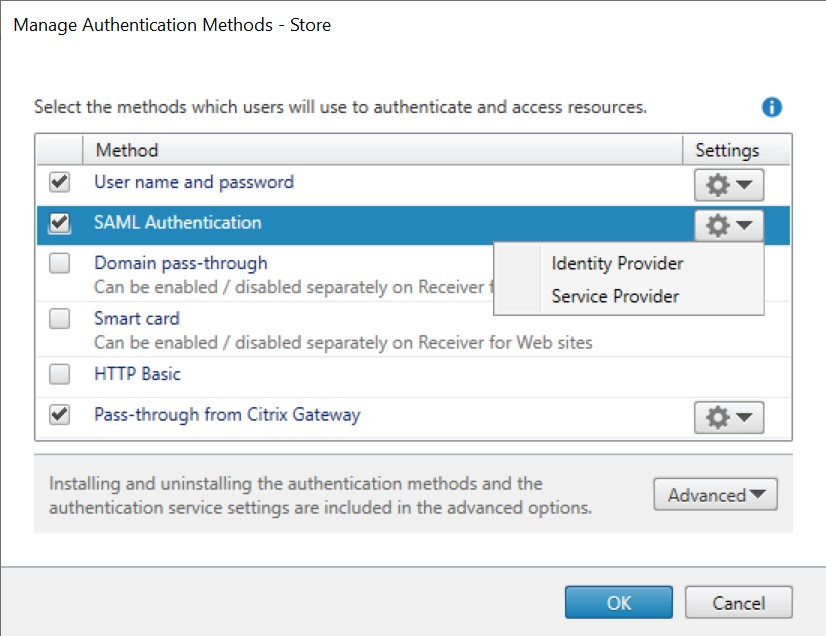
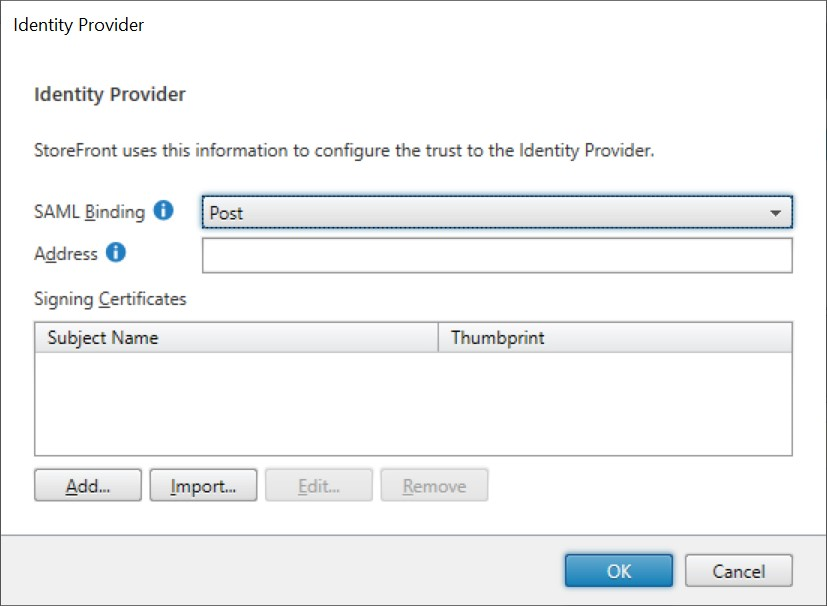
在 SAML 身份验证 行中单击设置下拉菜单,然后单击 身份提供商。
-
选择 SAML 绑定 为 Post 或 Redirect。
-
输入身份提供商的地址。
-
导入用于签署 SAML 令牌的证书。
-
按“确定”保存更改。
配置服务提供商
-
点击 SAML 身份验证 行中的设置下拉菜单,然后点击 服务提供商。身份提供程序窗口的屏幕截图(/en-us/storefront/2507-ltsr/media/stores/authentication/saml-service-provider.png)
-
可选地,选择一个导出签名证书,用于向身份提供程序签名消息。
-
可选地,选择一个导出加密证书,用于解密从身份提供程序接收到的消息。
-
服务提供程序标识符已预填充商店的身份验证服务。
-
按确定以保存更改。
PowerShell
使用 PowerShell:
-
要导入签名证书,请调用 cmdlet Import-STFSamlSigningCertificate。
-
要导入加密证书,请调用 cmdlet Import-STFSamlEncryptionCertificate。
测试
要测试 SAML 集成:
-
转到 SAML 测试页面,请参阅 StoreFront SAML Endpoints。
-
这会将您重定向到身份提供程序。输入您的凭据。
-
您将被重定向回测试页面,该页面显示身份声明和断言。
配置 Delivery Controller™ 以信任 StoreFront
使用 SAML 身份验证时,StoreFront 无法访问用户的凭据,因此无法向 Citrix Virtual Apps and Desktops 进行身份验证。因此,您必须配置 Delivery Controller 以信任来自 StoreFront 的请求,请参阅 Citrix Virtual Apps and Desktops Security considerations and best practices。
使用联合身份验证服务对 VDA 进行单点登录
使用 SAML 身份验证时,StoreFront 无法访问用户的凭据,因此默认情况下无法对 VDA 进行单点登录。您可以使用联合身份验证服务来提供单点登录。