
Configuration
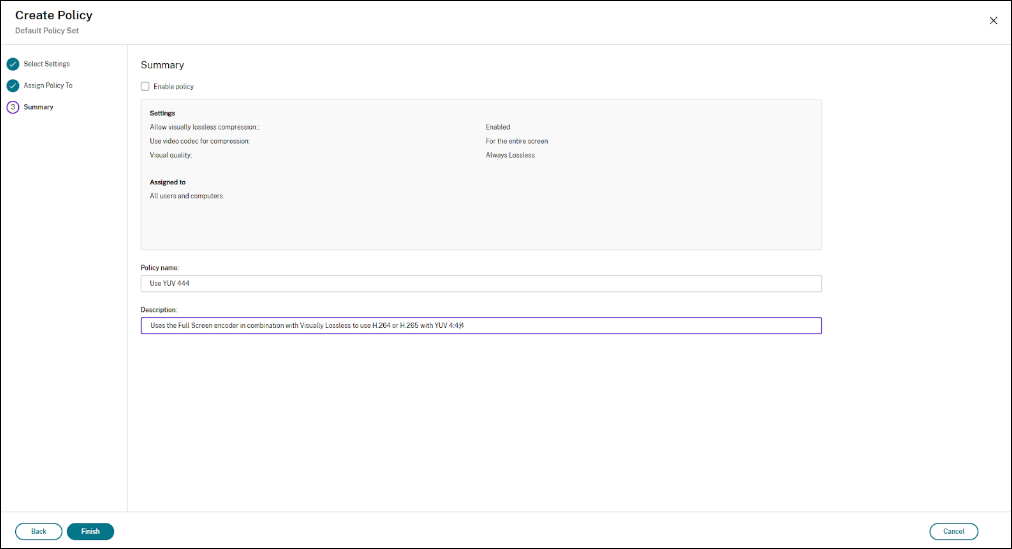
To use the higher image quality and color accuracy with YUV 4:4:4, Enabling YUV 4:4:4 involves adjusting several HDX™ policy settings within Citrix Studio:
Use Video Codec for Compression: Set this to "For the Entire Screen" to apply the video codec (and thus the chosen chroma subsampling) to the entire screen content.
Visual Quality: Select "Build to Lossless" or "Always Lossless" to prioritize image quality over bandwidth consumption.
Allow Visually Lossless: Enable this policy to allow for visually lossless compression.
By default, Thinwire uses H.264 YUV 4:4:4 and if compatible hardware is detected on the client, thinwire will automatically use H.265 YUV 4:4:4 hardware decoding.
With H.265 YUV 4:4:4, internal testing shows a 4X increase in Frames per Second (FPS) compared to H.264 4:4:4 and a 2.5X reduction in size per frame compared to H.264, due to H265’s superior efficiency.