
What's new in 2507 (initial release)
StoreFront 2507 LTSR includes the following new features and enhancements since StoreFront 2402 LTSR:
Remove Citrix Workspace™ app detection as a prerequisite for App Protection for hybrid launch scenarios
Starting with the 2507 LTSR release, Citrix Workspace app detection is no longer a prerequisite for App Protection for hybrid launches to function. This change simplifies the enablement of App Protection for hybrid launch scenarios.
Previously, when StoreFront™ was configured to enable App Protection for hybrid launches, the user interface only displayed resources requiring App Protection if it detected certain versions of Citrix Workspace app via Citrix Workspace web extensions or Citrix Workspace launcher. This prevented use of App Protection in situations where it was not possible to use Citrix Workspace launcher or Citrix Workspace web extensions. This check has been removed and the user interface now displays such resources regardless of whether Citrix Workspace app was detected.
With this change, resources requiring App Protected are displayed in situations where ICA files are downloaded and when using legacy versions of Citrix Workspace app that do not implement App Protection. This makes it possible for users to avoid applying App Protection by tampering with the ICA file or using a version of Citrix Workspace app that does not enable App Protection. Therefore if you have enabled App Protection for hybrid launches, it is important that you also enable App Protection Posture Check and Policy Tampering Detection.
Enhanced Scout functionality
Scout now supports displaying the Add machine button on the Collect page. This enhancement enables you to manually add multiple StoreFront Server machines in the same cluster and trigger collection simultaneously, improving the efficiency of data collection across StoreFront deployments.
Removal Citrix Customer Experience Improvement Program
StoreFront no longer sends data to the Citrix Customer Experience Improvement Program.
Citrix Workspace app for HTML5 HDX Client
This release includes Citrix Workspace app for HTML5 HDX client 2505.
Display StoreFront server name in end-user UI
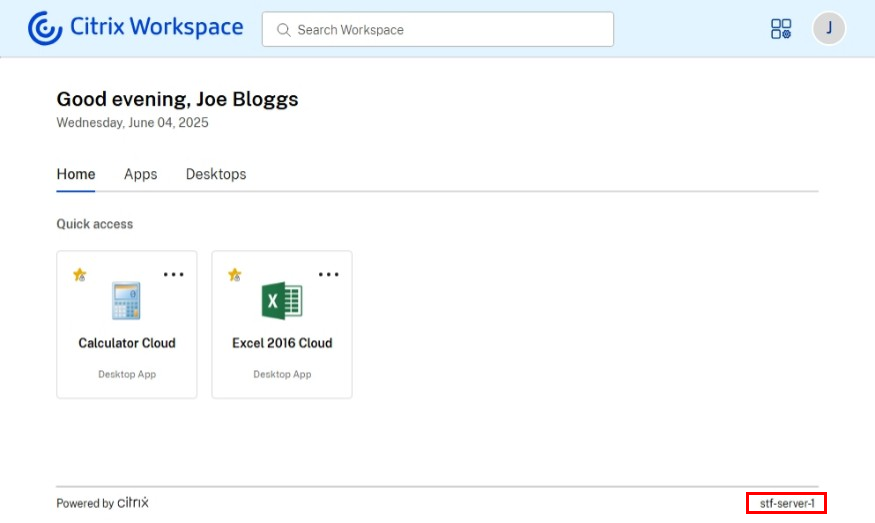
When using the modern experience, the name of the server the user is connected to is displayed at the bottom of the screen on desktop, and in error messages on all platforms. This helps support team to quickly locate relevant server logs.
Citrix Workspace Launcher for Android, iPhone, and iPad devices
Citrix Workspace Launcher allows web browsers to communicate with Citrix Workspace app to launch resources without downloading ICA files. Previously this was only available on Windows, macOS and Linux. Citrix Workspace launcher is now supported on Android, iPhone, and iPad. When an Android, iPhone or iPad user first opens a store website in their web browser, the website detects Citrix Workspace app using Citrix Workspace Launcher. If detected successfully, Citrix Workspace Launcher is used for all subsequent launches. This streamlines the launch experience and improves security by avoiding saving ICA files to the device.
This requires Citrix Workspace app for Android 25.03 or higher and Citrix Workspace app for iOS 25.03 or higher. It is available with both the Classic and Modern experience.
Change passwords at any time using modern experience
Previously, when using the modern experience, users could change expired passwords at log in but had no way to change them at other times. With StoreFront 2503, if configured in password options, there is an option in account settings to change passwords at any time, similar to the classic experience.
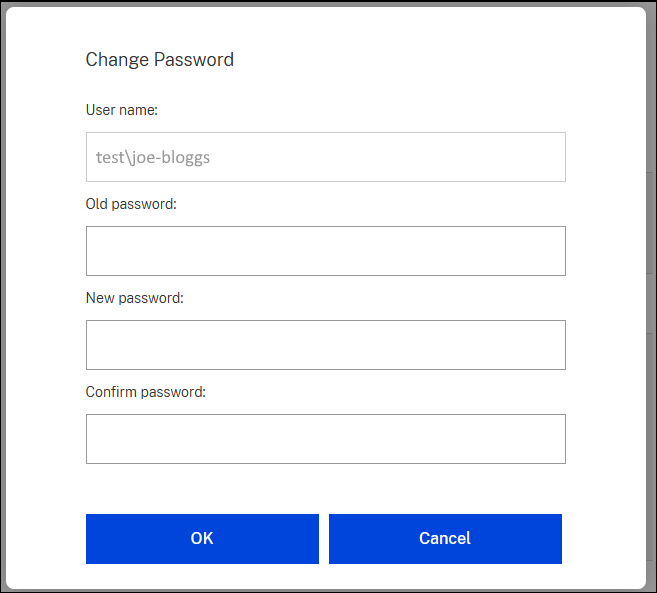
For more information, see Change password.
Enhanced navigation and default tab configuration using modern experience
When using the modern experience, administrators can customize the end-user navigation tabs. Administrators can configure the following options:
-
Always display navigation tabs.
-
Show home tab
-
Default tab
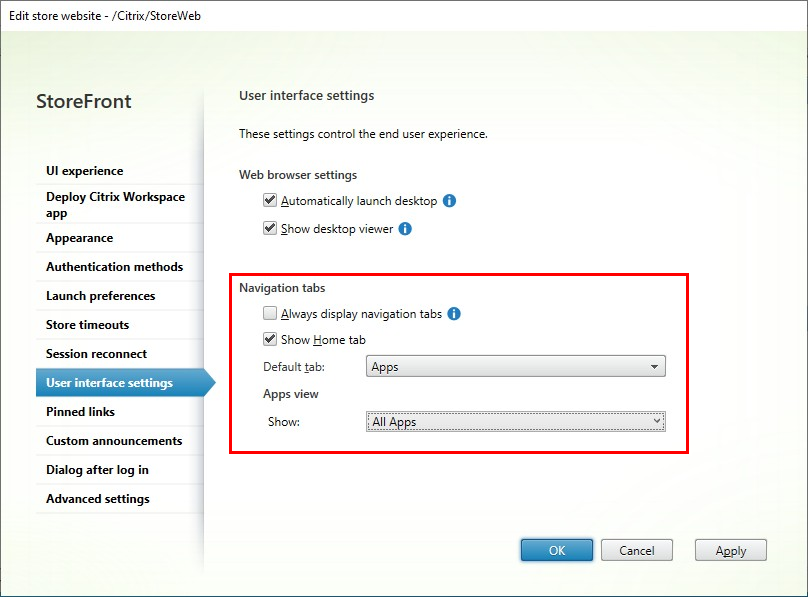
For more information, see Navigation tabs
Display dialog after login
When using the modern experience, administrators can configure a pop-up dialog that appears to end users after login, which users must accept before interacting with StoreFront. You can use this to inform users about important information such as regulatory information, policy acknowledgments, internal policies, instructional content, security notices, system updates, and legal disclaimers. This is only available when using the modern experience.
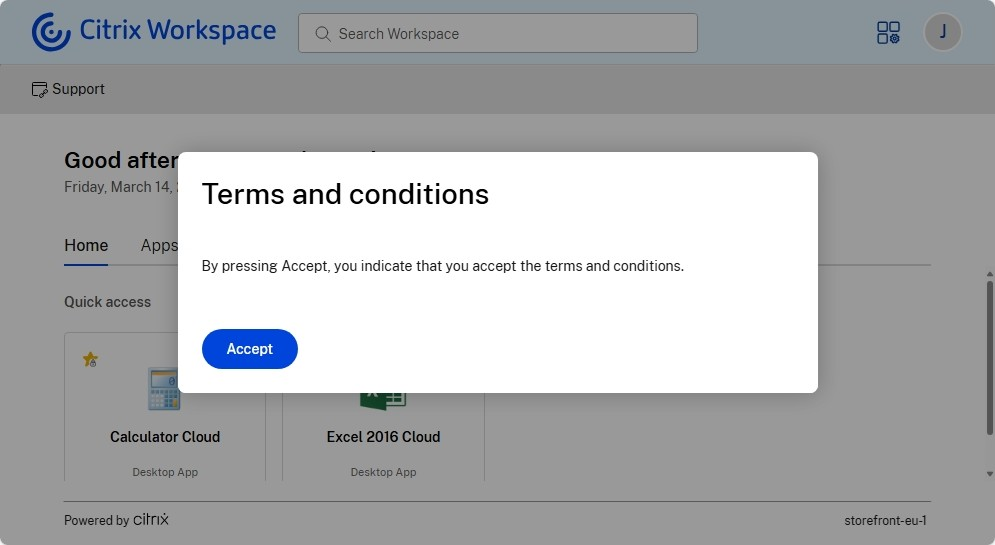
For more information on how to configure this, see Dialog after login.
Custom announcements
When using the modern experience, administrators can configure a banner that is displayed to the end-users, for instance to notify them of upcoming changes or maintenance windows. For more information, see Custom announcements.
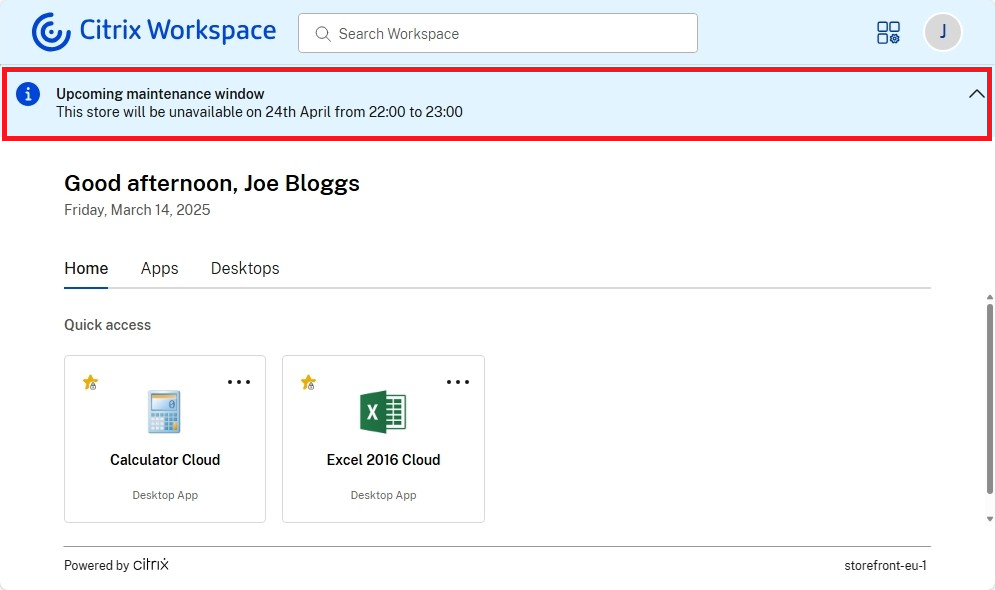
Session reconnect using the modern experience
Session reconnect (formerly known as Workspace Control) is now available when using the modern experience. Previously it was only available when using the classic experience. With session reconnect, you can configure the following settings for users connecting through a web browser:
-
Store log out action - whether to leave sessions active, disconnect them or log them out.
-
Whether to automatically reconnect to sessions when users log in.
For more information, see Session reconnect
Color customization using the modern experience
The default colors have been updated.
Old default color:

New default color:

Furthermore, the colors are now applied more consistently to buttons, links and spinners.
For more information, see Appearance.
Display power state of assigned desktops
The end user interface now provides visibility into the power state of the user's assigned desktops, when using the modern experience with DaaS. The power state indicates whether an assigned desktop is Powered On, Powered Off, or in a suspended state (in hibernation). This enhancement allows users to quickly identify the status of their desktops, enabling them to make informed decisions and manage their resources more effectively.
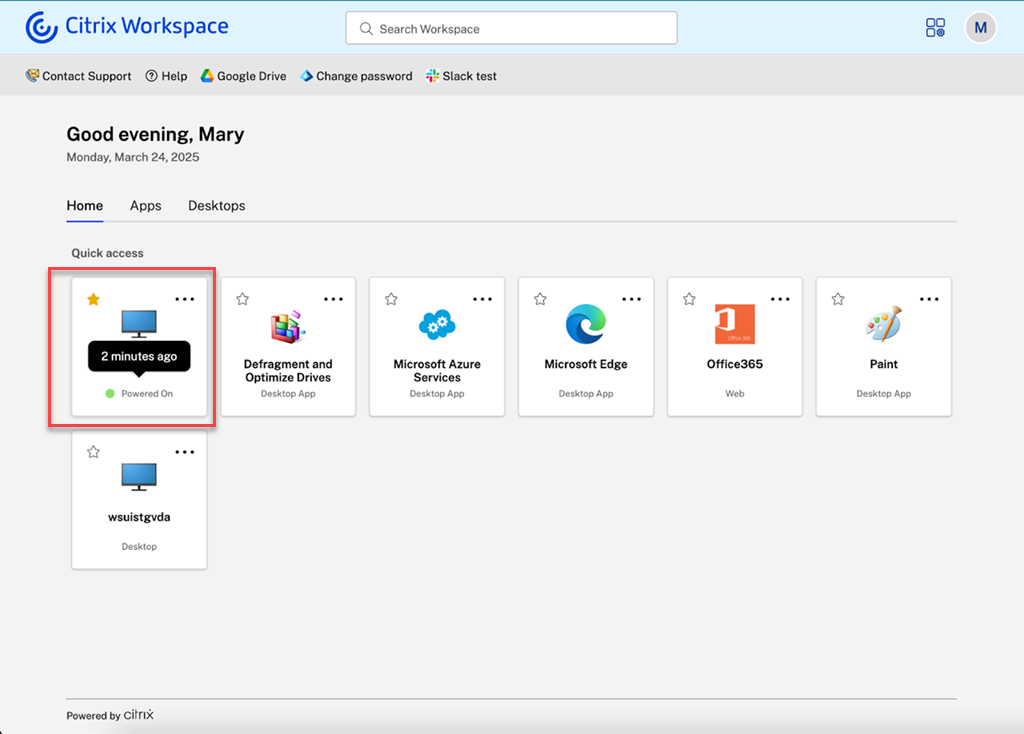
Users can perform power-related actions directly from the desktop tile using the More options menu (ellipsis icon). Available actions dynamically change based on the desktop's current power state.
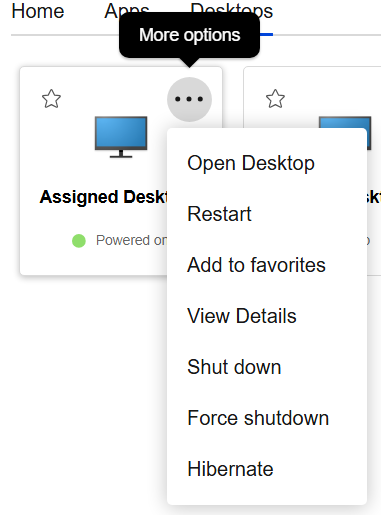
For more information, see Assigned desktop power status and Tile actions.
Note:
-
This functionality requires Citrix DaaS. It is not currently available with Citrix Virtual Apps and Desktops.
-
Power states are not displayed for desktops where App Protection is enabled.
-
Power states are only displayed for assigned desktops, not pooled desktops.
Updated terminology in management console
The management console uses updated terminology. In particular the follow have been updated:
| Old term | New term | Notes |
|---|---|---|
| Citrix Receiver | Citrix Workspace app | Citrix Receiver is not supported and has been replaced by Citrix Workspace app. |
| HDX™ engine (plug in) | Citrix Workspace app | The HDX client is a component of Citrix Workspace app. |
| Receiver for Web | website | |
| Unified experience | Classic experience | On the UI Experience tab when editing a website. |
| Next generation experience | Modern experience | On the UI Experience tab when editing a website. |
| Configure Unified Experience | Set Citrix Workspace app website | The link on the actions pane. |
| Delivery controller™ | Site | This reflects that each entity is a site consisting of multiple delivery controllers, or a DaaS tenant or SPA server. |
| Workspace control | Session reconnect |
Pinned links
Custom URLs on StoreFront UI refer to customer-defined hyperlinks that provide quick access to specific websites. This feature functions as a shortcut that helps users to efficiently navigate to websites directly from the StoreFront UI. Important links, such as support websites or company portals, can be made available to the users without needing them to search for these links. It makes the navigation effortless and faster. This feature is only available on the modern experience.
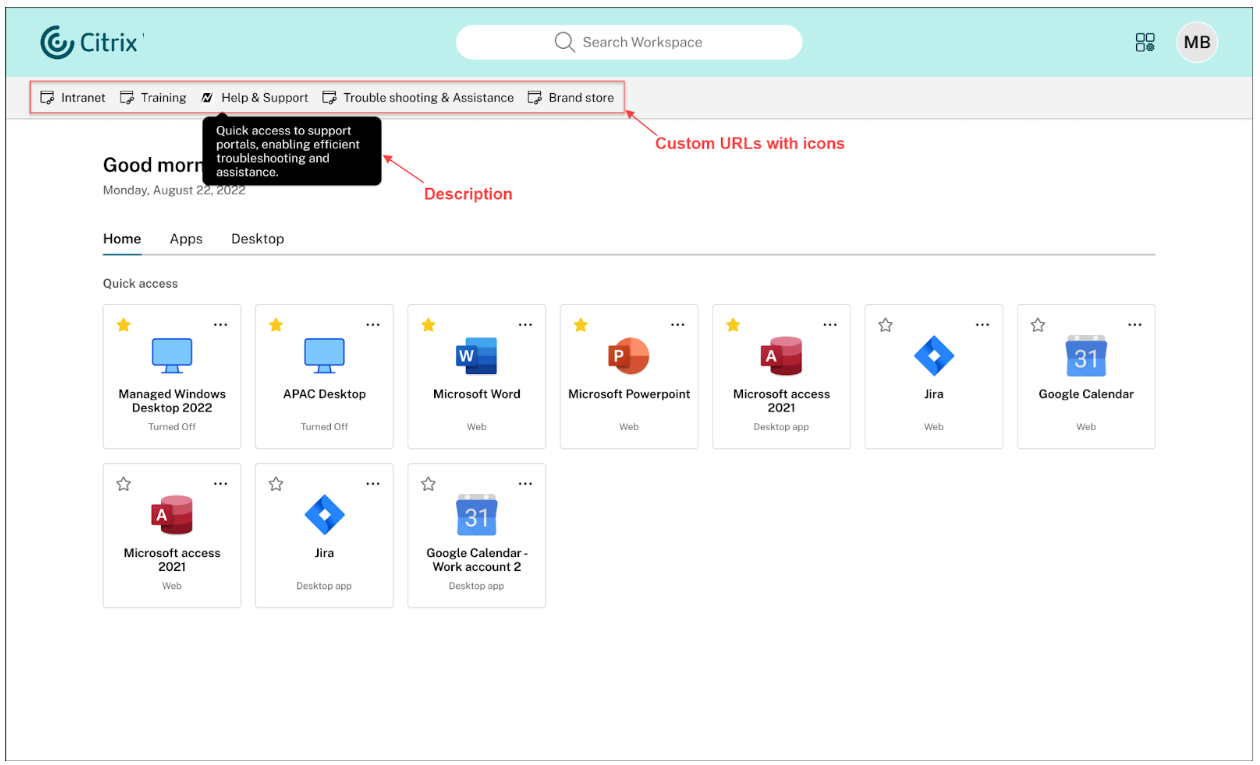
For more information, see Pinned links
Require end users to use the locally installed Citrix app only
Administrators can enforce the use of the native Citrix Workspace app, eliminating the option for users to access the Citrix Workspace web client on browsers. This feature is designed for customers who want to leverage the full benefits of the native app. The native app offers advantages such as built-in App Protection service, no browser version compatibility issues, enhanced security and telemetry for monitoring and troubleshooting.
For more information, see Require end users to use the locally installed Citrix app only
XenApp® Services off by default for new stores
When you create a new store, XenApp Services is disabled by default. You can enable it manually in the GUI or using PowerShell. Note that XenApp Services is deprecated and will be removed in a future release.
Progressive Web App
The Progressive Web App (PWA) feature allows you to install the store website so that it can be launched from your start menu or desktop, similar to a native app. This is available only in the old UI. For more information, see Progressive Web App
Citrix Licensing Telemetry
StoreFront collects telemetry on user log-ins and your configuration. For more information, see Citrix Licensing data collection programs.
Citrix Gateway Service for StoreFront
Citrix Gateway Service for StoreFront provides HDX routing to your resources without needing to host your own gateway. For more information, see Gateway Service for StoreFront and Add Citrix Gateway Service.
If you've opted the Citrix Gateway Service for StoreFront (Technical Preview) with StoreFront 2311 or 2402 and you've configured a CloudGateway, the configuration is no longer valid with StoreFront 2507. You must delete the existing gateway and create new gateways following the updated documentation.
Citrix web extensions
Citrix web extensions is enabled for all installations without needing to manually configure StoreFront using PowerShell.
Windows Server 2025 support
Storefront 2407 can be installed on Windows Server 2025 Datacenter and Standard editions.
Removal of support for Windows Server 2016
StoreFront 2407 can't be installed on Windows Server 2016. Install StoreFront on Windows Server 2019, 2022 or 2025. For more information on removed items, see Deprecation notices.
Fixed issues
This release includes the following fixes since 2402 CU2:
-
When Cloud Connectors operate in LHC mode and a user attempts to launch a resource that is accessible from multiple locations, the session might fail to start if the resource isn't immediately available. The issue occurs because, after checking the resource's readiness, StoreFront might send the request to a different connector than the one initially used to launch the resource.
-
If a FAS server fails to respond, StoreFront continues to attempt to contact it for every user, adding delay to the log-in or launch time (depending on configuration). With this fix, when a FAS server fails to respond, StoreFront avoids attempting to use the same server for a period of time so subsequent users are not impacted by the delay.
-
During an outage, when the connectors go into Local Host Cache mode, StoreFront needs to send launch requests to the connector in the same zone as the resource. When a resource is available in multiple zones, previously, StoreFront would only try to launch the resource in one zone. With this enhancement, if the attempt to start a resource in one zone fails, in some cases StoreFront server tries to make another attempt to start the resource using connectors in other available zones to improve resilience.
-
In the StoreFront Web API, the list endpoint should set
isSubscriptionEnabledaccording to whether favorites are enabled. -
In the Store Services API, the Resource Enumeration endpoint should set subscription status according to whether favorites are enabled.
-
When you change the launch option from Open in Citrix Workspace app to Let the user choose or Open in a web browser and select OK then you may get error An error occurred while saving changes on the 'Launch preferences' property dialog. Please check the log in the Event viewer and try again. This occurs if the HTML5 HDX client is unexpectedly already installed.
Fixes to the Classic UI experience:
-
Updated the Content Security Policy defined in the http-equiv tag of the HTML file to block inline scripts. If you have customized StoreFront in a way that uses eval or adds inline scripts to the DOM then this action causes those customizations to fail.
Fixes to the modern UI experience:
Known issues
-
If StoreFront has a gateway of type Citrix Gateway Service, then on upgrading from StoreFront 2407 or 2411 to 2507, launches using that gateway may fail. In the Gateway configuration window, on the Cloud Connector tab, the cloud connectors incorrectly contain port 8090 so StoreFront is unable to reach the cloud connector to request an STA ticket. To fix this, remove the port from each Cloud Connector's URL in the list.