Dashboard
(from SCG 1 2209)
In the SCG Dashboard, various widgets show the most important key figures and key performance indicators so that you can get an overview of the entire infrastructure at any time.
Devices
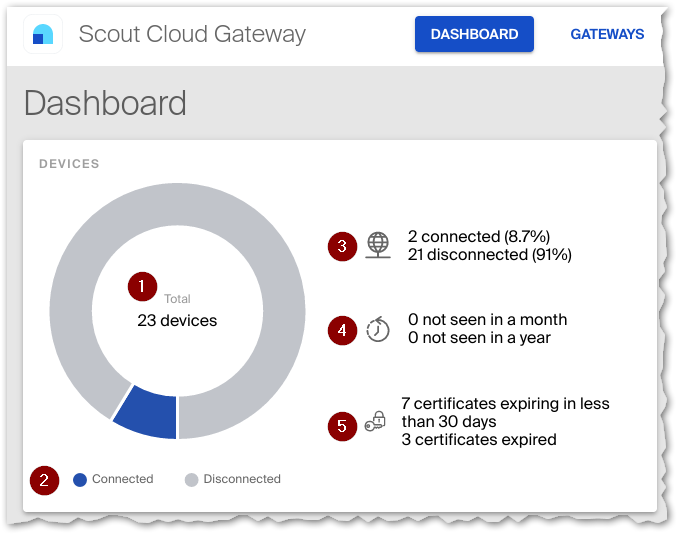
| 1 | Total number of all connected devices | |
| 2 | Currently connected and disconnected devices | |
| 3 | Number of connected and disconnected devices | |
| 4 | Devices that have not been connected for at least one month / at least one year | |
| 5 | Devices whose device certificate has expired / will soon expire | |
Load Balancing
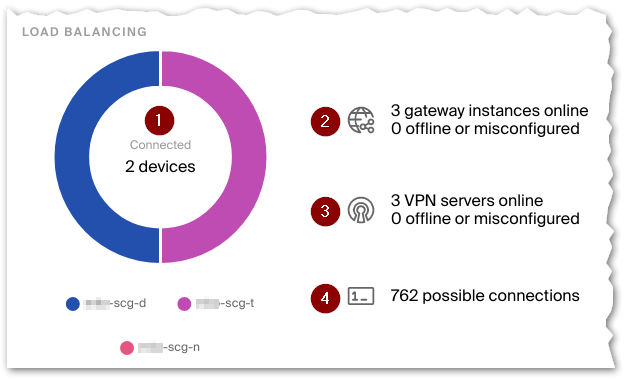
| 1 | Total number of all connected devices with current distribution to instances | |
| 2
|
Number of gateway instances that are currently online, offline, or not configured | |
| Unconfigured gateway instances can be freshly installed instances or disabled instances. | ||
| 3
|
Number of VPN servers on the gateway instances that are currently online, offline, or not configured | |
| If a VPN server is not configured, Configuration > Gateways > Gateway-specific configuration is missing. | ||
| 4
|
Total number of possible device connections | |
| with display of instances that have only a few free IP addresses left | ||
Performance
Average CPU and RAM usage, as well as memory across instances.
The instance with the highest values is displayed.
Configuration
 |
|
|---|---|
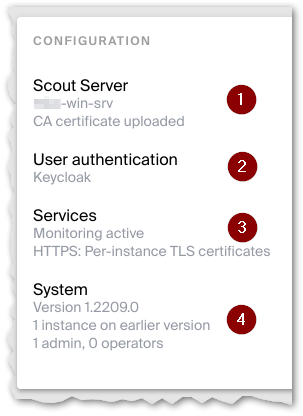
| 1 | Name of the current [Scout Server]. CA certificate or self-signed certificate that ensures secure communication between SCG and devices see Configuration > Server device settings |
| 2 | Selected Identity provider. For SCG authentication additionally number of token see Configuration > User authentication |
| 3 | Health check service active or inactive.Web server configuration see Configuration > Monitoring and Configuration > Gateways |
| 4
|
Latest SCG version in the cluster |
| Number of instances that are on earlier version | |
| Number of SCG administrators with roles see Configuration > SCG administrators |
Administrator activities
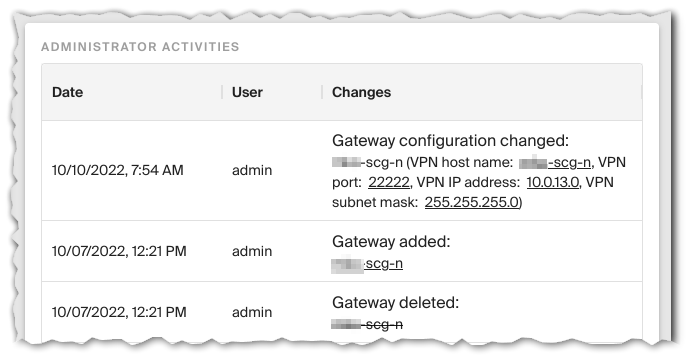
Various activities are logged, including configuration value changes and adding/changing/deleting gateway instances.
The old values are crossed out, the new ones are underlined.
Dashboard
Copied!
Failed!