
Configuration reports
Customer administrators can generate configuration reports to gain insights into the Secure Private Access setup. The configuration report includes information for the following categories:
-
Access policies governing access to applications and resources.
-
Applications configured within Secure Private Access.
-
Routing domains set up for the applications.
-
Resource locations associated with the customer.
-
Authentication domain used for verifying user identities.
-
Identity Provider (IdP) used for user identity.
-
Customer parameters defined for a specific customer.
-
Store configurations related to cloud stores.
The configuration reports can be used in the following scenarios:
-
Identify and resolve configuration issues.
-
Share with the Citrix Support team for investigation and troubleshooting purposes.
-
Use the report as a reference for new setup or modify existing setup details.
Generate a configuration report
Perform the following steps to generate a configuration report.
-
In the Secure Private Access admin console, go to Settings > Global Configuration.
-
Click Create report to initiate the report generation process.Once the report is generated, the Configuration Report dialog displays the following status:
-
Report Completed: Indicates that all required details are successfully included in the report.
-
Report Partially Complete: Indicates that some details are missing or not generated.The dialog also lists the categories for which the report generation was incomplete.
The following figure shows a sample Configuration report dialog with complete and partially complete status.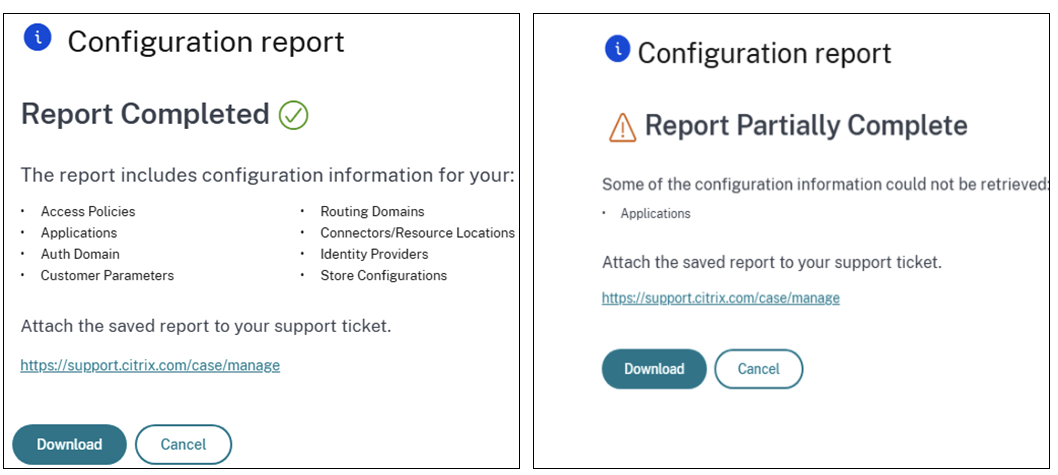
-
-
Click Download to manually export the report to your local drive.
Important:
Generating configuration reports is limited to administrators with the following Secure Private Access roles:
-
Full Access Administrator
-
Read Only Administrator
-
Full Monitor Administrator
Administrators with the Help Desk Administrator role cannot generate configuration reports.