
User-defined Commands
Authorized administrators may issue individual commands to the devices. A user-defined command can be executed with system rights so that far-reaching operations can be performed. The correct syntax is particularly important here.
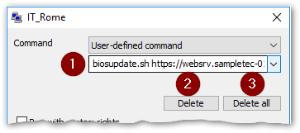
| 
-
Select a command from the list (recently used commands) or enter it.
-
Delete the selected command.
-
Delete all user-defined commands.
Important:
Always test a user-defined command in a test environment before using it productively.
User-defined commands can be helpful for tasks such as the following:
-
Perform a special UEFI/BIOS update
-
Update a license lease
-
Wipe data disks
Note:
After having executed a user-defined command, after a time span of 30 seconds, you can run the next user-defined command or update command.