
User information before update
Note:
Before an update is executed, the relevant users can be informed by a system message. Depending on the configuration in Firmware > Reminder settings, users are provided with various options for deferring or aborting the request.
The system message is displayed in the following situations:
While the message is displayed, users may close applications, disconnect sessions, or - if configured - defer the update.
If the display duration for the message has been set to 0, the message will be displayed until the user clicks a button.
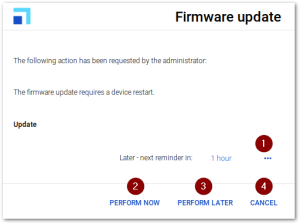
Users have the following options:
| 1 | Select a time interval until the next reminder for the firmware update |
| The list-field contains the values specified in Firmware > Reminder > Delays until next reminder. | |
| Displayed only, if the Number of allowed deferments is set to 1 or higher, and if at least one more deferment is possible. | |
| 2 | Perform the firmware update immediately |
| 3 | Postpone the firmware update by the time period selected (1) |
| If the device is shut down before the time interval expires, the update is performed during shutdown. | |
| Displayed only, if the Number of allowed deferments is set to 1 or higher, and if at least one more deferment is possible. | |
| 4 | Abort the update process definitively |
| Displayed only, if the command option User can cancel the command is selected. | |
| There will be no automatic restart of the update process. |