
Actions for devices
-- applies to device lists in all views --
Via a device list you have access to your devices and can, for example, send commands. All available actions can be found in the Actions context-menu of a device.
Performing an action for a device
-
To the right of a device, click
 .
.
-
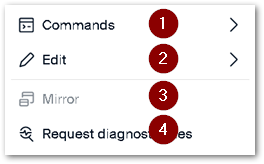
From the context-menu, choose an action.
 |
|
|---|---|
| 1 | Execute or schedule a [Scout] command on the device |
| 2 | Rename, delete or move the device |
| 3 | Mirror the device |
| 4 | Retrieve diagnostic data |
Note:
You may also use drag-and-drop operations to move devices between OUs.
Performing actions on multiple devices

Note:
To remove the selection of devices, click the minus icon above the selection column.