
Persistent User Configurations
This guide describes the Persistent Home feature in eLux. When enabled, user-specific configuration data is retained across logoff/logon cycles and device reboots.
By default, Persistent Home is disabled.
Overview
When persistent home is enabled, your personal settings will be saved and selected user configurations remain available across:
-
User sign-out and subsequent sign-in
-
Device restarts
Persistence is controlled explicitly via configuration (see Configuration).
Supported Applications and Data
Google Chrome
-
Persisted data:
-
User profiles
-
Appearance settings (themes, fonts, color schemes)
-
other browser preferences
-
-
Behavior:
-
Settings persist across sessions
-
Depending on backend configuration, settings may follow the user across devices
-
Firefox
-
Persisted data:
-
Appearance settings (fonts, color schemes
-
Download location/path
-
other browser preferences
-
-
Important:
-
See Limitations regarding full profile file support.
ICA (Citrix Workspace App)
-
Persisted data:
-
User-specific ICA settings (for example, session-related preferences)
-
-
Continuity behavior:
-
Enables improved session continuity during temporary disruptions in the Citrix Delivery infrastructure.
-
GNOME Keyring (credentials/secrets)
This option is typically used in combination with browser or ICA persistence.
-
Persisted data:
-
Stored credentials
-
Application secrets used by supported applications
-
Configuration
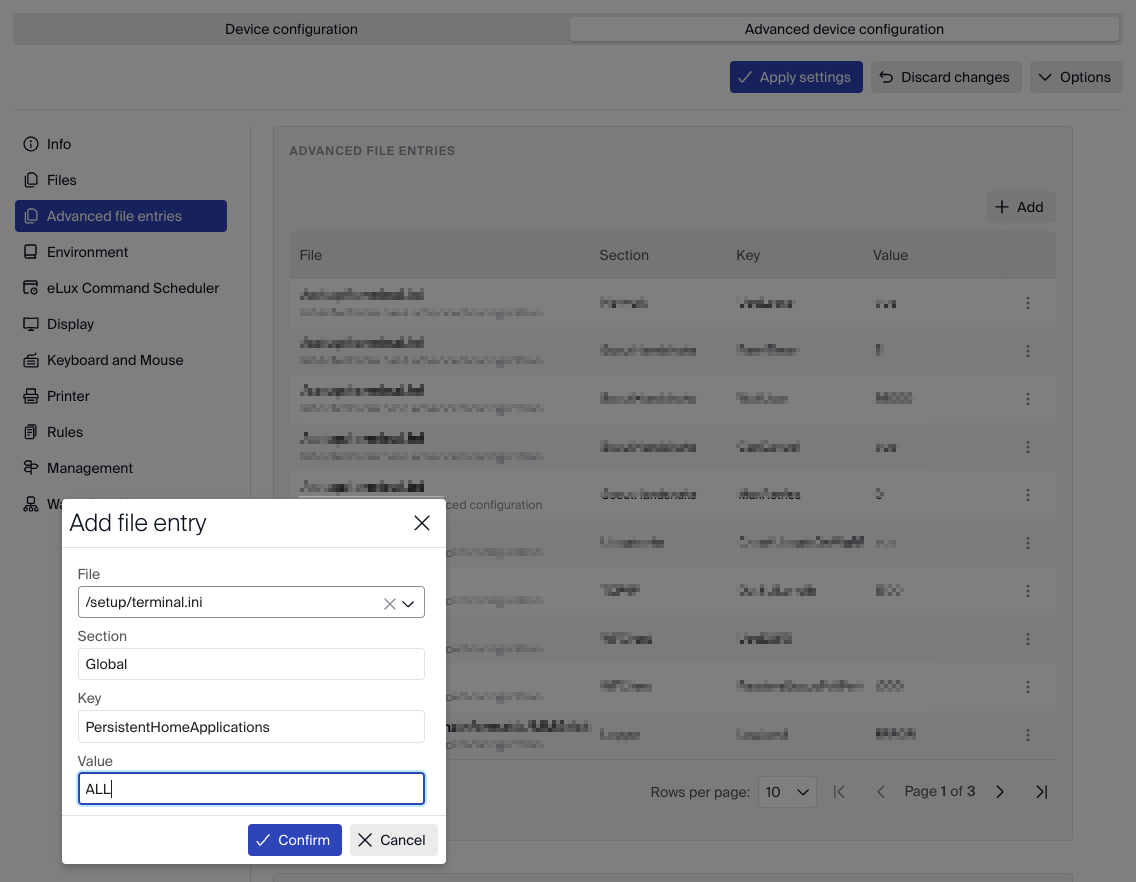
Persistent Home can be configured either locally or centrally.
-
Local file:
/setup/terminal.ini -
Central management: Configurable via device profile in Scout
Configuration Parameter
-
Use
PersistentHomeApplicationsto select which items persist. -
Allowed values:
-
google-chrome -
firefox -
ica -
gnome-keyring -
ALL
-
Behavior
-
Multiple values can be combined as required.
-
ALL enables persistence for all supported applications available in the environment.
-
gnome-keyring can be combined with:
-
google-chrome
-
ica
-
or both
-
Limitations
-
Firefox:
-
Customized settings persist
-
Full profile file persistence is not supported in this release
-
-
Persistence behavior may vary depending on:
-
Organizational security policies
-
Infrastructure configuration
-
Central management settings
-
-
Data stored for Persistent Home will not be affected by Factory Reset - If data needs to be removed a full re-installation with partition format is required.
Administrators should validate persistence behavior in their specific deployment scenario.