Citrix HDX™ Optimization
Note:
Microsoft has announced the deprecation of WebRTC-based HDX Optimization for Microsoft Teams on Windows endpoints. Two milestones apply:
October 1, 2026 - End of Support: No longer officially supported by Microsoft or Citrix
April 1, 2027 - End of Availability: Microsoft has announced deprecation for HDX WebRTC Optimization for Windows endpoints. WebRTC-based optimization stops functioning. Citrix Studio policies for the legacy optimization no longer take effect.
Customers are recommended to migrate to new VDI solution for Microsoft Teams (SlimCore). This change affects Windows endpoints only — macOS, Linux, ChromeOS, and HTML5 endpoints are not impacted. For more details, see Microsoft Blog.
In Citrix HDX (WebRTC Optimization), the media engine (HdxRtcEngine) on the endpoint responsible for handling offloaded media is embedded in the Citrix Workspace™ app and installing the Citrix Workspace app automatically installs the engine as well.
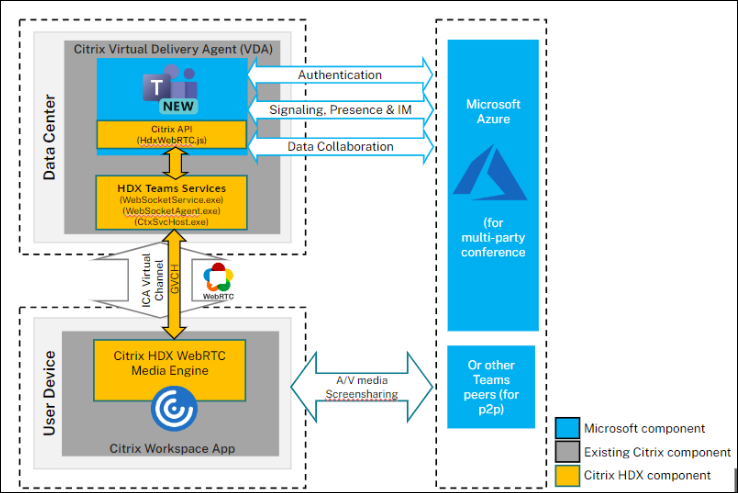
System requirements
This section depicts the minimum and recommended versions necessary to support the new Teams client. Note that in minimum versions some critical bug fixes or latest features might not be available. Deploy the recommended versions to have the best experience with the latest fixes and features.
VDI operating systems
For detailed information, see the recommendations provided in the Microsoft documentation.
Note:
- Windows Server 2016 is not supported. Citrix recommends you to plan your upgrades accordingly.
- As versions are updated frequently, the versions mentioned here might become end-of-life. Hence, see the product lifecycle pages of Citrix Workspace app and Citrix Virtual Apps and Desktops to ensure you’re using supported versions of different components.
- If you’re on Citrix Virtual Apps and Desktops™ 1912 LTSR, Citrix recommends planning an upgrade as it’ll be end of life in December of 2024.
Virtual Delivery Agent (VDA)
| Minimum versions | Recommended versions |
|---|---|
| 1912 LTSR CU8+; 2203 LTSR (any CU); 2212 CR | 2203 LTSR CU5+ (or) 2203 LTSR and any CR versions above |
Citrix Workspace app
| Minimum versions | Recommended versions |
|---|---|
| Windows 2203 LTSR (latest CU); Windows 2302 CR; Linux 2207; Mac 2302; Chrome/HTML5 2301 | Windows 2402 LTSR; Windows 2405 CR; Linux 2405; Mac 2405; ChromeOS/HTML5 2405 |
Deployment
- Install the new Teams client on VDI. For detailed information, see Deploy new Teams for VDI.
- Configure the following registry key on the VDA to optimize new Teams.
-
Location:
HKLM\SOFTWARE\WOW6432Node\Citrix\WebSocketService -
Key (REG_Multi_SZ):
ProcessWhitelist -
Value:
msedgewebview2.exeNote:
Starting with Citrix Virtual Apps and Desktops 2402 LTSR (or) Citrix Virtual Apps and Desktops 2203 LTSR CU5+, you don’t need to manually configure the
msedgewebview2.exeregistry entry as it’s allow-listed by default.
-
Location:
- Ensure that the Microsoft Teams redirection policy is enabled. This policy is turned on by default.
- No additional configuration is needed on the client side. Follow the wizard instructions to install the Citrix Workspace app.
App Layering
New Microsoft Teams has changed its installation method and now installs under C:\Program Files\WindowsApps. To support this change, you must run App Layering version 2403.2 or later. You can download an upgrade disk in the App Layering downloads page that includes this fix.
For detailed information, see the App Layering documentation.
Citrix Profile Management
See the Citrix Profile Management documentation for information on how to enable roaming for New Microsoft Teams. Current minimum version guidance for Citrix Profile Management is 2203 LTSR CU5+.
Networking considerations
Networking requirements for New Teams don’t differ from Classic Teams. Hence, see the Network Requirement section in Classic Teams documentation.
Feature matrix and version support
As versions are updated frequently, some older versions mentioned here might reach end of life. Hence, see the product lifecycle pages of Citrix Workspace App and Citrix Virtual Apps and Desktops to ensure you’re using supported versions of different components.
Note:
- The versions mentioned here are the minimum versions from which the particular feature is supported (or) the minimum version in which New Teams is supported, whichever is higher.
- Citrix Virtual Apps and Desktops 1912 LTSR CU8+ noted in the minimum versions section is not being mentioned in the table below as it will reach it’s end of life in December 2024. However, it is still a supported version until then.
- Features that have the minimum Citrix Virtual Apps and Desktops versions as
N/Ajust imply that the feature didn’t involve any changes from the VDA side.
| Feature | VDA (Minimum Version) | Citrix Workspace App for Windows (minimum version) | Citrix Workspace App for Mac (minimum version) | Citrix Workspace App for Linux (minimum version) | Citrix Workspace App for ChromeOS (minimum version) |
|---|---|---|---|---|---|
| Audio / Video (p2p and conference) | 2203 LTSR (any CU), 2212 CR | 2203 LTSR latest CU, 2302 CR | 2302 | 2207 | 2301 |
| Screensharing | 2203 LTSR (any CU), 2212 CR | 2203 LTSR latest CU, 2302 CR | 2302 | 2207 | 2301 |
| i. Screen Indicator Red Border | 2203 LTSR (any CU), 2212 CR | 2203 LTSR latest CU, 2302 CR | 2302 | 2207 | No |
| ii. Limit capture to Desktop Viewer | 2203 LTSR (any CU), 2212 CR | 2203 LTSR latest CU, 2302 CR | 2302 | 2207 | No |
| iii. Multimonitor | 2203 LTSR (any CU), 2212 CR | 2203 LTSR latest CU, 2302 CR | 2302 | 2207 | No |
| DTMF | N/A | 2203 LTSR latest CU, 2302 CR | 2302 | 2207 | 2301 |
| Proxy Server Support | N/A | 2203 LTSR latest CU, 2302 CR | 2302 | 2207 | 2305 |
| App Sharing | 2203 LTSR (any CU), 2212 CR | 2203 LTSR latest CU, 2302 CR | 2302 | 2209 | No |
| Live Captions | N/A | 2203 LTSR latest CU, 2302 CR | 2302 | 2207 | 2303 |
| Dynamic e911 | N/A | 2203 LTSR latest CU, 2302 CR | 2302 | 2207 | 2301 |
| Give Control | N/A | 2203 LTSR latest CU, 2302 CR | 2302 | 2207 | No |
| Request Control | N/A | 2203 LTSR latest CU, 2302 CR | 2302 | 2207 | 2303 |
| Multi Window | 2203 LTSR (any CU), 2212 CR | 2203 LTSR latest CU, 2302 CR | 2302 | 2207 | 2303 |
| Meeting Transcriptions | 2203 LTSR (any CU), 2212 CR | 2203 LTSR latest CU, 2302 CR | 2302 | 2207 | 2303 |
| Background blurring | 2203 LTSR (any CU), 2212 CR | 2203 LTSR latest CU, 2302 CR | 2302 | 2212 | 2303 |
| Screensharing (with App Protection) | 2203 LTSR (any CU), 2212 CR | 2402 LTSR, 2309.1 CR | 2308 | 2311 | No |
| Simulcast | 2203 LTSR (any CU), 2212 CR | 2402 LTSR, 2305 CR | 2305 | 2305 | 2312 |
| Secondary Ringer | 2203 LTSR (any CU), 2212 CR | 2402 LTSR, 2307.1 CR | 2308 | 2308 | 2312 |
| Share System Audio | 2203 LTSR (any CU), 2212 CR | 2402 LTSR, 2403 CR | 2405 | 2402 | No |
Troubleshooting and other considerations
For New Teams, see CTX253754 , Troubleshoot Microsoft Teams, For latest updates on anything related to New Teams, see CTX585013.
Known limitations
Limitations on Citrix Workspace app
- HID Support - Answer and end calls aren’t supported. Volume up and down are supported.
- Users can’t take screenshots of Microsoft Teams content while using a snipping tool on the VDA. However, if a snipping tool is used on the client side, the content can be captured.
- Share system audio limitations
- Audio cannot be shared using this feature when sharing the screen with RAVE and BCR redirected apps or tabs.
- This feature is supported only on published desktops
Limitations on the VDA
- New Teams as a published (seamless) application is not supported
- Fixed in CVAD 2203 LTSR CU5 and above
- When you configure the Citrix Workspace app High DPI setting to Yes, the redirected video window appears out of place. This limitation occurs when the monitor’s DPI scaling factor is set to anything above 100%.
Limitations on Citrix Workspace app and the VDA
- You can only control the volume of an optimized call using the volume bar on the client machine – not on the VDA.
For more details on the limitations from Microsoft, see Features not supported in VDI.